April 21, 2017
Answered

Word count in Indesign

  • April 21, 2017
  • 2 replies
  • 22786 views

Hi all,

How to get the word count in Adobe Indesing? At present i paste content in word to do this.

Thanks

    This topic has been closed for replies.
    Correct answer amaarora

    Hi,

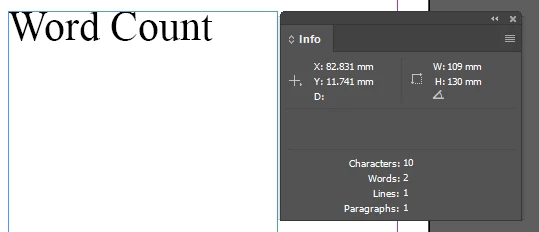
    Open the info panel (F8) from the windows menu. Select the desired content (entire frame, or only some of the text) to get the required parameter count.
    -Aman

    2 replies

    Participant
    December 14, 2017

    Here's a workaround that's more accurate than doing a search & replace for the space character. Export an InDesign document as a PDF. Open the PDF in Adobe Acrobat. Export as a Word document. Open in Word and select Word Count from the Tools menu. The number of words appears in a dialogue box.

    I tested both methods. I had a document with 3942 words but the search & replace method only showed 3009 spaces.

    Onpo1nt
    Participant
    December 14, 2017

    Thanks

    amaarora
    Community Manager
    amaaroraCommunity ManagerCorrect answer
    Community Manager
    April 21, 2017

    Hi,

    Open the info panel (F8) from the windows menu. Select the desired content (entire frame, or only some of the text) to get the required parameter count.

    -Aman

    April 21, 2017

    Thank you a lot