
A2D2
Inspiring
April 17, 2017
Answered

World-Ready Composer, Non-spacing accent, Auto switch to combined character

  • April 17, 2017
  • 2 replies
  • 3816 views

Hello,

I am experiencing a problem on two different computers with various fonts. Details of the scenario are as follows:

  • Windows 10
  • InDesign CS6
  • using Adobe World-Ready composer (both single-line and paragraph)
  • each computer uses a different complex script plugin

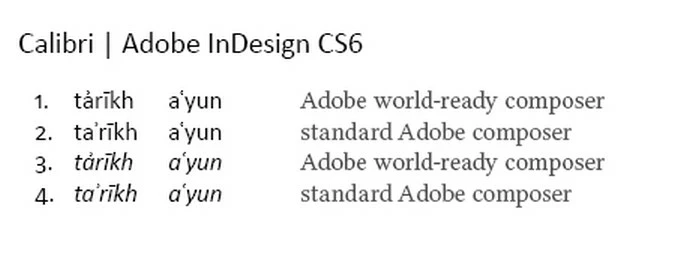
The problem is that when I type "a" and follow with "ʾ" (U+02BE; which is the hamza diacritic) there is an automatic switch to "ẚ" (U+1E9A; which is a combined character). The problem is I do not want the combined character but want the hamza to have its own width, as is normally the case.

I turned off ligatures but this had no effect.

The problem does not occur with the standard Adobe composers.

I have included a screenshot to show the desired (i.e. standard composer) and undesired (i.e. world-ready composer) behavior. Any help in dealing with this problem will be appreciated. I am not sure if this effects other characters. The desired presentation (e.g. lines 2 and 4 in the screenshot) is required in the transliteration of languages which use the Arabic script and is widely used in the academic fields of Middle East and Islamic studies, for example.
As a side note, the position of the diacritic on top of the base character is actually a mistake introduced in Unicode 3.0 and corrected in Unicode 5.1

Errata fixed in Unicode 5.1.0

It is a shame that the mistake has found its way into fonts and that the world-ready composer appears to force the mistake upon users.

This topic has been closed for replies.
Correct answer Steve Werner

Here is where to report features requests and bug reports:

Feature Requests/Bug Reports

2 replies

A2D2
A2D2Author
Inspiring
May 2, 2017

Seeing as my problem has been replicated but nobody has any solutions what is the best way to bring this to the attention of Adobe developers given that the support pages refer to the forum?

Steve Werner
Community Expert
Steve WernerCommunity ExpertCorrect answer
Community Expert
May 2, 2017

Here is where to report features requests and bug reports:

Feature Requests/Bug Reports

Zaid Al Hilali
Community Expert
Community Expert
April 17, 2017

Very well explained issue. From the four numbered lines in your post it appears that your typing Latin words only, I wonder why would you need to use any of the two "World-ready composers"? World-ready composers are meant for Right-to-Left scripts.

ad-astm  wrote

each computer uses a different complex script plugin

What are these plug-ins, do you think they have any thing to do with your issue?

A2D2
A2D2Author
Inspiring
April 17, 2017

Thank you.

Good point about the need for world-ready composer in Latin only texts. I tend to use the world-ready composer in my paragraph styles by default because I work with different scripts. In some paragraphs I may even combine scripts, for example (ًمثلا).

The plugins I am talking about was ScribeDOOR on one computer and a similar plugin by another company on the other. Because I got the same results on both computers I do not think the issue is to do with the plugins.

Zaid Al Hilali
Community Expert
Community Expert
April 18, 2017

Right, ScribeDoor was developed for users who don't have a Middle Eastern copy of let's say InDesign, so you type your Arabic text in ScribeDoor, copy text from there, then paste it into a non-Arabic supporting application.

I'm sure you know your workflow better, but if I were you, I wouldn't use the copy/paste method from ScribeDoor or any other utility if I have InDesign CS6 ME since I can type Arabic natively within InDesign. Any way this technique surely is not the culprit behind the accent issue you're facing.

By the way I tried to replicate the 02BE in Helvetica Neue or Adobe Garamond Pro, I'm using Glyphs panel in InDesign to locate it but can't see it there.