Exit
  • Global community
    • Language:
      • Deutsch
      • English
      • Español
      • Français
      • Português
  • 日本語コミュニティ
  • 한국 커뮤니티
0

Lightroom Classic synchronizes new photos after closing en starting

Community Beginner ,
Jan 21, 2023 Jan 21, 2023

LR version:

lr_12.1_202212072312-d7ab524b

OS:


Adding a photo to a synchronised folder doesn't start synchronising.

Closing Lightroom and starting starts synchronising or stop synchronsing the folder and start synchronising the folder starts sybchronising the photo.

TOPICS
Windows
367
Translate
Report
Community guidelines
Be kind and respectful, give credit to the original source of content, and search for duplicates before posting. Learn more
community guidelines

correct answers 1 Correct answer

Community Beginner , Jan 21, 2023 Jan 21, 2023

I am refering to a folder in collections with a synchronise icon in front:

lr_synced_folder

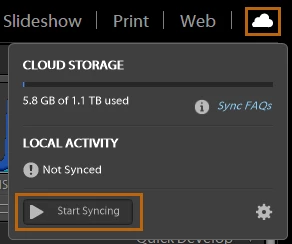
Stopping and starting synchronise from the cloud icon:

start-syncing.png.img

Also starts synchronising the photo.

Translate
LEGEND ,
Jan 21, 2023 Jan 21, 2023
Translate
Report
Community guidelines
Be kind and respectful, give credit to the original source of content, and search for duplicates before posting. Learn more
community guidelines
Community Beginner ,
Jan 21, 2023 Jan 21, 2023

I am refering to a folder in collections with a synchronise icon in front:

lr_synced_folder

Stopping and starting synchronise from the cloud icon:

start-syncing.png.img

Also starts synchronising the photo.

Translate
Report
Community guidelines
Be kind and respectful, give credit to the original source of content, and search for duplicates before posting. Learn more
community guidelines
Community Expert ,
Jan 21, 2023 Jan 21, 2023

Lightroom sync should stay on all the time, unless you actively turn it off. It can turn off if you're changing catalogs a lot as there's usually one main catalog that's connected. Once a photo is added to a collection, it should start to sync. It's not immediate as the Smart preview needs to generate and upload. 

Sean McCormack. Author of 'Essential Development 3'. Magazine Writer. Former Official Fuji X-Photographer.
Translate
Report
Community guidelines
Be kind and respectful, give credit to the original source of content, and search for duplicates before posting. Learn more
community guidelines
Community Beginner ,
Jan 22, 2023 Jan 22, 2023
LATEST

It works like it should now.


Perhaps the "Stopping and starting synchronise from the cloud icon" made it work automatically again.

Translate
Report
Community guidelines
Be kind and respectful, give credit to the original source of content, and search for duplicates before posting. Learn more
community guidelines