


Known Participant
July 17, 2022

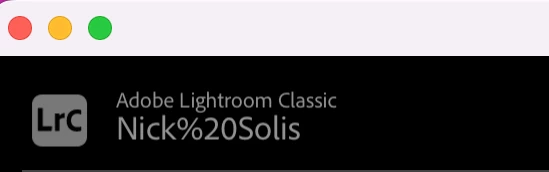
P: Account Name on Lightroom Classic is incorrect "%20" replaces [Space]

  • July 17, 2022
  • 33 replies
  • 7402 views

For no reason in particular, LR started to show my name as seen below. I have no idea how to fix it. When I log in to my account, it just has first and lastname without the "%20" in it. Does anyone know how to fix this? 


Thanks so much!
This topic has been closed for replies.

33 replies

NBS0616Author
Known Participant
October 21, 2022

Thanks, Rikk! Update back then did the trick. 

Participant
August 30, 2022
Thanks. I’ll do that.

Ronald Hooberman
johnrellis
Legend
August 30, 2022

"My user name is Ronald Hooberman but it showed it as Ronald%20Hooberman"


@Ronald Hooberman, as you can see, your post got merged into the thread for the "%20" bug.


"but a window came up stating "Lightroom cannot use the catalogue named Master Catalogue Lr9-v10 because it is not writable and cannot be opened".


This problem is almost certainly unrelated to the "%20" bug. I recommend you start a new thread describing your symptoms (omitting the "%20" issue), which will make it more likely people will respond with relevant help.

Participant
August 30, 2022

I use LR Classic v9 on my pc which runs Windows 11. I have a single catalogue which I update weekly.

When importing photos from an sd  card into LR yesterday the import dialogue would not let me choose which folder to import to and then the programme froze. Today, when logging into LR it showed my user name incorrectly in the top left corner and my catalogue as empty. (My user name is Ronald Hooberman but it showed it as Ronald%20Hooberman). I tried to open the master catalogue  but a window came up stating "Lightroom cannot use the catalogue named Master Catalogue Lr9-v10 because it is not writable and cannot be opened".


Can anyone help please?

GoldingD
Legend
August 25, 2022
quote

For no reason in particular, LR started to show my name as seen below. I have no idea how to fix it. When I log in to my account, it just has first and lastname without the "%20" in it. Does anyone know how to fix this? 


Thanks so much!


By @NBS0616

Update to 11.5


Inspiring
August 25, 2022

This just appeared for me yesterday for the first time. Adobe ID website shows my name correctly as "Michał Nowak". Get your act together Adobe.


Inspiring
August 19, 2022

My Adobe profile name displays as "First Last" but Lightroom is now displaying "First%20Last".  Since the account profile name is constructed from the "First" and "Last" values this is definitely a problem in the Lightroom display rendering.

GoldingD
Legend
August 19, 2022
Rikk Flohr_Photography
Community Manager
August 17, 2022

Greetings, 


Updates for Adobe Photography products began rolling out Tuesday night, August 16th,  The updates contain a fix for this issue. 

If you do not see the update in your Creative Cloud Application, you can refresh it by hitting [Ctrl/Cmd]+[Alt/Opt]+[ R ].

Note: It may take up to 24 hours for your update to be available in your Creative Cloud app.


Thank you for your patience. 

Rikk Flohr: Adobe Photography Org
Participant
August 14, 2022

Lightroom main panel has two glitches on my computer. I tried finding a similar issue on this forum as well as on the internet with no luck.


My PC is HP Spectre X360 with 16GB ram.


Issue 1: As I move the cursor over the folder icons (>) to select a subfolder. All these icons dissapear.


Issue 2: The Lightroon classic log always overlaps the drive name.


Participating Frequently
August 12, 2022

After not using lightroom classic for a few weeks and doing some updates I noticed that my name has a %20 added in between first and last names. See attached screenshots. This isn't editable or visible on my creative cloud app or logged in online. Please advise on a fix.