


Participant
November 30, 2021

P: Color grading opposite direction on video files

  • November 30, 2021
  • 6 replies
  • 2269 views

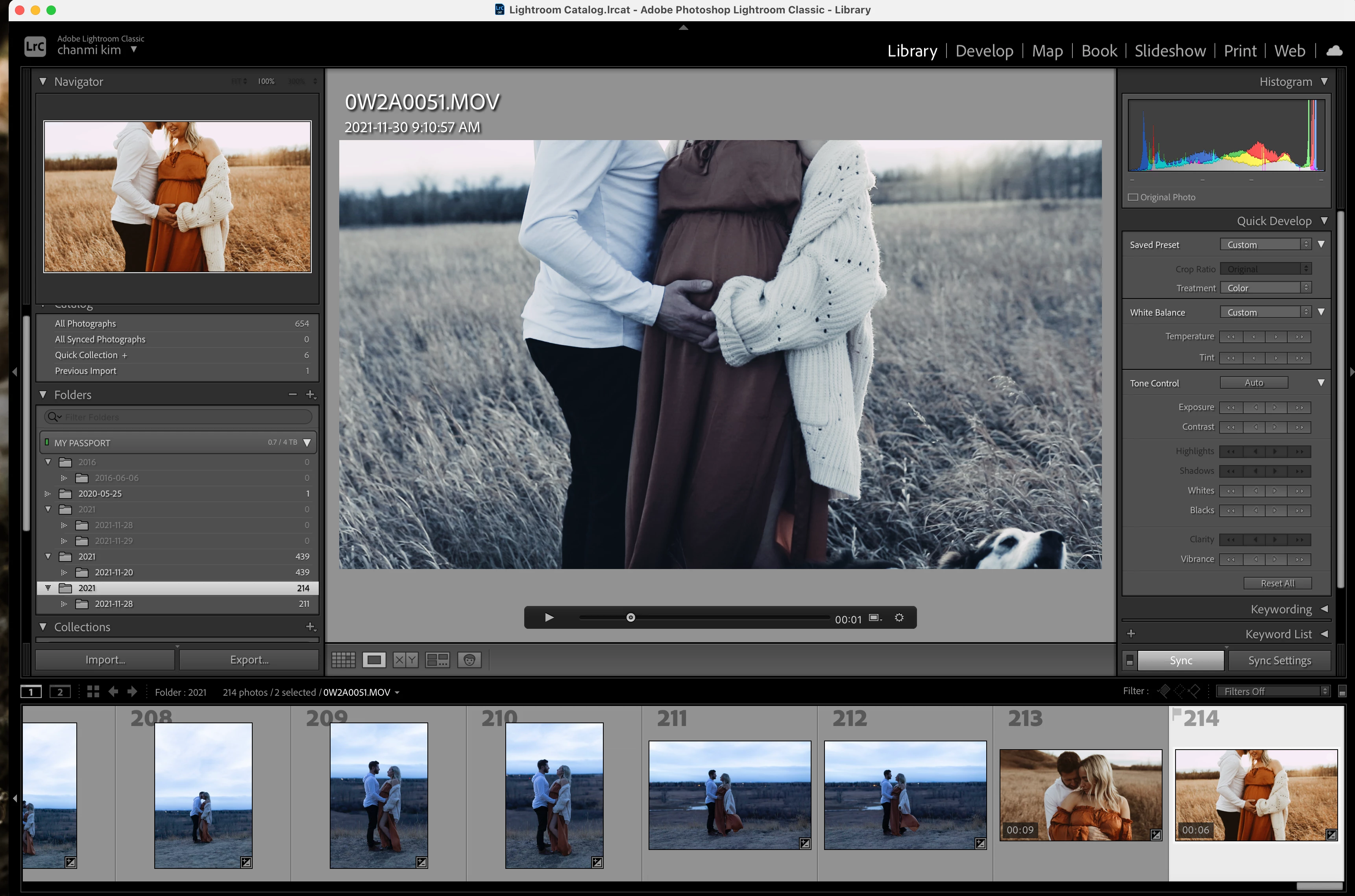
Since the lightroom update, colour grading videos has been messed up for some reason. When I turn UP the temperature, the video gets cooler on the main panel, but the preview in the navigator gets warmer like I wanted. When I export, the navigator view is what gets exported, but the main panel view is just messed up. Someone please help!! Photo below:
 

This topic has been closed for replies.

6 replies

Rikk Flohr_Photography
Community Manager
Community Manager
February 8, 2022

Updates to the Adobe Photography Products were released today and contain a fix for this issue. Please install the update via your Creative Cloud Desktop App or your respective App Store. 


Note: 

You may need to refresh the Creative Cloud App for desktop software to show an update available.  ([Ctrl/Cmd]+[Alt/Opt]+ [ R ])

For Mobile downloads, it may take several days for the update to appear in your respective App Stores.


Thank you for your patience. 

Rikk Flohr: Adobe Photography Org
Participant
January 21, 2022

Hi wondering if anyone else has come across this issue,

Since updating to V11.1 the white balance appears to display the oppite of what it is actuall doing

it's correct in the navigator thumb nail and that is how it saves, however the large preview is colder


I have attached an image to show for referance, any idea would be great


Thanks 

Graham

Known Participant
December 22, 2021

Ich habe die Entwicklungseinstellungen eines Bildes, auf das Video übertragen.

Die Änderung wird überall richtig angezeigt, nur in der Lupenansicht nicht.

Siehe Screenshot.

macOS 12.1

Lightroom classic 11.1


johnrellis
Legend
December 22, 2021

Google translation: "I have applied the development settings of an image to the video. The change is displayed correctly everywhere, only not in the magnifying glass view. See the screenshot. macOS 12.1

Lightroom classic 11.1"


Do the settings you copied include changes to Temperature or Tint?  In LR 11, a bug cause Temperature and Tint to display incorrectly in Loupe view:

https://community.adobe.com/t5/lightroom-classic-bugs/p-color-grading-opposite-direction-on-video-files/idi-p/12560428

johnrellis
Legend
December 23, 2021
Participant
December 15, 2021

I'm having this same issue on both my iMac and Macbook with different footage on each. I'm a wedding videographer and I NEED to color grade footage for 5 different videos immediately to meet deadlines. I cannot see what I'm doing and it is beyond frustrating. @Rikk Flohr: Photography WHEN WILL this be fixed?? 

Rikk Flohr_Photography
Community Manager
Community Manager
December 1, 2021

Add bug number

Set status

Rikk Flohr: Adobe Photography Org
johnrellis
Legend
December 1, 2021

Happens on my LR 11.0.1 / Mac OS 11.6 too, but not on my LR 11.0.1 / Windows 10.  Steps to reproduce:


1. Import this video:

https://www.dropbox.com/s/2szf8akv79fjfdu/IMG_6114.2021.11.30.MOV?dl=0 


2. Select the video and go to Library Loupe.


3. In Quick Develop > White Balance, repeatedly click Temperature >>.


4. Observe the blue cast of the Loupe preview and the orange cast in the Navigator:


5. Go to Grid view and observe the thumbnail matches the Navigator with an orange cast:


6. Export the video with Video Format: H.264, Quality: High and observe the exported video matches the Navigator, with an orange cast:


johnrellis
Legend
December 1, 2021

Moderators, @Rikk Flohr: Photography, please move to Bugs.