
charlesl75177870
Participating Frequently
March 27, 2025

P: Color issue with Raw files from Sony A1 ii and lightroom classic 14.2 and Photoshop 26.5

  • March 27, 2025
  • 45 replies
  • 10482 views

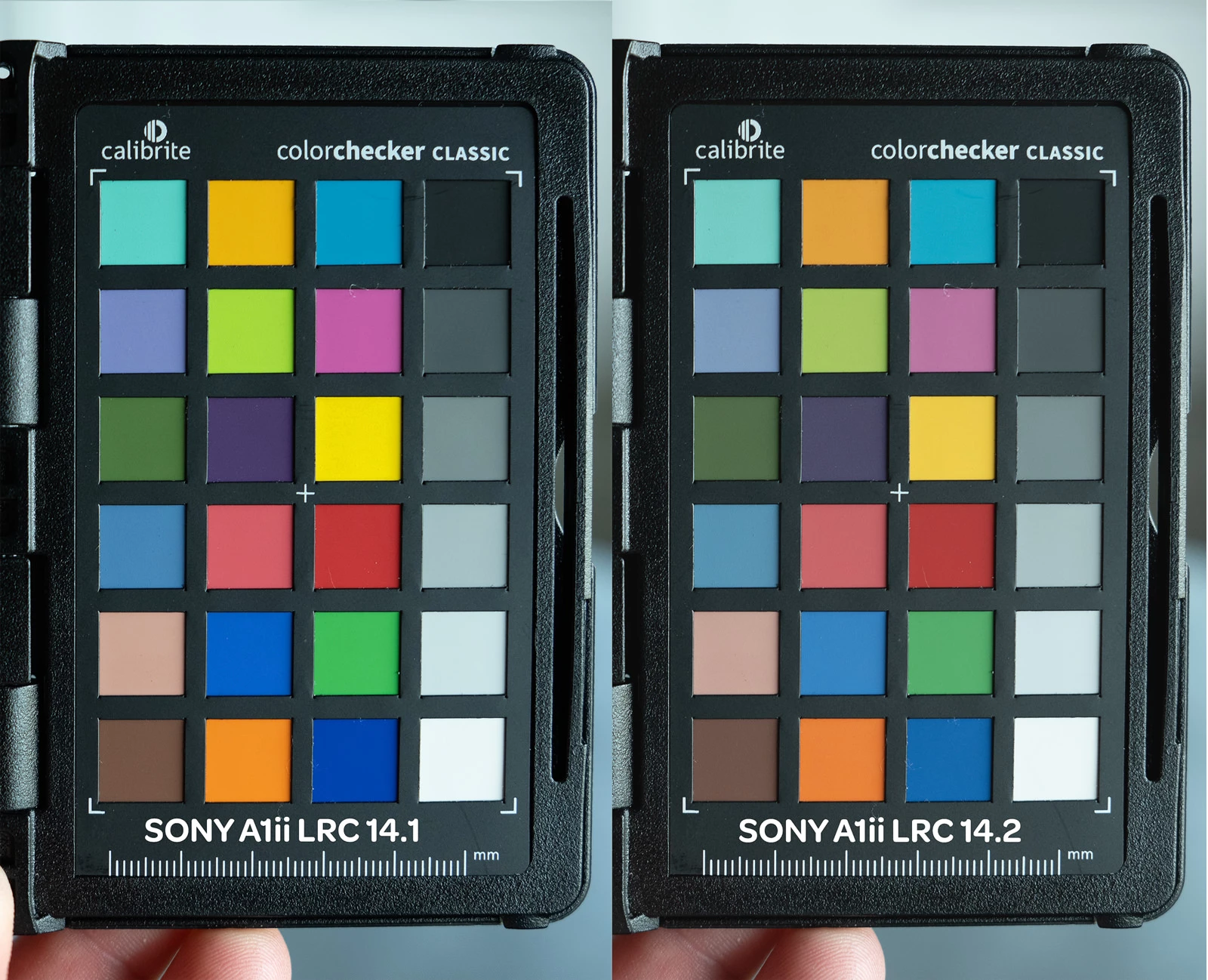
I've been having color issues using adobe color profile and LRC 14.2 and PS 26.5 and my Sony A1 ii.  I have a Sony a9iii and a7rv with no issues and LRC 14.1 the colors are fine.  The work around right now is converting the raw to dng in LRC 14.1 before editing in PS.  I reached out to Adobe and they confirmed the issues with the samples I provided.  Since it's isolated to the A1 ii it's not a monitor or icc issue.  see the issue in the pic below
45 replies

Participating Frequently
August 13, 2025

I will update to 14.5 one more time when I get backl from the studio later today and double check and download 14.5 one more time. 

Participating Frequently
August 13, 2025

oops, sorry, That is what I meant. I meant to write 14.5, but out of habit I typed 14.4.

I just updated to 14.5 this morning and this image collage was right after the update to 14.5


charlesl75177870
Participating Frequently
August 13, 2025

14.5 fixed the issue with adobe color, 14.4 still has the issue

Participating Frequently
August 13, 2025

I just updated all my apps and the issue is still there. Top Image SOOC Raw 14.1 LR, Bottom Image SOOC Raw 14.4

Notice the red hue as well as the com,pletely muted greens?
I am a commercial photographer and work with major clothign companies where color correctness is everything. 

Now I can downgrade Lightroom again to 14.1 and I have a feeling that Adobe will never fix this issue. I am this close to switching over to Capture 1.

Rikk Flohr_Photography
Community Manager
August 13, 2025

Greetings all, 


A new update for the Adobe Photography products has been released.  The August update contains an update regarding this issue. 

If you do not see the update in your Creative Cloud Application, you can refresh it by pressing  [Ctrl/Cmd]+[Alt/Opt]+[ R ].

Note: It may take up to 24 hours for your update to be available in your Creative Cloud app.


Thank you for being so patient. 

Rikk Flohr: Adobe Photography Org
Participating Frequently
August 11, 2025

@Anshul_Saini  How many more months shall we wait? This is the latest model of the most professional camera Sony is selling and Adobe thinks that the photographer community should just look for different software to replace lightroom? So many colluegues already recommend different software and we are still loyal to lightroom after all these years. But how arrogant is it to simply ignore such a severe bug for three software versions for that camera that the most professional photographers use?

Participant
August 11, 2025

Any update ETA for A1 II yet? 

Participant
August 9, 2025

Adobe please fix this. I'm currently looking for other photo editing software in the meantime. It's absolutely ridiculous 

Inspiring
August 5, 2025

@elisabethm83122842  It's normal that profiles 14.4 and 14.1 change the white balance. You should stick with 14.1 for now, because the final Adobe profile will be closer to 14.1 than to 14.4.

Participating Frequently
August 5, 2025

I am not sure what I am doing wrong. When I try to drop the old profile from 14.1 into the 14.4 version, my images turn very pink. I had to downgarde to 14.1 again to make it work. I am beyond annoyed that Adobe cannot fi this issue