
charlesl75177870
Participating Frequently
March 27, 2025

P: Color issue with Raw files from Sony A1 ii and lightroom classic 14.2 and Photoshop 26.5

  • March 27, 2025
  • 45 replies
  • 10283 views

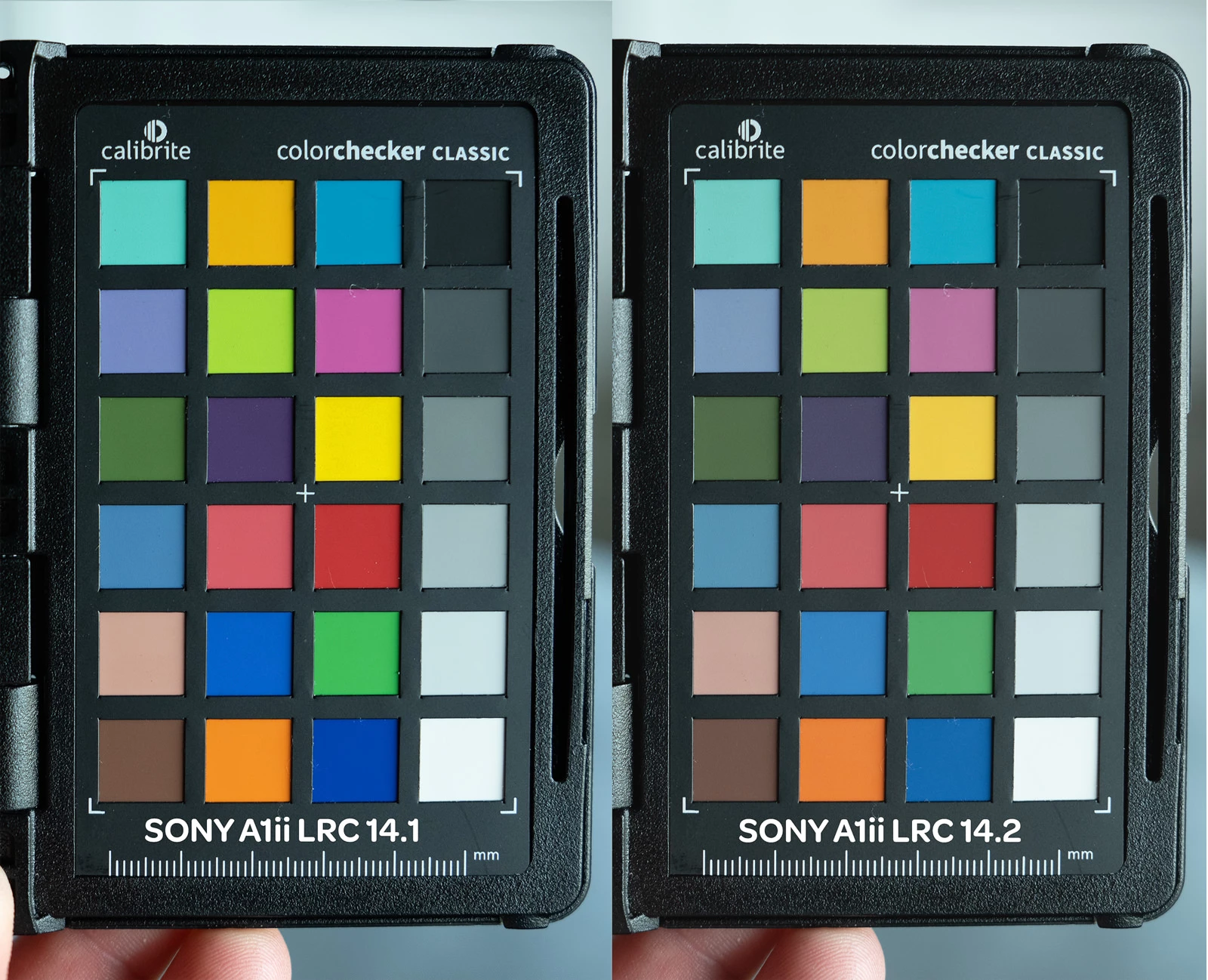
I've been having color issues using adobe color profile and LRC 14.2 and PS 26.5 and my Sony A1 ii.  I have a Sony a9iii and a7rv with no issues and LRC 14.1 the colors are fine.  The work around right now is converting the raw to dng in LRC 14.1 before editing in PS.  I reached out to Adobe and they confirmed the issues with the samples I provided.  Since it's isolated to the A1 ii it's not a monitor or icc issue.  see the issue in the pic below
45 replies

Inspiring
August 14, 2025

The Adobe Standard profile will only be displayed if you select a preset set to Adobe Standard. Then, in the profile, you will see Adobe Standard and Adobe Standard v2.

DdeGannes
Community Expert
Community Expert
August 14, 2025

@mathieu323314395hg5 , Ok so in LrC 14.5 there is an Adobe Standard profile available in Process Version 6 the latest, it does not indicate v1 or 2. 
What do you see when you use raw files from your Camera?


Regards, Denis: iMac 27” mid-2015, macOS 11.7.10 Big Sur; 2TB SSD, 24 GB Ram, GPU 2 GB; LrC 12.5,; Lr 6.5, PS 24.7,; ACR 15.5,; (also Laptop Win 11, ver 24H2, LrC 15.0.1, PS 27.0; ) Camera Oly OM-D E-M1.
Inspiring
August 14, 2025

I have a lot of presets, so it takes a while to change everything.

DdeGannes
Community Expert
Community Expert
August 14, 2025

@mathieu323314395hg5 , why not update them to Adobe Color which is the latest Standard profile.


Regards, Denis: iMac 27” mid-2015, macOS 11.7.10 Big Sur; 2TB SSD, 24 GB Ram, GPU 2 GB; LrC 12.5,; Lr 6.5, PS 24.7,; ACR 15.5,; (also Laptop Win 11, ver 24H2, LrC 15.0.1, PS 27.0; ) Camera Oly OM-D E-M1.
Inspiring
August 14, 2025

This does not solve the problem when you have several presets based on Adobe Standard v1. You have to modify all these presets to Adobe Standard v2.

DdeGannes
Community Expert
Community Expert
August 14, 2025

@mathieu323314395hg5 , so you know now the Adobe Color is the latest Standard profile so you need to update your preset.

Regards, Denis: iMac 27” mid-2015, macOS 11.7.10 Big Sur; 2TB SSD, 24 GB Ram, GPU 2 GB; LrC 12.5,; Lr 6.5, PS 24.7,; ACR 15.5,; (also Laptop Win 11, ver 24H2, LrC 15.0.1, PS 27.0; ) Camera Oly OM-D E-M1.
Inspiring
August 13, 2025

@elisabethm83122842  Both are very good for colors, but the problem is that if your presets are based on Adobe Standard, they won't work. You'll have to modify them to use the Adobe Standard V2 profile. Adobe has just created a new problem.

Participating Frequently
August 13, 2025

I'm not sure I understand- Am I supposed to use Adobe color now or v2? 
Adobe color looks slightly more saturated than v2.

Inspiring
August 13, 2025

@Rikk Flohr: Photography  

However, all presets purchased or created based on Adobe Standard are incorrect, because you have created a new Adobe Standard v2, and if you click on a preset, it will select the old Adobe Standard v1 profile, which is defective... Why not do as Adobe Colors did and not create a v2...

Inspiring
August 13, 2025

However, if you have presets already saved with the standard Adobe profile, you will need to update them all to the standard Adobe profile v2 ..... A galley adobe should have deleted and replaced adobe standard as the Adobe colour profile and not put a V2...