
Known Participant
October 20, 2021

P: (Customer specific) LR Classic showing inconsistent details about synching with LR Mobile

  • October 20, 2021
  • 32 replies
  • 3987 views

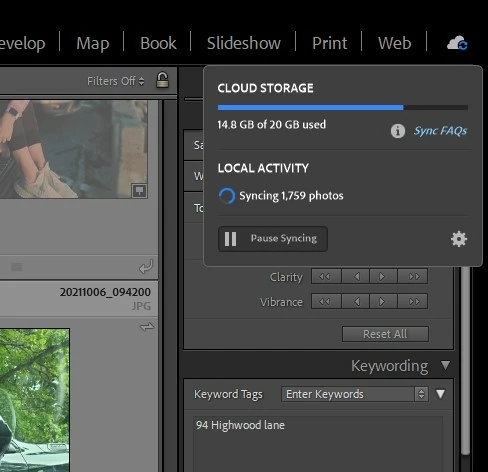
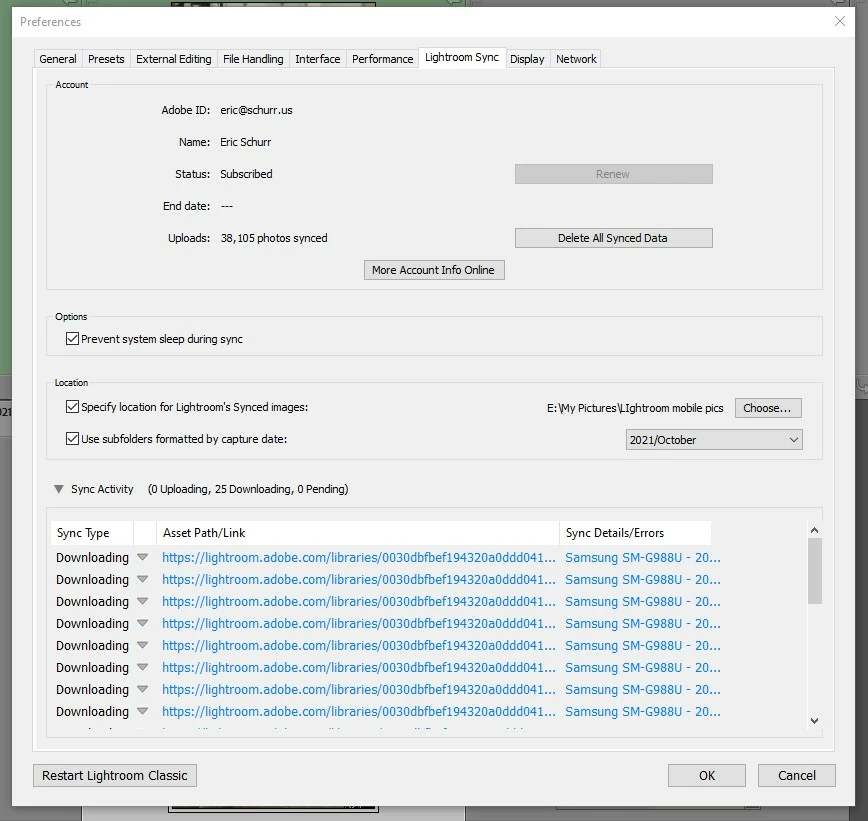
When I click on the cloud icon in the upper right hand of LR Classic it says it is synching 1,759 photos.  If i click on the gear icon and go to the sync dialog it says it is syncing 25 photos.  It's been saying this for many weeks. I can't figure out what photos it's syncing (or not) and what is going on...?
 

This topic has been closed for replies.

32 replies

eschurrAuthor
Known Participant
March 11, 2022

Rick, thank you again for all your help. Your instructions were very clear.


I ranomly selected a number of files from the list that i received in the private message. ALL of them are on my Android device and LrWeb but NONE of them are in my LR Classic catalog.


Here are a few that I selected:


E:\My Pictures\LIghtroom mobile pics\2020\July\20200725_135102.jpg
E:\My Pictures\LIghtroom mobile pics\2020\July\20200725_155549.jpg

E:\My Pictures\LIghtroom mobile pics\2020\July\20200723_193556.jpg


Those photos are part of a group of photos that are all in a shared album called "Cleveland Summer 2020."   Note that:

  • The shared album appears on my Android phone, LrWeb, and my LrC catalog.
  • That shared album on LrC only has five photos in it, but on my Android device and LrWeb there are 19 photos in the album.
  • All of the five photos in that album on LrC are also on my Android phone and LrWeb.


I hope this is clear and helpful.


Rikk Flohr_Photography
Community Manager
March 11, 2022

Locate one of the files I sent you privately on your Android device. 
In Lightroom Web (https://lightroom.adobe.com) verify that the same file is synced to the cloud and in the same folder/album as on the device. 


If you cannot locate the file on your Android device, then we have a different problem.

If you can locate the file on your Android device but it is not in the cloud then do you have a Sync Errors/Issues Album showing that lists that file name?

If you can locate the file on your Android device and in the cloud but it is not in your Classic Catalog - I need to know the file name. 


Rikk Flohr: Adobe Photography Org
eschurrAuthor
Known Participant
March 11, 2022

What must i do to "allow theose listed files to continue syncing?"  LrM on my Android phone says everything is synced...?

Rikk Flohr_Photography
Community Manager
March 10, 2022

The files I listed are in process from Android to the Cloud - they are holding things up right now. Can you log in your Android device and allow those listed files to complete syncing?

Rikk Flohr: Adobe Photography Org
eschurrAuthor
Known Participant
March 10, 2022

i really appreciate the quick action, thank you!  Unfortunately, i don't understand what the private message is asking me to do!  the only thing i can say is that i have not done anything special with those files.  

Rikk Flohr_Photography
Community Manager
March 10, 2022

Instructions are on a direct message. Replay back here on the thread when complete. Thank!

Rikk Flohr: Adobe Photography Org
eschurrAuthor
Known Participant
March 10, 2022

and if that doesn't work, you can also try this (this is the entire ZIP file)


https://eschurr-my.sharepoint.com/:u:/g/personal/eric_schurr_us/Eak98BRNyy5Hr3Lg7viTb_MBCHo3lYKisxj_G9JZE4zknQ?e=gvDb6b


eschurrAuthor
Known Participant
March 10, 2022

Thank you for your efforts and i'm sorry for trouble with the download. I'm having some challenges with DropBox.  Please try this link

https://www.dropbox.com/s/oa6kc4nhxuwwnhw/lrsync.lrcat?dl=0


Rikk Flohr_Photography
Community Manager
March 10, 2022

Neither I nor the engineer can download this file.  Can you review your sharing permissions?

Rikk Flohr: Adobe Photography Org
eschurrAuthor
Known Participant
March 9, 2022

thank you (again!). Here is the link to a new set of logs


https://www.dropbox.com/s/ipn5pn4456lizzy/LrSyncDiagnostic.zip?dl=0