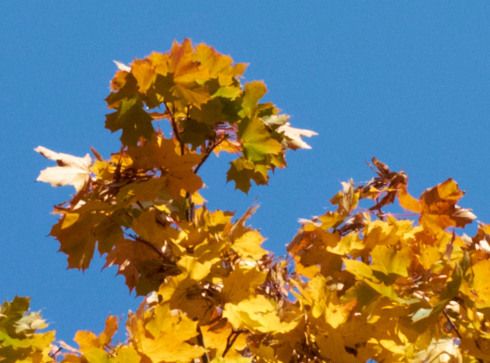
Objects photographed against the sky or other blue coloured areas get a "halo" when images from Fujifilm X-trans cameras are developed in Lightroom.
My camera is a Fujifilm X-T1. Before this, I owned the X-E series cameras and noticed the same thing with them. Today I installed the latest version of Lightroom (5.4) and the problem is still there.
Lightroom doesn't handle blue coloured areas well. Take a look at the blue and red traffic signs. You may need to click the images to view them full size (they are 100 % crops).
Compare this with the same raw file developed in Capture One:
Things photographed against a blue sky get a soft "halo":
Looking at the red channel only shows this clearly
The issue you have described is a known limitation of Adobe's current X-Trans demosaic method. Our current method has the benefit that it avoids many types of color speckle artifacts, but the tradeoff is that this type of color bleeding may occur across some colored and light/dark edges. We hope to improve this support in a future release.
"We hope to improve this support in a future release."
I'm really looking forward to this - and I know many other Fuji photographers do as well. I posted a thread about this at the fujix-forum.com discussion site and was overwhelmed with the response.
/t5/lightroom-classic-bugs/p-fujifilm-x-trans-cameras-and-halo-around-blue-areas/idc-p/12267874#M6150May 05, 2014
May 05, 2014
Copy link to clipboard
Copied
Hakan, thanks for the examples. That red channel shot really highlights the problem.
--Is using Capture One your solution? I have only fairly recently started using LR & it would bother me to dump it & purchase another program, but I don't want to invest a lot of time working around problems LR has with the X-Trans.... Photo Ninja?
/t5/lightroom-classic-bugs/p-fujifilm-x-trans-cameras-and-halo-around-blue-areas/idc-p/12267870#M6149May 11, 2014
May 11, 2014
Copy link to clipboard
Copied
Hello - sorry for replying so late, I've stopped visiting this thread.
I don't have a solution. I don't do a lot of landscape photography, so it's not a huge problem for me, but I would want to se this problem solved. I'm always wondering when this artifact will show up in my images.
I still use Lightroom, because apart from this, it does a lot of things very well: the highlight and shadow recovery are the best I've used, the correction of purple fringing is good, I like the way it renders the noise in high-ISO images - plus it's the fastest of all raw developers I have tried. I've tried Photo Ninja, which is excellent at sharpness, but purple fringing around highlights gets really ugly and I don't like the way the noise looks in high-ISO images. And it's hopelessly slow (on my computer at least). Lightroom seems to be the best all-round compromise.
I've found that setting colour noise reduction to max in Lightroom might make these bright halos around leaves etc. disappear somewhat. It's worth noting that the raw developer that comes with the camera, Silkypix, has the same problem.
/t5/lightroom-classic-bugs/p-fujifilm-x-trans-cameras-and-halo-around-blue-areas/idc-p/12267851#M6144Jun 16, 2015
Jun 16, 2015
Copy link to clipboard
Copied
Yes, there is an obvious improvement. Compare the traffic sign above (LR 5.x) with this image from LR 6.1. Both are 100 % crops; you need to click the images to see them att full size.
/t5/lightroom-classic-bugs/p-fujifilm-x-trans-cameras-and-halo-around-blue-areas/idc-p/12267847#M6143Jun 17, 2015
Jun 17, 2015
Copy link to clipboard
Copied
I wasn't able to find the same raw file. For the LR 6.1 conversion I used another raw file from the same day, shot with a smaller aperture, so the background is sharper/more contrasty.
What's important to me is the rendering of the blue/red areas of the traffic sign (you need to click the images to see them at 100 %). LR 6.1 is a clear improvement.
/t5/lightroom-classic-bugs/p-fujifilm-x-trans-cameras-and-halo-around-blue-areas/idc-p/12267843#M6142Jun 17, 2015
Jun 17, 2015
Copy link to clipboard
Copied
I have processed the same image in LR5.7 and LR6.1 and there's a significant improvement, here are some 100% crops. In each case the LR5.7 image comes first followed by the LR6.1 image. Processing was fairly normal, modest sharpening with detail at 100%. The first two shots are from near the centre of the image, the second two are from the corner. Shot with 18 - 135 at f8.
/t5/lightroom-classic-bugs/p-fujifilm-x-trans-cameras-and-halo-around-blue-areas/idc-p/12267839#M6141Jun 17, 2015
Jun 17, 2015
Copy link to clipboard
Copied
I also can confirm that 6.1 produces better results than 6.0. I have some old pictures I processed with Iridient trial and the 6.1 are much closer in quality than the 6.0 ones were. But there is still room for improvement.
/t5/lightroom-classic-bugs/p-fujifilm-x-trans-cameras-and-halo-around-blue-areas/idc-p/12267887#M6153Jun 17, 2015
Jun 17, 2015
Copy link to clipboard
Copied
Does the improvement also apply to files converted to DNG on import, or only to original RAW processing? (Sorry if this is too simple a question, but I'm not sure what the conversion to DNG entails - is it via the ACR Converter, in which case the damage has already been done?







 16
Replies
16
Replies


 AdChoices