



johnrellis
Legend
April 26, 2023
Question

P: Metadata > DNG says denoised DNGs don't embed the original raws

  • April 26, 2023
  • 15 replies
  • 748 views

Denoised DNGs embed the original raw, as confirmed by Exiftool and DNG Converter 15.3, which extracts the original raw from the DNGs.


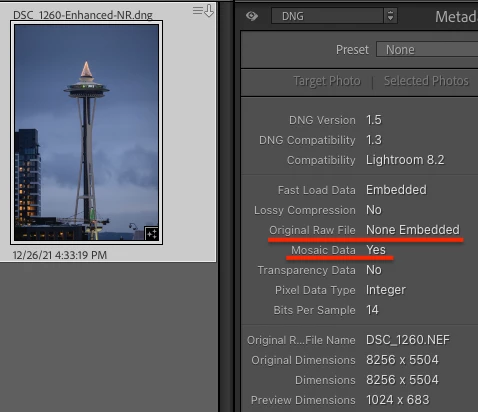
But LR's Metadata > DNG panel shows that the original raw is not embedded, even though it says the DNG contains Mosaic Data:
 

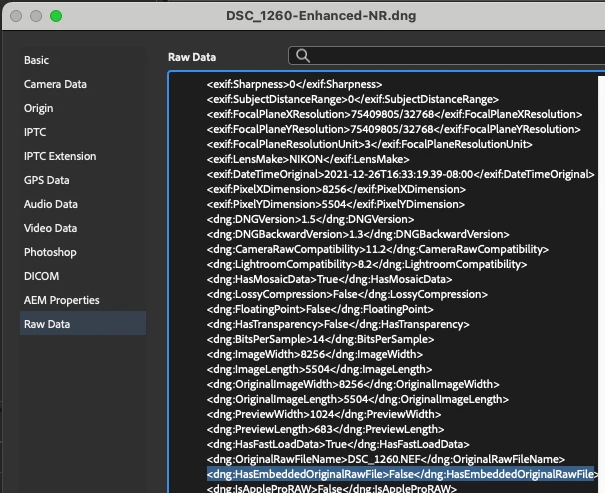
Similarly, Bridge File > File Info says the DNG doesn't contain the original raw but has Mosaic Mosaic Data: 
 

Tested on LR 12.3 / Mac OS 13.3.


This topic has been closed for replies.

15 replies

Rikk Flohr_Photography
Community Manager
Community Manager
April 27, 2023

@johnrellis  I am going to let the CR team comment before demoting it. 

Rikk Flohr: Adobe Photography Org
Rikk Flohr_Photography
Community Manager
Community Manager
May 16, 2023

This has been reviewed by the Camera Raw team and determined not to be a bug. I have reverted this to a discussion.


The intent of the mosaic data being included in the Denoised result is not to extract an original file at a later date. It is more accurate to say the original mosaic data is included for future iterations of the tool to accurately reprocess the original data for improved models and other possible enhancements (excuse the pun).  Ultimately, there is no additional 'file' within to extract. 

Rikk Flohr: Adobe Photography Org
johnrellis
Legend
May 16, 2023

Thanks for confirming that.

johnrellis
Legend
April 27, 2023

@Rikk Flohr: Photography, I no longer think this is a bug but, rather, confusion caused by the ambiguous use of the term "embed" by some posts in these forums. The Metadata panel is accurately reflecting the contents of the Enhanced DNG.  See here for details:

https://community.adobe.com/t5/camera-raw-bugs/p-dng-converter-doesn-t-extract-original-raws-from-denoise-dngs/idc-p/13757017#M4361


Sorry for contributing to the confusion.

TheDigitalDog
Inspiring
April 27, 2023

To add:

I just tried Ehnance to apply Raw Detal: no original embedded into the DNG. Same size as the original.

I then tried Super Resolution and again, the size is 3X, making be believe there is no original embedded into that new DNG. 

Adobe, this is a bit messy. I'm not sure the 'concept' of embedding the original raw into (only?) Denoise was explained and there needs to be an option to not do so and of course, an option to remove that original. 

Author “Color Management for Photographers" & "Photoshop CC Color Management/pluralsight"
TheDigitalDog
Inspiring
April 27, 2023

Up voted on your bug report and asked there:


To Adobe:

1. Is the DNG converter supposed to do this?

2. Why isn't such a function offered in Lightroom Classic? And Adobe Camera Raw. 

3. Do users even know that the original is embedded into the Enhanced DNG? Why not state this in the Enhanced dialog? 

4. Better still, offer a check box "Embed original into DNG" so we can disable this. I'm keeping the original; I may not want the original also embedded into the new Enhanced Linear DNG. 

Author “Color Management for Photographers" & "Photoshop CC Color Management/pluralsight"
johnrellis
Legend
April 27, 2023

I'm thoroughly confused -- yesterday, DNG Converter was extracting the original raws from denoise DNGs for two cameras but not two other cameras. Today it's not extracting from any of the DNGs.  I submitted a bug report here as a new location for this issue:

https://community.adobe.com/t5/lightroom-classic-bugs/adobe-dng-converter-doesn-t-extract-original-raws-from-denoise-dngs/idi-p/13756277


Maybe I'm hallucinating in some way.

TheDigitalDog
Inspiring
April 27, 2023

No idea if it's a bug or not. Until this week, I didn't even know the original was in there. 

Author “Color Management for Photographers" & "Photoshop CC Color Management/pluralsight"
Rikk Flohr_Photography
Community Manager
Community Manager
April 27, 2023

I've been watching with interest here. Do we think we have a bug on Original extrication from the Denoise DNG or not? If we do we should probably make it a new thread. If you have a file you want me to test, send it over.

Rikk Flohr: Adobe Photography Org
TheDigitalDog
Inspiring
April 27, 2023

I tried again with a proprietary raw not converted first, and can't extract the original so yeah, either a bug or the converter isn't built for this. But this functionality should be within, at the very least, Lightroom Classic, if not Adobe Camera Raw too. As Rikk is here, I'll wait to file a bug report and see if this is on Adobe's radar or not. 

Also, in the Enhance dialog, there should be some indication for the user that the original is also getting embedded into the new Linear DNG. 

Author “Color Management for Photographers" & "Photoshop CC Color Management/pluralsight"
johnrellis
Legend
April 27, 2023

I just tried sample 5D MII and R6 MII raws: Denoised them to DNGs and ran Adobe DNG Converter.  It refused to extract either raw.  Seems like a bug.

TheDigitalDog
Inspiring
April 27, 2023
quote

It worked with two denoised DNGs, one from a Nikon Z 9 and one from a Canon EOS R6.


By @johnrellis


Very odd.  I tried this with a 5DMII and an R6MII, and neither worked. 

I'm on Mac. The latest version of the DNG converter. 

But this may be part of the issue (a bug?), all my raws get converted to DNG in LR from import. So a DNG to Linear DNG, could that be it? Are you creating the Enhanced DNG from an original raw? 

Author “Color Management for Photographers" & "Photoshop CC Color Management/pluralsight"