


Bob Somrak
Legend
April 16, 2018

P: Preset works all the time with raw files but only some of the time with a JPG file

Lightroom 7.3 and osx 10.13.4

First, I would like to note that this is not the same as RAW and non-RAW specific presets.  In this case the preset does work with both RAW and JPG files, just not consistently.   

A preset in certain scenarios will work ALL the time with a RAW but only works SOME of the time with a JPG

Create a preset using the following method

Select photo and do a RESET so no settings are applied
Create a Preset called ZeroSaturation   (I think this can be any slider)
Save the preset with ONLY Saturation selected 
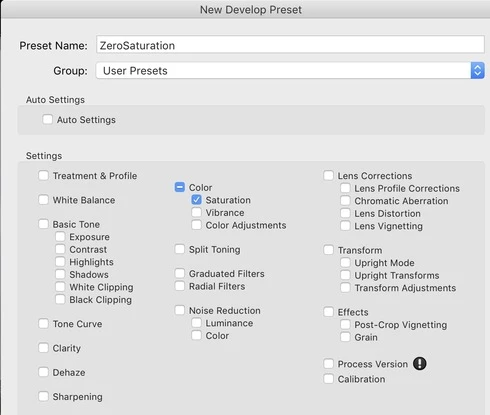


DO THE FOLLOWING WITH BOTH  RAW AND JPG FILES

Select photo
Do a RESET
Apply a Saturation that is not Zero
Apply the ZeroSaturation Preset.   (The Preset works with BOTH JPG and RAW)
Apply Dehaze
Apply Clarity
Select Dehaze
Apply the ZeroSaturation preset. (The Preset did NOT work the JPG)


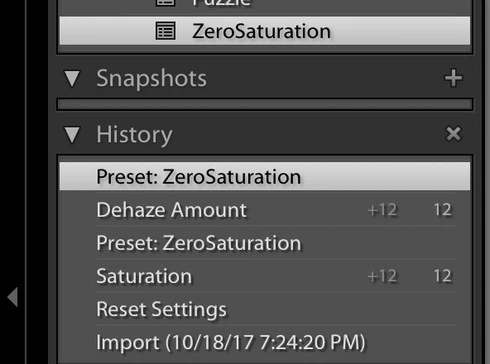
History on RAW
As you can see the preset works all the time on the RAW.  When you execute the preset on the Dehaze step the history is cleared above Dehaze and the preset is executed and registered as a history step

History on JPG.    
As you can see the preset works on the JPG when the saturation is not zero but it does not not execute when the saturation is zero.  When you select Dehaze and execute the preset the history above Dehaze is Not cleared and the preset is not registered in history.  APPARENTLY NOTHING HAPPENS.  
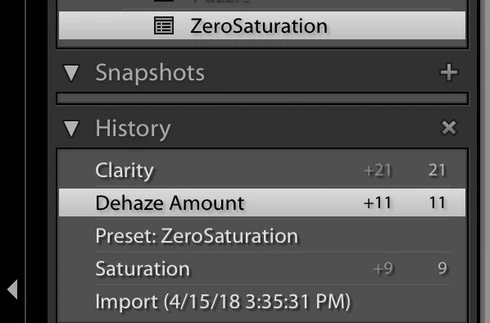


I realize Saturation is already ZERO and the preset is not needed but the the behavior should be the same for both JPG and RAW and the preset should execute and be registered in history when pressed..   The JPG behavior is very disconcerting to the user because NOTHING happens.

이 주제는 답변이 닫혔습니다.

29 답변

Bob Somrak
Bob Somrak작성자
Legend
November 13, 2018
Rikk

While working on the recent issue I noticed something in the history panel and command-z's I was doing that may help solve the ORIGINAL problem.

Create a preset called TEST that changes the Exposure

Select a photo

Apply preset. TEST. (Its added to History)

Add Contrast.  (Its added to History)

Apply preset TEST  (Its not added to History) (It appears to the user it didn't work!)

Add Highlights.  (Its added to History)

Do an Undo.   (popup says "Undo Highlights")

Do an Undo.  (popup says "Undo preset TEST" although this step is not in History)

Do an Undo.  (popup says "Undo Contrast)


It appears that the problem is that the second application of TEST is being correctly applied IF CHANGES ARE MADE IN HISTORY after the first application of TEST but the step is not recorded in History.   Previous versions of Lightroom before Lr7 would record this in History.  Not recording the step in history is what is disconcerting to the user and should be fixed.

I do agree that TEST should not be applied twice in a row but if an edit step is done after the first application of TEST is should apply AND BE RECORDED IN HISTORY a second time.  It used to previous to Lr7


M4 Pro Mac Mini. 48GB
Bob Somrak
Bob Somrak작성자
Legend
November 13, 2018


 Rikk

Thanks for the clarification.  can confirm the difference you explained between library and develop.  

I can see what you are saying that this is designed behavior in the Develop module as the preset shouldn't be applied twice in a row but it is a surprising behavior when you first encounter it. With Autosync in Develop if the command isn't executed on the most selected than it won't apply to the other photos.   I thought it used to work differently but maybe I am mistaken.  

I still hope the original issue in this thread gets resolved.  Any word on its resolution?


M4 Pro Mac Mini. 48GB
Bob Somrak
Bob Somrak작성자
Legend
November 12, 2018
Develop for all of them.    I think if the original bug in this post has something to do with this behavior and is why I posted in this thread.    I discovered this as I apply a preset in develop and if like the look I then select other photos by shift-click with auto sync on and immediately try to apply that preset.  It used to work.  Now I have to do a command-z to get rid of the preset in the most selected and then shift-click the others and then it works.  Or just select the others.   If the effect is subtile I may forget to do this.
M4 Pro Mac Mini. 48GB
Rikk Flohr_Photography
Community Manager
November 12, 2018
Are you using Develop or Quick Develop to (Reset, Apply Preset)?

Quick Develop works - likely because the preset is only applied to one of the 3 images and it picks up the 2 unapplied images and leaves the Active alone.

Develop doesn't but I am betting it is as-designed behavior. You can't apply a preset to Active image twice. So essentially, you are doing nothing here when you apply the preset a second time. 
Rikk Flohr: Adobe Photography Org
Bob Somrak
Bob Somrak작성자
Legend
November 12, 2018
I changes for me if I do anything to the Most Selected photo that adds a history stemp before trying to apply it to the other 2 photos but it doesn't if the last history step in the Most Selected photo is the preset I am trying to apply.  I could send you a movie if that would help.
M4 Pro Mac Mini. 48GB
Rikk Flohr_Photography
Community Manager
November 12, 2018
They change here.  
Rikk Flohr: Adobe Photography Org
Bob Somrak
Bob Somrak작성자
Legend
November 12, 2018
Rikk
I restarted the computer and tried this again and it still doesn't work in the last step.

The easiest way to try this is to do the following.


1.    Have a preset that only does the minus 1.5 exposure (it could be contrast, clarity etc)

2.    Start with 3 photos that have NO edits.  (They can have edits but it is easier to show if they are similar without edits)

3.    Select one photo and apply the preset. (it changes)

4     Make sure AutoSync is ON

5     Use Shift-Click to select a couple other photos making sure the photo selected in step 3 is still the MOST SELECTED

6.   Apply the preset.   (The other 2 don't change)
M4 Pro Mac Mini. 48GB
Rikk Flohr_Photography
Community Manager
November 12, 2018
I must be missing something in your steps, Robert.  I tried multiple times and in the last step, the remaining two images updated to use the -1.5 preset in all cases. 

The history on my system is correct also. 10.14.1
Rikk Flohr: Adobe Photography Org
Bob Somrak
Bob Somrak작성자
Legend
November 10, 2018

Hi Rikk

Lightroom Classic 8.0 MacOS 10.13.6

I found another issue related to the original thread that is MORE than just disconcerting to the user but is a more serious problem.  This problem happens with ALL file types (The original problem NOW may affect all file types as Adobe supposedly tried to fix the issue and made it even worse as noted above.)

Create a preset that sets the Exposure to -1.50. and call it Minus Exp

Select 3 photos and reset all the adjustments.  (Notice the cat sitting up is the MOST SELECTED image.


Turn AUTOSYNC on

Apply Preset Minus Exp.  Al 3 photos will change which is the correct behavior.

 
Reset all the images again

Select only the sitting up cat and apply the preset Minus Exp


Select all the images again with AUTOSYNC still turned on with the sitting up cat as the MOST SELECTED image and apply preset Minus Exp


As you can see the preset DOES NOT EXECUTE.   This can be confirmed by looking at the History of the MOST SELECTED photo.

M4 Pro Mac Mini. 48GB
Bob Somrak
Bob Somrak작성자
Legend
October 15, 2018
Thanks for the update.
M4 Pro Mac Mini. 48GB