

johnrellis
Legend
October 25, 2022

P: Save Metadata To File doesn't clear GPS EXIF fields for DNGs

  • October 25, 2022
  • 17 답변들
  • 2490 조회

After you clear the GPS field of a DNG via the Metadata panel, Metadata > Save Metadata To File doesn't clear the GPS coordinates in the file's EXIF.  To reproduce:


1. Import this DNG and observe in the Metadata panel that it has GPS coordinates:
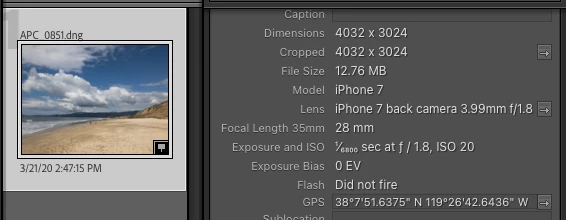
 

2. In the Metadata panel, clear the GPS coordinates.


3. Do Metadata > Save Metadata To File.


4. Use Exiftool to observe that the file still has GPS coordinates:


$ exiftool -a -G -gps:all APC_0851.dng
[EXIF]          GPS Version ID                  : 2.2.0.0
[EXIF]          GPS Latitude Ref                : North
[EXIF]          GPS Latitude                    : 38 deg 7' 51.64"
[EXIF]          GPS Longitude Ref               : West
[EXIF]          GPS Longitude                   : 119 deg 26' 42.64"
[EXIF]          GPS Dilution Of Precision       : 6.000906208
[EXIF]          GPS Speed Ref                   : km/h
[EXIF]          GPS Speed                       : 1.770554817
[EXIF]          GPS Track Ref                   : True North
[EXIF]          GPS Track                       : 344.3322663
[EXIF]          GPS Img Direction Ref           : True North
[EXIF]          GPS Img Direction               : 260.815979
[EXIF]          GPS Horizontal Positioning Error: 6.000906208 m


I observe the same misbehavior with other random DNGs I tried.  The bug doesn't appear to affect JPEGs or XMP sidecars.


Tested on LR 12.0 / Mac OS 12.6.

이 주제는 답변이 닫혔습니다.

17 답변

johnrellis
johnrellis작성자
Legend
June 14, 2023

I verified that the bug recipe now produces correct results.

Rikk Flohr_Photography
Community Manager
Community Manager
June 13, 2023

Greetings all,


Updates for Adobe Photography products have been released.  The June 2023 updates contain a fix for this issue. 

If you do not see the update in your Creative Cloud Application, you can refresh it by hitting [Ctrl/Cmd]+[Alt/Opt]+[ R ].

Note: It may take up to 24 hours for your update to be available in your Creative Cloud app.


Thank you for your patience.

Rikk Flohr: Adobe Photography Org
Rikk Flohr_Photography
Community Manager
Community Manager
June 13, 2023

Greetings all,


Updates for Adobe Photography products have been released.  The June 2023 updates contain a fix for this issue. 

If you do not see the update in your Creative Cloud Application, you can refresh it by hitting [Ctrl/Cmd]+[Alt/Opt]+[ R ].

Note: It may take up to 24 hours for your update to be available in your Creative Cloud app.


Thank you for your patience.

Rikk Flohr: Adobe Photography Org
DdeGannes
Community Expert
Community Expert
November 16, 2022

Just another thought, how does Bridge / Camera Raw deal with a DNG image like the one the author of this thread is working with?


Regards, Denis: iMac 27” mid-2015, macOS 11.7.10 Big Sur; 2TB SSD, 24 GB Ram, GPU 2 GB; LrC 12.5,; Lr 6.5, PS 24.7,; ACR 15.5,; (also Laptop Win 11, ver 24H2, LrC 15.0.1, PS 27.0; ) Camera Oly OM-D E-M1.
DdeGannes
Community Expert
Community Expert
November 15, 2022

At John, I stated “My observation..............................Just my humble opinion”

It's just my understanding that LrC always retains the original imported image and you should always be able to export an original with all the data intact. If you wish to create a file with data altered you can do so by exporting it to a new file. My point is the DNG in discussion is created by the Camera and tangermount to a RAW file and any alterations made should be saved separately in the file header.

Again just my humble opinion.

One other thought when I was working with the DNG file that was shared there was no option to export the DNG to DNG. With Camera Raw files you can export the original and if you wish to share edits and added metadata you would need to share the XMP sidecar.

I cannot check that as I have not retain the DNG.

Regards, Denis: iMac 27” mid-2015, macOS 11.7.10 Big Sur; 2TB SSD, 24 GB Ram, GPU 2 GB; LrC 12.5,; Lr 6.5, PS 24.7,; ACR 15.5,; (also Laptop Win 11, ver 24H2, LrC 15.0.1, PS 27.0; ) Camera Oly OM-D E-M1.
johnrellis
johnrellis작성자
Legend
November 15, 2022

@DdeGannes, I'm sorry, I saw your reply just now (seems the forum platform has dropped lots of my notifications in the last few weeks).


"My observation however is the image under discussion is a DNG created by the Camera with the GPS coordinates included. That is what LrC is preserving and that should continue, user can do either turn of the option in their camera or export and create a new file type and remove the location data there. Just my humble opinion."


I understand your point, but the behavior occurs with Title and User Comment as well.  Your argument wouldn't apply to those fields.


In general, LR maintains the principle that any metadata field that can be changed in the application can be (optionally) saved back to the file. It seems inconsistent to me to have a special rule for GPS. 


If a user takes a JPEG with a camera that records GPS, should LR not write back changed GPS coordinates to that JPEG?  In this case, what would be the difference between a DNG and a JPEG created by the camera?


What about a DNG or JPEG in which the camera didn't record GPS coordinates.  If the user later adds the coordinates in LR, should LR not write them back to the files, like it does with all other metadata (keywords, caption, title, star rating, etc.).


DdeGannes
Community Expert
Community Expert
October 28, 2022

At John, I believe the original capture metatadata should be preserved, metadata added after should be editable. My observation however is the image under discussion is a DNG created by the Camera with the GPS coordinates included. That is what LrC is preserving and that should continue, user can do either turn of the option in their camera or export and create a new file type and remove the location data there. Just my humble opinion.

Regards, Denis: iMac 27” mid-2015, macOS 11.7.10 Big Sur; 2TB SSD, 24 GB Ram, GPU 2 GB; LrC 12.5,; Lr 6.5, PS 24.7,; ACR 15.5,; (also Laptop Win 11, ver 24H2, LrC 15.0.1, PS 27.0; ) Camera Oly OM-D E-M1.
johnrellis
johnrellis작성자
Legend
October 28, 2022

"It seems from my testing that the Title field is also not cleared if saving an empty field to metadata."


The same misbehavior occurs for me with GPS, Title, and User Comment but not any other field (e.g. it doesn't occur with Caption, Keywords, or any IPTC fields other than Title).

DdeGannes
Community Expert
Community Expert
October 28, 2022

Did a few further tests as follows,

Using the original imported DNG made some basic edits in the Develop Module and removed the GPS data in the Library Module > Metadata. Then from the menu Metadata > Save Metadata to the file, watited about 10 sec just to ensure that was completed, then from the menu Metatdata > Read Metadata from the file. Result the image shows the edits done in the Develop Module and the GPS coordinates are showing. Removed the GPS again, then exported to DNG the file shows the GPS coordinates. GPS coordinates in the original file are retained, which is as expected with Lightroom preserving the integrity of the Original.

Same happens with export as jpg and tiff not selecting Metadata > Remove Location Information not selected. GPS info retained.

With jpeg and tiff if Metadata > Remove Location Information selected the exported image does display the GPS coordinates. New file created without GPS info and Original integrity retained.

LrC functions as designed for me on my Win PC using LrC 12 and latest Win 11 update.


Regards, Denis: iMac 27” mid-2015, macOS 11.7.10 Big Sur; 2TB SSD, 24 GB Ram, GPU 2 GB; LrC 12.5,; Lr 6.5, PS 24.7,; ACR 15.5,; (also Laptop Win 11, ver 24H2, LrC 15.0.1, PS 27.0; ) Camera Oly OM-D E-M1.
DdeGannes
Community Expert
Community Expert
October 27, 2022

At Jim Wilde,  stated "4. The OP then wanted to export the DNG, but did not want the GPS data included in the exported file. To do this, they erased the GPS coordinates from the Metadata panel, then saved metadata back to the file, which should have cleared the existing GPS data from the file header, then exported."

Ok the original DNG file contains the GPS coordinates are included in that file and as far as I know Lightroom will not delete that info as the concept the Original file is not altered. Removing the Metadata from the Library module is probably removing it from being displayed and saving metatadata to the file may add info to the file header like other edits and does not alter the Original the GPS data remains intact.

PS. I also tested this, after removing the GPS data in the Library module for the DNG and exported a jpeg, added to the Catalog and the GPS is back and displayed in the Library Module. The GPS remains in the DNG even though it is not displayed.

If it was an Original Raw file the info would be in a xmp sidecar and the GPS in the original file would remain intact, why should DNG raw be treated differently. Lightroom needs to retain the integrity of the original file.

Regards, Denis: iMac 27” mid-2015, macOS 11.7.10 Big Sur; 2TB SSD, 24 GB Ram, GPU 2 GB; LrC 12.5,; Lr 6.5, PS 24.7,; ACR 15.5,; (also Laptop Win 11, ver 24H2, LrC 15.0.1, PS 27.0; ) Camera Oly OM-D E-M1.