
P: Scaling issue in Photoshop but only when exporting from Lightroom Classic
Basically when I use Edit in Photoshop 2021 I get scaling issues like this - i.e. the mouse pointer appears in one place but affects the image in another.
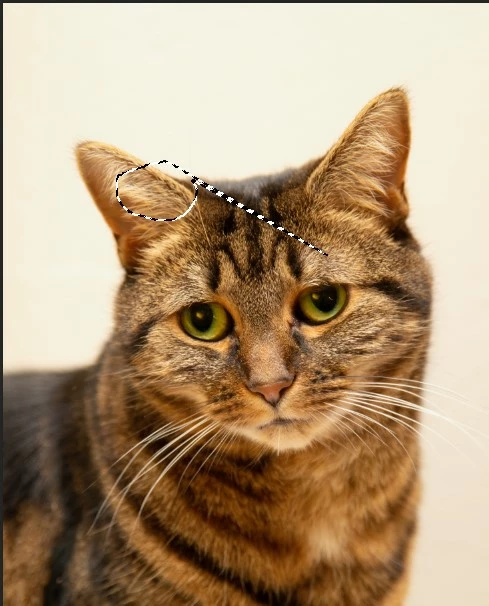
So when I try and draw around the eye on the right the effect is as above.
If I export the image to the desktop and open manually in Photoshop this doesn't happen - only when exporting from Lightroon Classic.
Both Lightroom and Photoshop individually work fine on different monitors at different resolution, but like most people, I like to use the Edit in Photoshop function as it is a fundamental part of my workflow.
I thought to start with this was a Photoshop problem but now I am not sure.
I have tried uninstalling and reinstalling without plugins but nothing has changed. I've even tried reinstalling the OS.
You can read the full thread here under the Photoshop section.
Many Thanks
Ian
 AdChoices