
wlm50
Participating Frequently
August 18, 2017
Answered

Adding folders to an external hard drive?

  • August 18, 2017
  • 1 reply
  • 3401 views

I am new to Lightroom. I'm viewing the Julieanne Kost tutorials. In the video on adding folders, it shows clicking the + button next to Folders, and a dialogue box comes up that says "Choose or Create New Folder." However, in my CC version, this dialogue box does not appear. It just asks me to name a folder. Then it puts it into n existing folder by default. It does not allow me to direct where the folder goes. In addition, she says I can put the folder in my external drive (which is attached to my iMac). However, the external drive does not show up on the screen. Of course, I can go to Finder and do this manually. But how do I do it in this version of Lightroom?

Thanks.
    This topic has been closed for replies.
    Correct answer Bob Somrak

    Thanks for the suggestion. When I try to Import in Lightroom, my only choices are on my internal drive. The external drive does not show up. And in the Import screen, there is no option for "destination," so I can't choose. If I manually move a photo into my external drive via Finder, then I can import that photo and the external drive does show up in Lightroom. So that can work. I haven't tried importing new photos from a camera card, so I don't know yet if I would have had the option to copy the photos to the external drive without having taken the manual steps above.

    I still have the problem that if I go to the + button to add a folder, I do not get a "Create or Choose New Folder" dialogue box. It just allows me to name the folder, and it gets added to whatever folder I was looking at before asking for the new folder.


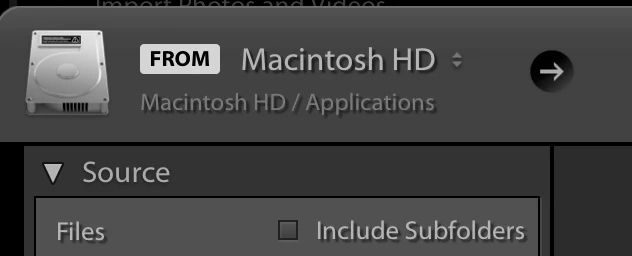
    In the Import dialog click the right arrow in the black circle at the top left  and chose "Other Source" and use your operating system to find the external.

    1 reply

    wlm50
    wlm50Author
    Participating Frequently
    August 18, 2017

    Also, if I do go to Finder and add a folder to my external drive, the drive still does not show up. Perhaps this is because the folder is empty? I'll try adding a photo. If that works, it still won't answer my question about why the original "Choose or Create New Folder" box does not appear....

    dj_paige
    Legend
    August 18, 2017

    The easiest thing to do is when you import photos, just select a folder (or create a folder) on the external drive.

    The external HD will not show up in Lightroom's Folder Panel until you have imported at least one photo from that drive (so if you want to place a photo on that drive using your operating system, then import the photo using the ADD option, then the drive will appear in Lightroom's Folder Panel).

    Known Participant
    April 21, 2018

    What function are you trying to use?

    I note the [Choose] button is active.

    This "limited" Finder dialog is asking you to "Choose" a folder.


    I finally figured it out. I needed to first select the folder where the new folder would go. That parent folder is MY PHOTOS AND VIDEO. Note in screen shot that folder is not highlighted. When I clicked on it, ‘New Folder’ was available. Thanks for responding. Lorraine Gracey

    Sent from my iPhone