
Participant
May 15, 2017
Answered

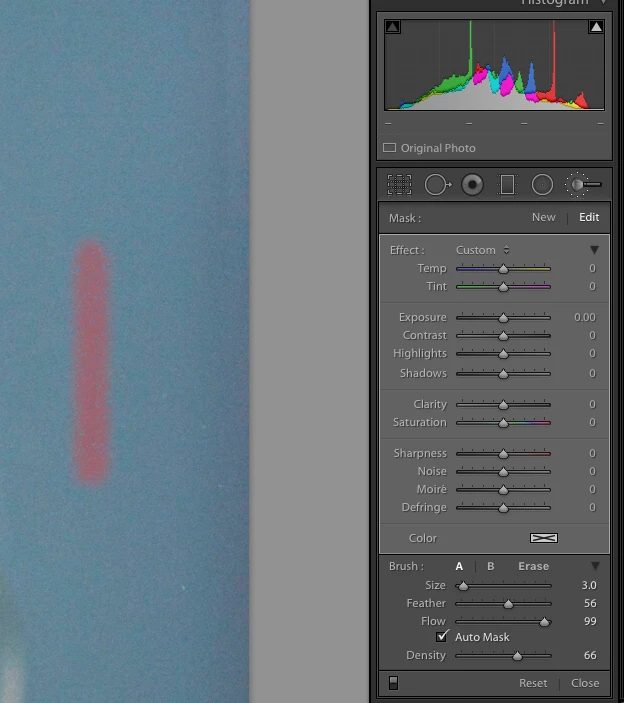
Adjustment brush color issue (pink tinted always added)

  • May 15, 2017
  • 1 reply
  • 1116 views

I select the adjustment brush and double click Effect (top left) to reset the brush settings (no pin selected).

If I go to draw using the brush tool it always leaves a pink shadow! (See example below)

(I had originally tried positive exposure and negative saturation settings to whiten teeth, but I was just making them pink!)

I am trying to figure out why this is and how to fix.

Any advice?
    This topic has been closed for replies.
    Correct answer Bob Somrak

    Hit the "O" key while using the brush to turn the overlay OFF.

    1 reply

    Bob Somrak
    Bob SomrakCorrect answer
    Legend
    May 15, 2017

    Hit the "O" key while using the brush to turn the overlay OFF.

    M4 Pro Mac Mini. 48GB
    Participant
    May 15, 2017

    Thanks, that was it!

    I don't seem to see anything change in the control panel to indicate this state (overlay on/off).

    Did I miss something? How can I tell the current state?

    Bob Somrak
    Legend
    May 15, 2017

    The "Indicator" is in the Toolbar above the filmstrip when using the brush.

    M4 Pro Mac Mini. 48GB