
Participant
October 17, 2018
Answered

Adjustment Brush - Lightroom 8 Classic Not Working Properly

  • October 17, 2018
  • 3 replies
  • 733 views

After updating to Lightroom classic 8, my adjustment brush (in the Develop module) is not working properly.  It requires extreme value movement to show even the slightest difference.... it is essentially not possible to tweak any of the slider controls in the adjustment brush pop up box; even extreme movement of a slider only creates a minor, barely perceptible change -- Help.

Lightroom Classic version: 8.0 [ 1193777 ]
License: Creative Cloud
Language setting: en
Operating system: Windows 10 - Business Edition
Version: 10.0.17134
Application architecture: x64
System architecture: x64
Logical processor count: 8
Processor speed: 4.0 GHz
Built-in memory: 63080.3 MB
Real memory available to Lightroom: 63080.3 MB
Real memory used by Lightroom: 2207.9 MB (3.5%)
Virtual memory used by Lightroom: 2674.1 MB
This topic has been closed for replies.
Correct answer Rafael Aviles

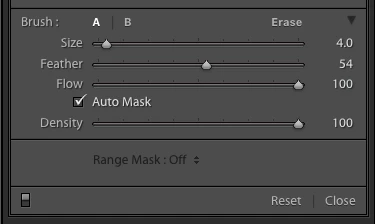
Make sure you have the Flow and Density of the brush to high values:

3 replies

Rafael Aviles
Rafael AvilesCorrect answer
Legend
October 17, 2018

Make sure you have the Flow and Density of the brush to high values:

Sahil.Chawla
Adobe Employee
Adobe Employee
October 17, 2018

Hi JafTimber,

We're sorry to hear about the adjustment brush not working, have you tried turning off the Graphics processor from the Lightroom preferences? Go to Lightroom > Preferences >Performance tab > Uncheck GPU > Restart Lightroom.

GPU troubleshoot Photoshop - https://helpx.adobe.com/photoshop/kb/troubleshoot-gpu-graphics-card.html

Regards,
Sahil

JafTimberAuthor
Participant
October 17, 2018

Yes, thank you... this did the trick - for some reason I had to turn off (uncheck) my Graphics processor, exit Lightroom then open LR, recheck the GP, close LR and then when I opened a 3rd time,  it now appears to be working.   Thanks also to those who both suggest Flow and Density - they were set ok

Ian Lyons
Community Expert
Community Expert
October 17, 2018

Have you checked that the flow and/or density settings haven't been set to zero or near zero?