
Inspiring
November 4, 2021
解決済み

Adjustment brush need help

  • November 4, 2021
  • 返信数 1.
  • 786 ビュー

The new LR11 brush is killing my workflow. Previously if I needed an adjustment brush (which I do on every image, all day, every day) I would just click the brush icon and it would pop up, already working with whatever the previous settings were. So it was a simple "1 click" to get working. With the new "improved" LR, it's now a 5 step process. 1) click new mask button 2) click brush icon 3) click on list of my brush presets 4) find my preferred preset in a list 5) slect the brush I need.

I need to get back to a one click option, this new workflow is killing me. Any ideas??

Signed,

Frustrated
このトピックへの返信は締め切られました。
解決に役立った回答 Per Berntsen

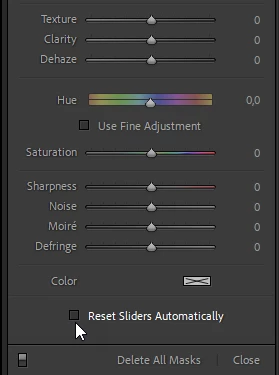
First, make sure that Reset Sliders Automatically at the bottom of the adjustment panel for the brush is unchecked.

This will make the settings you have made stick.

To create a new brush, press K, which will open the Masking panel with a new brush.

When you're done, press K (or Esc) twice to close the panel.


返信数 1

Per Berntsen
Community Expert
Per BerntsenCommunity Expert解決!
Community Expert
November 4, 2021

First, make sure that Reset Sliders Automatically at the bottom of the adjustment panel for the brush is unchecked.

This will make the settings you have made stick.

To create a new brush, press K, which will open the Masking panel with a new brush.

When you're done, press K (or Esc) twice to close the panel.


shayb68441784作成者
Inspiring
November 4, 2021

Oh wow, now I'm realizing that with the "K" shortcut that gets me there in one click again. You're my hero.