
Inspiring
November 4, 2021
Answered

Adjustment brush need help

  • November 4, 2021
  • 1 reply
  • 787 views

The new LR11 brush is killing my workflow. Previously if I needed an adjustment brush (which I do on every image, all day, every day) I would just click the brush icon and it would pop up, already working with whatever the previous settings were. So it was a simple "1 click" to get working. With the new "improved" LR, it's now a 5 step process. 1) click new mask button 2) click brush icon 3) click on list of my brush presets 4) find my preferred preset in a list 5) slect the brush I need.

I need to get back to a one click option, this new workflow is killing me. Any ideas??

Signed,

Frustrated
This topic has been closed for replies.
Correct answer Per Berntsen

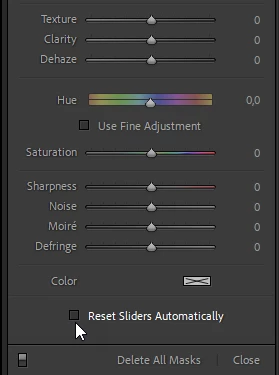
First, make sure that Reset Sliders Automatically at the bottom of the adjustment panel for the brush is unchecked.

This will make the settings you have made stick.

To create a new brush, press K, which will open the Masking panel with a new brush.

When you're done, press K (or Esc) twice to close the panel.


1 reply

Per Berntsen
Community Expert
Per BerntsenCommunity ExpertCorrect answer
Community Expert
November 4, 2021

First, make sure that Reset Sliders Automatically at the bottom of the adjustment panel for the brush is unchecked.

This will make the settings you have made stick.

To create a new brush, press K, which will open the Masking panel with a new brush.

When you're done, press K (or Esc) twice to close the panel.


adamk4
Participant
May 16, 2022

Thank you so much for your answer! This has helped a lot.

A follow up question though, from the previous iteration of LR Classic, I would be able to go to the next photo without even having to exit the brush tool (if I was doing Iris Enhancement for example), so I'd be able to use the brush tool very quickly without having to actually open up the tool when moving to the next photo. Is this possible on the latest version? It seems I have to exit the brush tool when finishing my adjustments, go to the next photo, and then open up the tool again.