Inspiring
March 30, 2014
Answered

Adjustment Brush not Working

  • March 30, 2014
  • 4 replies
  • 37484 views

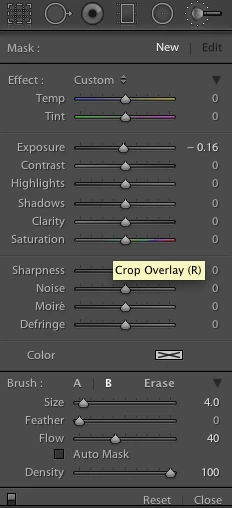
in the Develop module my adjustment brush is not working, all the other sliders work, what is wrong?

This topic has been closed for replies.
Correct answer Kdarlin3

I realize the sliders are not adjusted differently. I want to simply do a adjustment with exposure without having to use a brush.


I have got the problem fixed.

I moved the extender beside the adjustment brush tool, which set it back to Basic.

Everything is now working.

Thank you all for your help.

4 replies

Participant
November 25, 2021

I am not able to make any edits with the mask tool. When select create a new mask and brush, make the edits I want with the brush and press done it simply reverts back to the original image. What am I doing wrong?


Participant
May 25, 2018

Mine doesn't work, either.  I want to make the sky bluer (can't use the graduated filter because of the way the mountains are shaped).  I get nothing from the brush, even with density, etc turned all the way up.  I have no "extender" next to my brush, so not sure what you are referring to.

I'm using Lightroom 6.14.

Adam St.
Participant
April 16, 2015

my problem is that is does not act like a brush, but just a "spot" adjustment brush.  It used to work.  I tried deleting the preference file for LR5, and restarting MAC OS Yosemite.

Any ideas?

ssprengel
Inspiring
April 16, 2015

Make sure Flow and Density are set to 100 and AutoMask is unchecked/turned-off.

Adam St.
Participant
April 16, 2015

Thanks, but the flow is set to 100. When I use he spot healing brush, I can

drag that as a brush, and it works fine. I have used the adjustment brush

before, and it worked fine.

I don¹t know if there was some maintenance that is causing the issue.

Sent from my iMac

PC free since 2011

Adam

dj_paige
Legend
March 30, 2014

Flow or density set to zero?

Otherwise describe your problem in more detail

Kdarlin3Author
Inspiring
March 30, 2014

Density is set at 77 and Flow is at 100.

When I am in the Develop Module and working with the adjustment Brush the sliders don't have any effect when I try to use them.

The Crop Overlay Spot Removal, Red Eye Correction the Radiul Filter and the Graduated Filter all work find with adjusting. The Adjustment Brush is the only one that doesn't make any adjustments when I try using them.

Bob Somrak
Legend
March 30, 2014

Whatever the brush B is that's what it is set on

I'm using lightroom5 with the updated version.

To adjust a simple exposure on a picture it will not change the exposure by using the slider.

I am new at this so don't understand what most of the stuff does. Just the basic stuff.


You STILL haven't said if you can see the adjustment brush OVERLAY by hitting O key while you are using the brush.

Also, what is the EXACT Lightroom version and OS version you are using..

M4 Pro Mac Mini. 48GB