Participating Frequently
July 2, 2025
Answered

Adobe Creates Misunderstanding in describing Lightroom Class and Lightroom CC Synching

  • July 2, 2025
  • 1 reply
  • 191 views

Adobe is 'loose" in their use of synching between LRC and LR CC. In some cases syncing means UPLOAD as when you use the Collection folder in LRC to move images to the Cloud.

In other cases it means DOWNLOAD as when you sync LRC and the Cloud.


I was very surprised when I followed Adobe's direction to 'sync" my Collection  in LRC which was described as a selective sync and found out ALL my items in the Cloud were also Downloaded


It is apparent from reading the discussions that this source of confusion is widely misunderstood.


Adobe could help their users if they were more precise in describing "syncing" in their documentation and support discussions


Correct answer Rob_Cullen

I do have to agree with you, and the confusion over the app names has been ongoing since 2017!

If you read the Sync FAQ:   https://helpx.adobe.com/au/lightroom-classic/kb/sync-faq.html

You will see this small reference to uploads vs downloads-

And this-


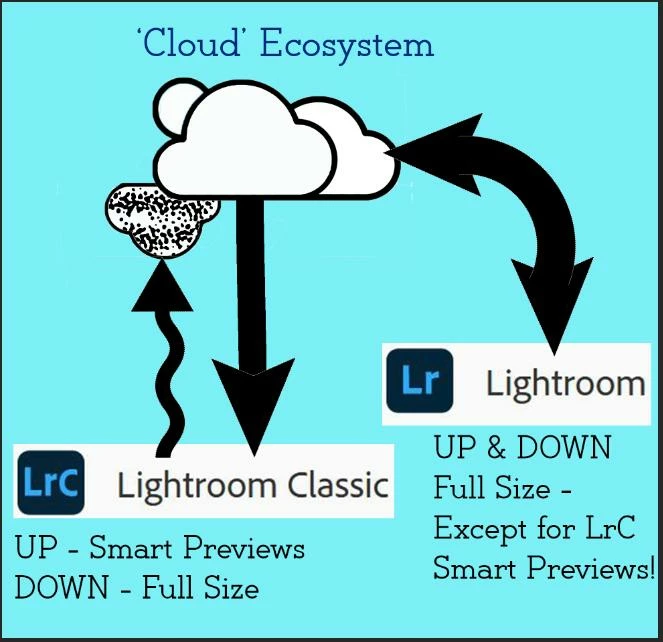
My graphic-


1 reply

Rob_Cullen
Community Expert
Rob_CullenCommunity ExpertCorrect answer
Community Expert
July 3, 2025

I do have to agree with you, and the confusion over the app names has been ongoing since 2017!

If you read the Sync FAQ:   https://helpx.adobe.com/au/lightroom-classic/kb/sync-faq.html

You will see this small reference to uploads vs downloads-

And this-


My graphic-


Regards. My System: Windows-11, Lightroom-Classic 15.1.1, Photoshop 27.3.1, ACR 18.1.1, Lightroom 9.0, Lr-iOS 10.4.0, Bridge 16.0.2 .
Participating Frequently
July 3, 2025

@Rob_Cullen  Great graphics. Explains better than a thousand words (an looks sort of stimulating!)