
mynaturephotography
Participant
September 4, 2021
Question

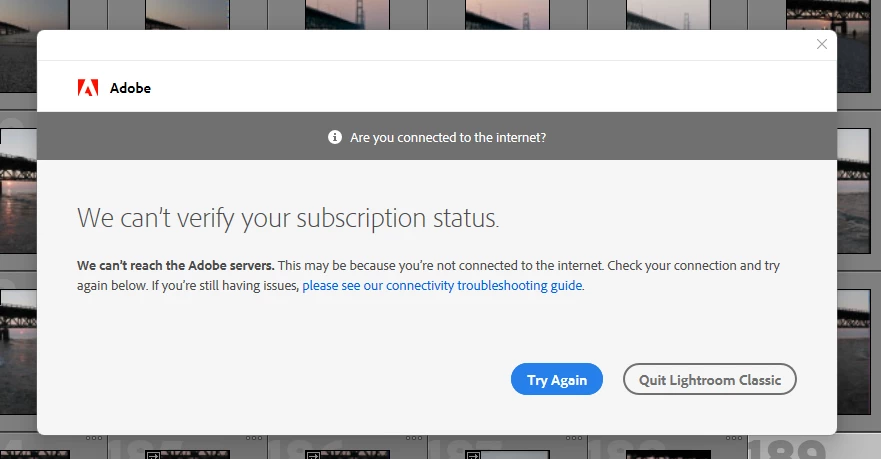
Adobe Products Will Not Authenticate with Adobe Servers on Windows 11

  • September 4, 2021
  • 7 replies
  • 1174 views

None of the Adobe Applications, Photoshop, Lightroom or LRC cannot verify the subscription service. Creative Cloud connects and updates without issue. It just seems to be the other Adobe Desktop applications. I have no issues with any other program. Disabled firewall and anti-virus and still same issue.


I am running:


Processor Intel(R) Core(TM) i7-8700 CPU @ 3.20GHz 3.19 GHz
Installed RAM 64.0 GB
Device ID FE6E38BA-C070-43BC-91B5-BDEA42A721D4
Product ID 00330-80000-00000-AA693
System type 64-bit operating system, x64-based processor
Pen and touch No pen or touch input is available for this display


Edition Windows 11 Pro Insider Preview
Version Dev
Installed on ‎9/‎2/‎2021
OS build 22449.1000
Experience Windows Feature Experience Pack 1000.22449.1000.0


This topic has been closed for replies.

7 replies

Participant
September 17, 2021

Just to bring some closure to this issue, as of September 17th, between updates from Adobe and Microsoft (concerning Windows 11), Creative Cloud now installs.  No additional reconfiguration was required in a default settings install of Windows 11.  

Thanks everyone for the help/suggestions.

Participant
September 8, 2021

Thanks folks for the suggestions.  I tried all of the above.  TLS, firewall, hosts files, etc.  It's a fresh install (formated and installed from scratch).  Adobe Acrobat Reader installed fine as did other software.  Adobe Creative Cloud is the only software that acts strangely.  I suspect there's some new security stuff going on on either the Adobe or Microsoft side that is preventing the initial connection to fully install Creative Cloud.  Once Creative Cloud is installed, things appear fine on my other systems.  It's just the initial installation of the Creative Cloud Desktop app that appears to be the problem.

Is there another way of installing the full Creative Cloud Desktop app offline (other than the ACCx5_5_0_617 folder)?  Maybe that workaround will do it, and once it's fully installed, things can proceed and I can download apps from Creative Cloud?

AxelMatt
Community Expert
Community Expert
September 8, 2021
My System: Intel i7-8700K - 64GB RAM - NVidia Geforce RTX 3060 - Windows 11 Pro 25H2 -- LR-Classic 15 - Photoshop 27 - Nik Collection 8 - PureRAW 6 - Topaz Photo AI
Participant
September 8, 2021

I'm having the same issue here.  I've had luck installing Adobe on an earlier build of Win 11, but now I get "Server disconnection" error 206 when I try to install Creative Cloud.  I've disabled all firewall and AV settings but no luck.  On my other systems I can update my Adobe apps via Creative Cloud, but on this Win 11 install, I can't even get Adobe Creative Cloud Desktop to install.

Any ideas would be appreciated.

GoldingD
Legend
September 4, 2021
Creative Cloud connects and updates without issue. 

Please clarify, your copy of the Adobe Creative Cloud Desktop App, does that open, and can you sign in?


When you sign in, do you see any errors? 


After you signed in, you do leave it alone, that is, you do bot sign out, correct?


GoldingD
Legend
September 4, 2021

You need to talk to Microsoft. 

Whole point of being a  beta tester is to tell Micrisoft what they have screwed up. 

Heck, basically pre-release beta, so even worse.

Not an Adobe employee, most of us are not, but I doubt if Adobe is going to spend much effort towards Windows 11 at this early stage.