
Sean H [Seattle branch]
Known Participant
December 10, 2022
Question

AI can't find people in darker images

  • December 10, 2022
  • 1 reply
  • 590 views

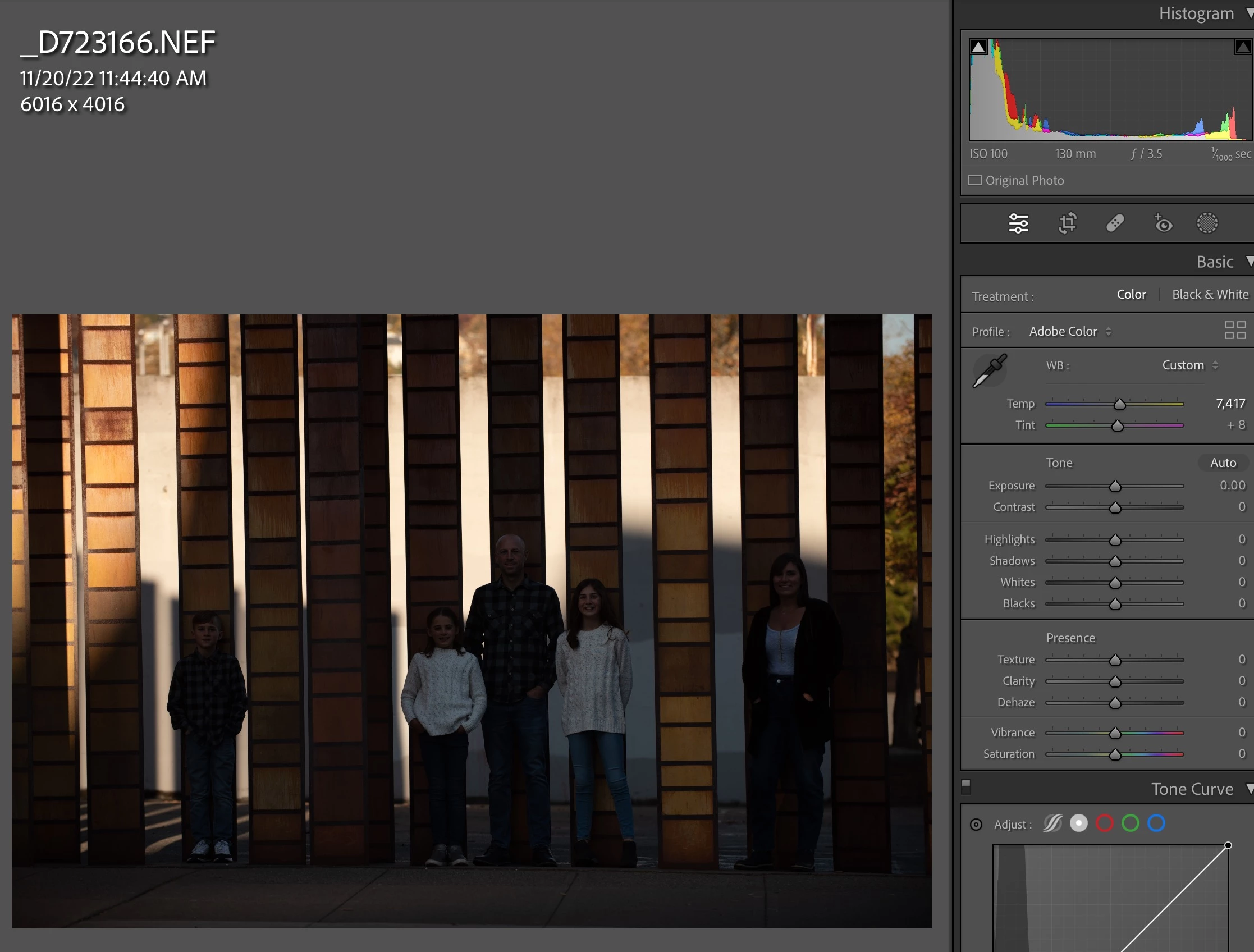
I've noticed that the AI can't find "People" in my shots when the exposure is low. If I round-trip the shot into PS or something and it comes back brighter, the AI masks the people just fine. This suggests the AI isn't adjusting the luminescense to find people. Please increase the exposure a few times as part of the routine if the AI isn't finding people. 
 

This topic has been closed for replies.

1 reply

GoldingD
Legend
December 10, 2022

Why did you not correct/adjust the tonality of the image globally BEFORE making local (Masking) adjustments? This appears to be a workflow issue.


Followup/ from replys, sounds like not a workflow issue, sounds like a bug.

Community Expert
December 10, 2022

Adjusting the exposure by whatever means won't help the AI find people in the orginal raw if it is underexposed as you can see in the screenshots. I have seen the same thing too. It appears the AI works on an unadjusted version of the image always even if you preadjust everything before going into masking. The trick to get it to work is to roundtrip it into Photoshop with the adjusted exposure. If you do nothing in Photoshop and simply save as is, it will now recognize people and objects. This is only an issue for severely underexposed images. If it is just one stop or so underexposed for the people it will still work fairly well.