
Participating Frequently
October 10, 2018
Question

All LR Catalogs Corrupt When Backing Up To WD My Book 10TB RAID

  • October 10, 2018
  • 3 replies
  • 770 views

Hey guys,

I'm running the latest version of LR CC and for the last year or so have been backing up my work in multiple ways: Time Machine, Backblaze and a WD My Book 10TB Raid (via SuperDuper!). My problem is that ALL my LR catalogs backed up to the long-term storage on WD My Book are getting corrupted. When I copy and paste them back onto my local hard drive they ALWAYS give the same error

Lightroom encountered an error when reading a catalog file and needs to quit.

Lightroom will attempt to diagnose the problem the next time it launches. Then I get this:
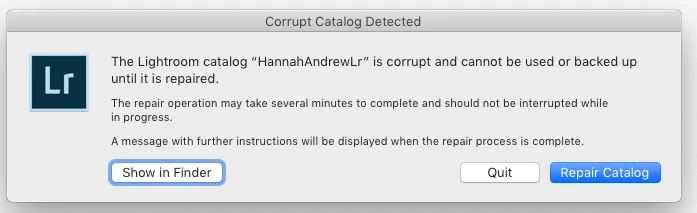
Then this:
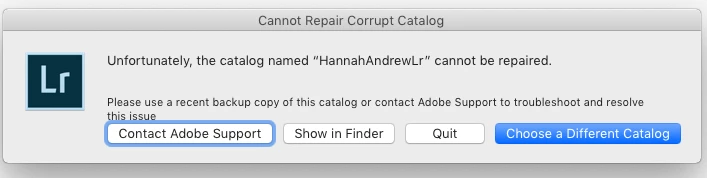
This only happens with LR catalogs retrieved from this drive. Versions in my Time Machine on a WD My Passport and up in Backblaze are totally fine.

Any ideas what the issue could be and how it might be fixed?

Thanks!

    This topic has been closed for replies.

    3 replies

    KR Seals
    Community Expert
    Community Expert
    October 11, 2018

    What exact version of LR CL are you using? Are you trying to open the backup catalogs created by the LR backup process?

    The current is 7.5. Some earlier versions of 7 actually created corrupt catalog backups.

    See this Adobe info:

    Lightroom Classic ( v6.x-7.3): Backups have errors preventing usage | Photoshop Family Customer Community

    https://feedback.photoshop.com/photoshop_family/topics/all-lr-v6-x-7-3-backups-have-errors-preventing-useage-since-last-year-sometime-plus-3-photos-always-syncing

    Ken Seals - Nikon Z 9, Z 8, 14mm-800mm. Computer Win 11 Pro, I7-14700K, 64GB, RTX3070TI. Travel machine: 2021 MacBook Pro M1 MAX 64GB. All Adobe apps.
    Legend
    October 10, 2018

    Back one up and then IMMEDIATELY try opening it (don't copy/paste, open in place) on the external drive.

    This will tell you if the SuperDuper backup is bad. Its possible that SuperDuper is doing a block-level copy that isn't working right with the RAID.

    If you can open it on the external drive directly, DRAG (don't copy/paste) it to your desktop and try opening it there.

    I would create a small test catalog for this purpose, with just a few dozen images so it is faster.

    dj_paige
    Legend
    October 10, 2018

    Sounds like either the connection to the drive is not working properly, or the hard disk is malfunctioning.

    Participating Frequently
    October 10, 2018

    Everything else works fine. It's only the LR Catalogs that corrupt in that drive. No other problems at all.

    dj_paige
    Legend
    October 10, 2018

    joep29518405  wrote

    Everything else works fine. It's only the LR Catalogs that corrupt in that drive. No other problems at all.

    Not relevant. Disks can have bad sectors, only the files in those bad sectors will be corrupted and everything else will be fine.