
karinav6539382
Inspiring
May 6, 2017
Answered

All of my backup files are missing

  • May 6, 2017
  • 2 replies
  • 3480 views

I have lightroom 3. 

I've been working on editing pictures from a session daily, for the last 3 weeks or so.  Every time I stop working, I close lightroom, and it automatically backs up.  Because of this habit, I should have several backups to choose from, from this session, but also over this whole year.   Today, when I was working, lightroom froze up for a bit, and I had to shut it down.  When I tried restarting it, it said my catalog was corrupt, & asked if I wanted to fix it.  I said yes, but it was still having trouble.  I shut it all down and restarted my computer.  When everything was up and running again, my catalog, along with all of the back-ups were missing.  I've lost all of my work, and I'm feeling panicky. 

Hoping somewhere out there can help?
This topic has been closed for replies.
Correct answer Todd Shaner

said:

I've tried doing a search for lrcat fies.  I've checked the trash. ...nothing.

Try this search procedure to check all drive locations. Make sure your backup drive and all other external drives you use are connected and showing before starting the search.

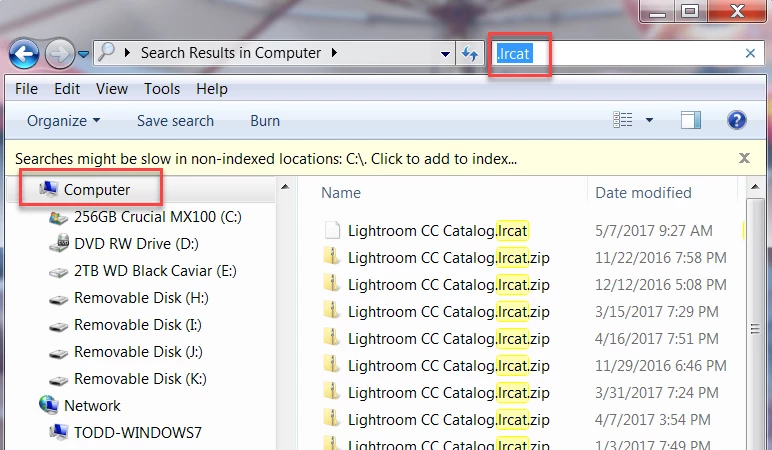
Open Windows Explorer, select 'Computer' and type .lrcat in the Search box as shown below. Let the search complete, which can take several minutes.

2 replies

Just Shoot Me
Legend
May 6, 2017

What exact version of LR are you using?

Search all your drives for .lrcat and .lrcat.zip (depending on the version of LR you are using the backup catalog files can be either straight LRCAT files or compressed into ZIP files that need to be expanded before you can open them in LR

Also what type of computer are you using and what exact version of operating system?

JP Hess
Inspiring
May 6, 2017

This individual is using Lightroom 3, so the files will be lrcat files.

JP Hess
Inspiring
May 6, 2017

Where do you have Lightroom configured to save your backups?

karinav6539382
Inspiring
May 7, 2017

I keep them in my "my pictures" file - and also on a backup hard drive.  I've had to restore my catalog other times in the past.  It hasn't been a big deal.  I just find the back up & use it.  But now all the files are missing.  I've tried doing a search for lrcat fies.  I've checked the trash. ...nothing.  I just purchased & downloaded lightroom creative cloud hoping it would inspire Adobe to help me, but they're closed on weekends. 

...this is my first time using the forums.  Not quite sure how to reply to everyone.  I'll just copy & paste in reply to both questions.  Feel free to correct me if there's a better way.

Todd Shaner
Todd ShanerCorrect answer
Legend
May 7, 2017

said:

I've tried doing a search for lrcat fies.  I've checked the trash. ...nothing.

Try this search procedure to check all drive locations. Make sure your backup drive and all other external drives you use are connected and showing before starting the search.

Open Windows Explorer, select 'Computer' and type .lrcat in the Search box as shown below. Let the search complete, which can take several minutes.