
Participant
April 26, 2020
Question

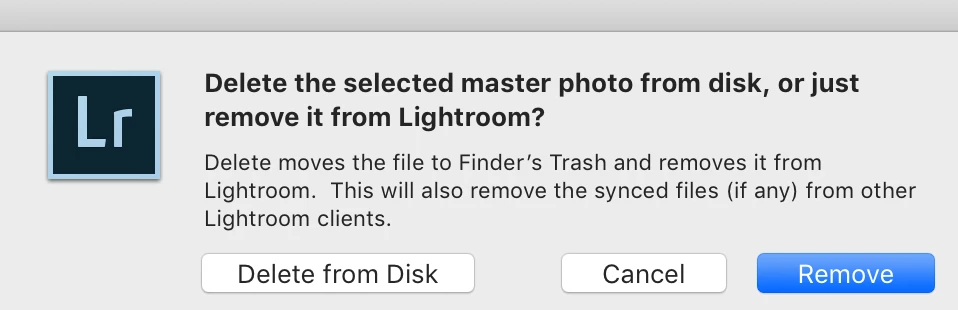
Argh - popup window when using keyboard-x to reject photos
  • April 26, 2020
  • 5 replies
  • 1080 views

I forget which version I started noticing this behavior but it is driving me crazy.  When I use the keyboard-x to reject photos if I press x for another photo to close in time to the previous x I get a popup window if I want to delete the photo from disk or just remove from Lightroom.  I just want to set the reject flag!  How can I stop this popup box?

This topic has been closed for replies.

5 replies

Bob Somrak
Legend
May 2, 2020

I can't duplicate this behavior either.  I can set the filter to Unflagged and hold the X key down or tap it quickly and is works correctly.  

M4 Pro Mac Mini. 48GB
johnrellis
Legend
May 2, 2020

Also, upload the screen recording to Youtube or Dropbox and including the sharing link in your bug report.


[Use the blue reply button under the first post to ensure replies sort properly.]

johnrellis
Legend
May 2, 2020

That's strange. I'm not able to reprodcue that behavior. I suggest you make a full-resolution screen recording of your entire LR window showing the bad behavior and submit a bug report to the official Adobe feedback forum:

https://feedback.photoshop.com/photoshop_family/categories/photoshop_family_photoshop_lightroom

Be sure to include the first ten lines of the menu command Help > System Info.  Provide all the details, rather than linking back to this thread -- experience shows that Adobe developers tend not to follow the links.


[Use the blue reply button under the first post to ensure replies sort properly.]

johnrellis
Legend
April 26, 2020

[This post contains embedded images that don't appear in email. View the post in your Web browser to see the images.]


I can't reproduce that behavior and I don't recall seeing other reports about this problem. Initial troubleshooting steps:


1. Attachments are currently broken in this forum and we can't see "screenshot_33.png".  Can you please reply and insert the screenshot inline into the post using the picture icon:


2. Please copy here the first ten lines from the menu command Help > System Info, so we know precisely which version and platform you're on.


3. Is the menu item Photo > Auto Advance checked or unchecked?


[Use the blue reply button under the first post to ensure replies sort properly.]


gr8fultxAuthor
Participant
May 1, 2020

Lightroom Classic version: 9.2.1 [ 202004070813-7699d98a ]
License: Creative Cloud
Language setting: en-US
Operating system: Mac OS 10
Version: 10.14.5 [18F132]
Application architecture: x64
Logical processor count: 12
Processor speed: 3.2 GHz
SqLite Version: 3.30.1
Built-in memory: 32,768.0 MB

gr8fultxAuthor
Participant
May 1, 2020

3. Is the menu item Photo > Auto Advance checked or unchecked?

Unchecked. 


When I am viewing an newly imported set I have the flag filter to show only "unflagged photos".  When I hit "x" to reject the photo I am viewing the view goes to the next photo.  If I hit "x" again too soon the popup window appears.  If I wait long enough I can reject the next photo with "x".

Just Shoot Me
Legend
April 26, 2020

Please Edit your post and remove the screen shot you attached. the forum is broken and no one can download attachments.


Use the Proper method for including a screen shot by using the Insert Photos icon in the tool bar to place the image or images you want to show in line with the text of you post.