
FlyOnTheMoon
Participating Frequently
November 4, 2021
Frage

Aufnahmedatum lässt sich nicht ändern

  • November 4, 2021
  • 3 Antworten
  • 1270 Ansichten

Ich kann seit der neuen Version 2022 das Aufnahmedatum und auch andere Metadaten nicht mehr ändern? Alle Felder sind ausgegraut?

Ich verwende die gleichen RAW Fotos aus meiner Sony A7C wie zuvor!
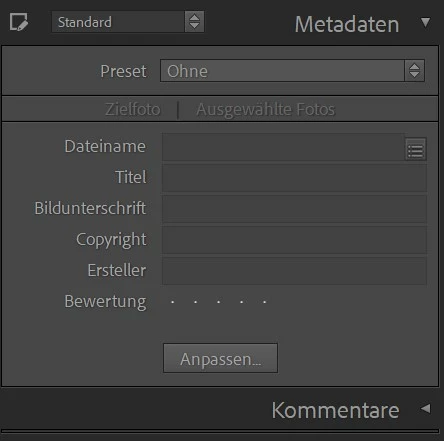
 

Dieses Thema wurde für Antworten geschlossen.

3 Antworten

Participant
January 13, 2022

Hast du das Problem lösen können? Ich steh genau vor demselben Problem und find keine Lösung.

Lieben gruss marianne 

FlyOnTheMoon
Participating Frequently
January 13, 2022

Ja :-))))


Reiter/Tab Bibliothek

Menü: Metadaten

Und einfach auf "Aufnahmezeit ändern" drücken


Das war wohl schon immer da - nur bisher konnte man das Menü auch anders erreichen

DdeGannes
Community Expert
Community Expert
January 13, 2022

Maybe you have not selected an image file in the Library module.


Regards, Denis: iMac 27” mid-2015, macOS 11.7.10 Big Sur; 2TB SSD, 24 GB Ram, GPU 2 GB; LrC 12.5,; Lr 6.5, PS 24.7,; ACR 15.5,; (also Laptop Win 11, ver 24H2, LrC 15.0.1, PS 27.0; ) Camera Oly OM-D E-M1.
GoldingD
Legend
November 4, 2021

Are you in the correct mode for editing vs viewing metadata.

Have you read the documentation on the new features

Have you read that documentation on the new metadata?


At the top of the Discussions, document on new LrC v11


and see: https://helpx.adobe.com/lightroom-classic/help/whats-new/2022.html#metadata

FlyOnTheMoon
Participating Frequently
November 4, 2021

I followed exactly the steps in the documentation, however it simply doesn't give me the option to edit anything? See also the screenshot I attached.

I did this all the time in the old version by simply clicking on the date - now this option isn't there anymore?

AxelMatt
Community Expert
Community Expert
November 4, 2021

Please try to reset the Lightroom preferences. 

https://www.lightroomqueen.com/how-do-i-reset-lightrooms-preferences/ 

My System: Intel i7-8700K - 64GB RAM - NVidia Geforce RTX 3060 - Windows 11 Pro 25H2 -- LR-Classic 15 - Photoshop 27 - Nik Collection 8 - PureRAW 6 - Topaz Photo AI
FlyOnTheMoon
Participating Frequently
November 4, 2021

Thanks for your suggestion - but it did not work 😞

Actually I made a complete new installation on a second computer, created a new catalogue, imported just one picture and had the same problem. I can't change any of the dates in the picture?

AxelMatt
Community Expert
Community Expert
November 4, 2021
My System: Intel i7-8700K - 64GB RAM - NVidia Geforce RTX 3060 - Windows 11 Pro 25H2 -- LR-Classic 15 - Photoshop 27 - Nik Collection 8 - PureRAW 6 - Topaz Photo AI
