
Ed.Macke
Inspiring
May 21, 2023
Answered

Auto Import Changing Capture Date to Current Date/Time

  • May 21, 2023
  • 3 replies
  • 3096 views

When I auto-import an image into LRC, it's magically changing the capture date/time from the original date to the current date/time.

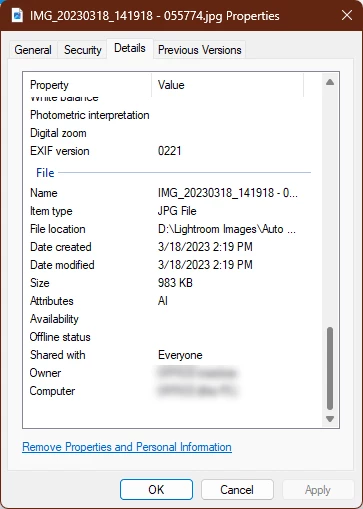
Here's an example... I've copied an image to my Lightroom's auto-import folder (LRC isn't open yet). I can see that the capture date is 3/18/23 @ 2:19pm. I can even see that the image name reflects that, IMG_20230318_141918...jpg.
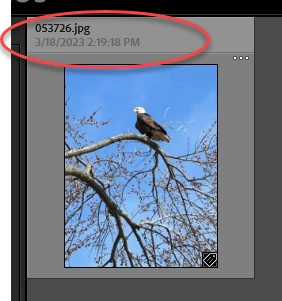
Then, I open Lightroom and I can see for a split second that the timestamp is correct.
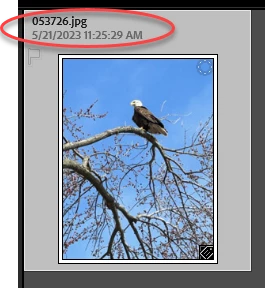
But then, a few seconds later the date magically changes to the current date/time.
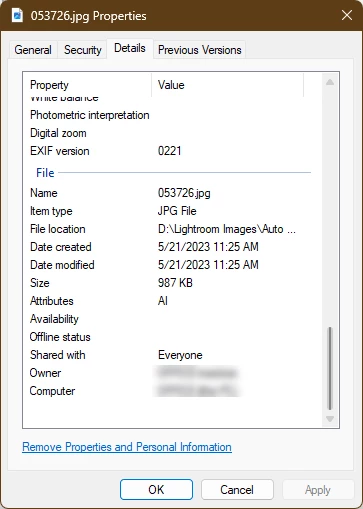
And if I look at the file properties for the image that was imported, I can see it really did change the date.
I've checked my auto-import settings, and the only thing I'm doing is renaming the file (which is why it is named "053726.jpg" after importing) and apply a copyright string to the IPTC Copyright and Creator fields. I don't even see an option for changing the date, even if I wanted to.

This seems to happen only to images that have been copied over from my Pixel 6 Pro phone's "messages" folder (i.e. images that were texted to me and I've saved).

But regardless of the source, why is LRC correctly interpreting the capture date as 3/18/23 - and then suddenly deciding it needs to change it from that to the current date/time? And more importantly, how to I get it to STOP DOING THAT?!?!

This topic has been closed for replies.
Correct answer Ed.Macke

Just to close this out, I'm guessing based on what I experienced that that Lightroom initially uses an OS timestamp from the file being imported as its temporary placeholder for capture time. It then tries to read the EXIF:DateTimeOriginal (0x9003) value, and if finds it, that becomes the new capture time. When LR doesn't find the EXIF field, or in my case when LR finds it but the value is invalid, the new capture time becomes the current date/time.

It also seems like whatever capture date it computes is used to update the OS's date created and date modified on the resulting imported image file.

3 replies

Ed.Macke
Ed.MackeAuthorCorrect answer
Inspiring
May 23, 2023

Just to close this out, I'm guessing based on what I experienced that that Lightroom initially uses an OS timestamp from the file being imported as its temporary placeholder for capture time. It then tries to read the EXIF:DateTimeOriginal (0x9003) value, and if finds it, that becomes the new capture time. When LR doesn't find the EXIF field, or in my case when LR finds it but the value is invalid, the new capture time becomes the current date/time.

It also seems like whatever capture date it computes is used to update the OS's date created and date modified on the resulting imported image file.

johnrellis
Legend
May 22, 2023

The industry standard metadata field for storing capture date is EXIF:DateTimeOriginal, which is where LR normally reads its capture date. But if that field is missing, LR will often use the File Modified date maintained by the operating system (when any program, including LR, last modified that file).  Further, due to a longstanding LR bug Adobe has shown no interesting in fixing, whenever the file's File Modified data changes, LR will update its own notion of capture date on the fly!


It sure looks like this is what's happening to you.  To figure out what's really going on, upload a sample file that hasn't been imported into LR to Dropbox, Google Drive, or similar and post the sharing link here. (Don't attach the file here, because the forum software could modify its metadata.)  I'll put the file under the microscope.


Ed.Macke
Ed.MackeAuthor
Inspiring
May 22, 2023
quote

The industry standard metadata field for storing capture date is EXIF:DateTimeOriginal, which is where LR normally reads its capture date. But if that field is missing, LR will often use the File Modified date maintained by the operating system (when any program, including LR, last modified that file).... To figure out what's really going on, upload a sample file that hasn't been imported into LR to Dropbox, Google Drive, or similar and post the sharing link here.

Thanks, John.

File was uploaded here: https://drive.google.com/file/d/1S9OHJlE3lGaleB3gbbnmeHVEXuk4PVRo/view?usp=sharing

The file on my drive has a created date of 4/9/23, but the file on GDrive has a created date of 5/21/23 (i.e. now).

What's weird is that as far as I can tell, the EXIF:DateTimeOriginal and OS Modified Date are both present and set to 4/9/23. So why LR is going rogue on my capture date, who knows. Maybe you can find something!

-Ed

Ed.Macke
Ed.MackeAuthor
Inspiring
May 22, 2023

Wait!! Found it!!

The problem was the test info I was putting in the EXIF:DateTimeOriginal field was not the correct format.

I had entered "2023-03-18 14:19:18" (with dashes between the year/month/day). When I entered the correct (but bizarre) format of "2023:03:18 14:19:18" (with colons between the year/month/day), everything worked.

I'm guessing what happens is that when LR initially imports the image, it uses the OS modified datetime as a temporary placeholder, then it examines the EXIF data to get the "true" datetime. In my case, it found the EXIF field it was looking for, but since it was invalid it panicked and just used the current date. Just a guess based on what I've noticed...

Michael J. Hoffman
Community Expert
Community Expert
May 21, 2023

Let's see your EXIF data - I'm not seeing that behavior. Here is a snapshot of a Canon CR3 file that I imported a few months ago, but did nopt rename nor convert to DNG on import (imported from iPad). Now today, I converted to DNG and then renamed the whole series of photos. The Date and time was updated as expected to today's date, but the original date is unchanged. Is it possible you have your grid labels set to show the wrong date field? Showing your EXIF data will help us understand:


As you would expect (since I created a new DNG file) the system file creation date is today. But the original date is preserved in the metadata:


Michael J. Hoffman
Community Expert
Community Expert
May 21, 2023

As a follow-up experiment, to be sure, I took some new (RAW) photos and imported them to LR. The only difference I saw here is that the file time stamp was also set to the creation date and was not changed to the current time, even when converting to DNG and renaming. I noticed you are shooting in JPG, so I set my camera to JPG mode and repeated, again with the same results - so I can't seem to duplicate what you are seeing.

Ed.Macke
Ed.MackeAuthor
Inspiring
May 21, 2023

I read somewhere on the web that LR uses the EXIF:Date/Time Original value to determine the "capture date". So I played around with the EXIF data but am seeing the same results. The image has EXIF "Date Taken", "Date Digitized" and "Date/Time Original" all set to 3/18/23. The file's Create, Modified, and Last Accessed are all 3/18/23. Yet when LR imports the file, it initially sets it to the correct value (from somewhere) but then a second or two later changes it to the current date/time. Very frustrating.