
Participant
February 27, 2017
Answered

Basic tab is missing in the Lens Corrections section of the Develop Module

  • February 27, 2017
  • 2 replies
  • 1033 views

I bought a new MacBook Pro and restored from my old one but am missing some functions in Lightroom 6.8 I am missing the basic tab, which includes the Upright correction.  I use this all the time. 

Here is how it looks on my old machine:
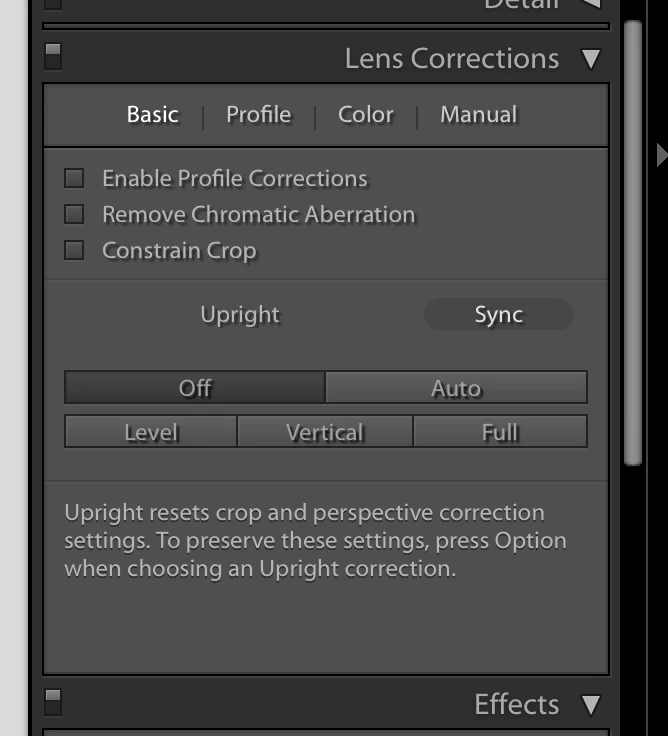
Here is how it looks on the new one:


    This topic has been closed for replies.
    Correct answer John Waller

    jmbreitinger  wrote

    I bought a new MacBook Pro and restored from my old one but am missing some functions in Lightroom 6.8 I am missing the basic tab, which includes the Upright correction.  I use this all the time.

    Upright correction is now in the new Transform panel

    Andrew S. Gibson photography blog How to Use the New Guided Upright Tool and Lens Correction Panel in Lightroom CC - An…

    2 replies

    John Waller
    Community Expert
    John WallerCommunity ExpertCorrect answer
    Community Expert
    February 27, 2017

    jmbreitinger  wrote

    I bought a new MacBook Pro and restored from my old one but am missing some functions in Lightroom 6.8 I am missing the basic tab, which includes the Upright correction.  I use this all the time.

    Upright correction is now in the new Transform panel

    Andrew S. Gibson photography blog How to Use the New Guided Upright Tool and Lens Correction Panel in Lightroom CC - An…

    Participant
    February 27, 2017

    Thanks.  I see it now. 

    Just Shoot Me
    Legend
    February 27, 2017

    Your older Mac is running an older version of LR. your newer Mac is running the most recent version of LR. The Lens Correction sections are different on the 2 different versions.

    Go to Help > About Adobe PS LR to check the version number on both systems.