
heatherc15475534
Participant
June 4, 2022
Answered

Batch Auto-straightening isn't working

  • June 4, 2022
  • 4 replies
  • 35244 views

Good morning! I'm trying to auto straighten a bunch of photos, something I haven't had issues with in the past. I select my images, select 'auto sync', go to the crop tool and hit Auto to straighten. All of my images look like they've had an adjustment made (or LR thinks they have) but if I go back into the image and hit the auto straighten, more adjustments are made. This is frustrating as this used to work, so I don't think it's my technique. Any ideas on how I can make this functional again? Anyone else having this issue? TIA.
Correct answer johnrellis

[This post contains formatting and embedded images that don't appear in email. View the post in your Web browser.]


When you click the crop tool's Auto button, Auto Sync copies the computed crop angle from the current photo to all the other selected photos, so they all end up with the same angle.  It does not recompute the straighten angle for each selected photo.  I verified this behavior in LR 11.3.1 and 10.4.


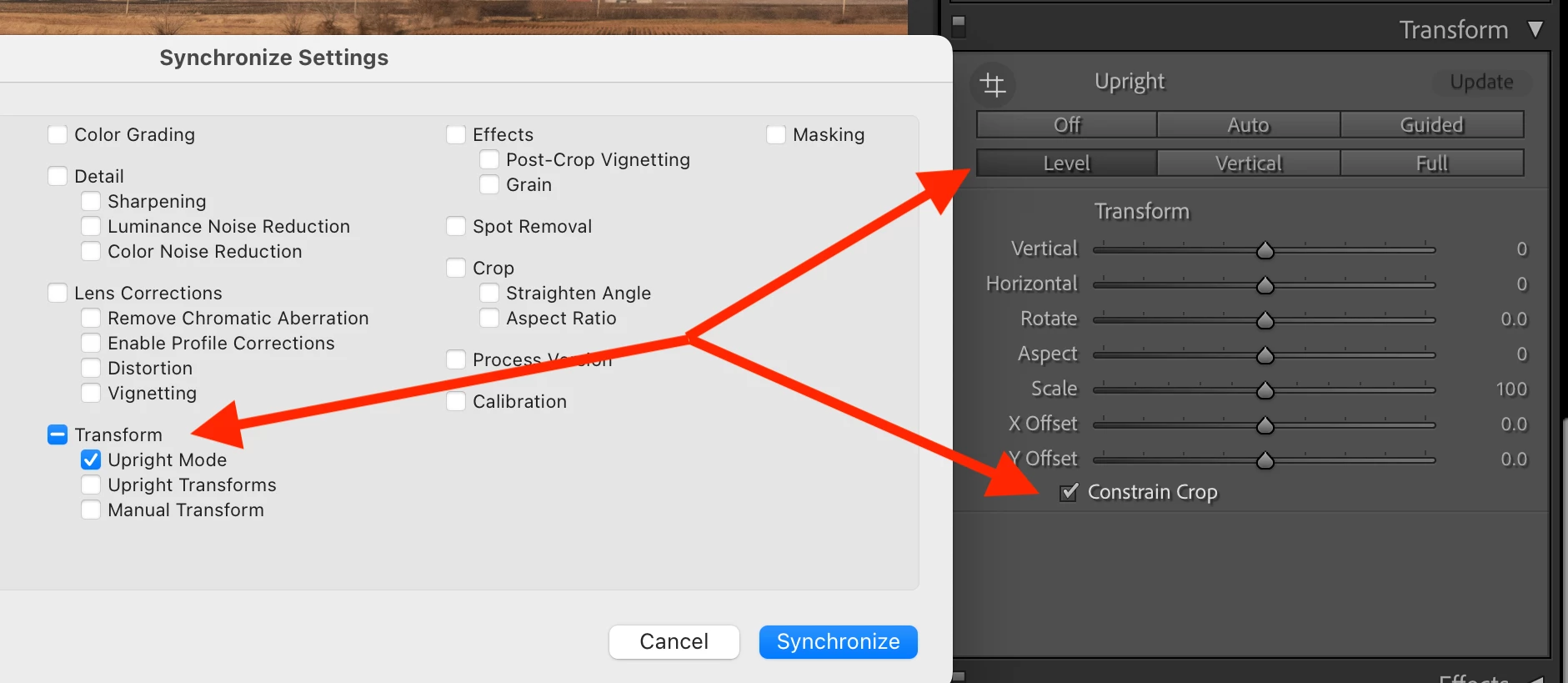
To batch-straighten all the selected photos, computing the correct angle for each photo separately, do this instead:


1. Select all the photos and go to Develop.


2. In the Transform panel, select Level and Constrain Crop.


3. Click the Sync button and select Upright Mode only:


And yes, you could also use Auto Sync, but it's dangerous, and for too many people, using it eventually ends in tears.

4 replies

Participant
January 3, 2024

2024. Still paying a premium subscription price and Adobe can't give us the ability to batch correct. 

johnrellis
Legend
January 4, 2024
Participant
November 1, 2023

Good day! I found this solution earlier this year and it had been working great for months. but then recently after these new updates, it hasnt been working right for each image any more. Is there a new solution or something I should be doing now?


johnrellis
Legend
November 2, 2023

Hmm, I just retested my steps above, and they worked in my test catalog with LR 13.0.1.  Do Help > System Info -- which exact version of LR are you running?

Nicolas Gop
Participant
December 5, 2023

Hi John! 
there is not Shortcut for  Crop - Auto.  isn´t ?

roc97007
Known Participant
November 1, 2022

I'd like to suggest an enhancement request.  There's currently no way to auto-straighten a batch of photos.  Auto-straighten sometimes gets it wrong, but it would still be a net timesaver.  I deal with thousands of photos over multiple days, and the single most common buttons I press in Develop is "r" followed by clicking on the "Auto" button.  There doesn't even seem to be a keyboard shortcut for auto straighten, which although not ideal might be faster.


Ideally, I would Select a bunch of photos, click "Auto" once, and have them all auto straighten, NOT to the same tilt as the first photo, but each straightened as if I did it individually.


   Ron

roc97007
Known Participant
November 1, 2022
I've read about the synchronize technique, but my understanding is that it adjusts the angle of the rest of the photos the same degree as the first photo, instead of recalculating the degree of straightening necessary for each photo. True or not true?

The issue is that I might have 2500 photos all taken against the same set of vertical columns, (in a stadium, as it happens) but each photo might be off by a slightly different amount and in a different direction. Syncing the angle of a bunch of photos to the angle of the first photo is not a solution, as the corrections will be different for each one.

Please advise.

Ron
johnrellis
Legend
November 7, 2022

So, interestingly enough, if I push "Update" after pushing "level", the photo shifts back to something more usable.  I'm not sure what "Update" does, but it does appear to help.  I don't know if pushing "level" and "update" on one photo would copy/paste correctly to other photos.  To be clear, I'm not sure whether "update" recalculates ... whatever it does .. or just pastes the adjustments made to the first photo.  I'm very much behind in the current job; maybe I'll continue experimenting later.


[This post contains formatting and embedded images that don't appear in email. View the post in your Web browser.]


With that DNG, I observe similar results as Richard: After setting Lens Corrections > Enable Profile Corrections, Crop > Auto and Transform > Level produce the exact same results (crop angle of -0.37).


A couple times during my experimentation, when switching back and forth between Crop > Auto and Transform > Level, I saw Update appear after clicking Level.  I think that's a bug.  I never saw Update if I first reset the photo, then set Enable Profile Corrections, then clicked Level.  


Update is only supposed to appear when you  Copy/Sync Transform settings and you've selected both Upright Mode and Upright Transforms:


"Upright Mode" is the transform you've selected: Off, Auto, Guided, Level, Vertical, Full.  "Upright Transforms" is the actual transformation (e.g. angle) computed for that mode in the source photo.  


When you copy both Upright Mode and Upright Transforms, LR enables the Update button in the Transform panel of the target photos to alert you that the actual applied transformation doesn't match what would be computed by the selected mode.  Clicking Update recomputes the mode's transformation.


To summarize: To batch-apply automatic leveling and get the same results as Crop > Auto, enable lens corrections and do Transform > Level.  Copy/Sync from the source to the target photos, selecting the option Transform > Upright Mode but not Transform > Upright Transforms.


johnrellis
johnrellisCorrect answer
Legend
June 4, 2022

[This post contains formatting and embedded images that don't appear in email. View the post in your Web browser.]


When you click the crop tool's Auto button, Auto Sync copies the computed crop angle from the current photo to all the other selected photos, so they all end up with the same angle.  It does not recompute the straighten angle for each selected photo.  I verified this behavior in LR 11.3.1 and 10.4.


To batch-straighten all the selected photos, computing the correct angle for each photo separately, do this instead:


1. Select all the photos and go to Develop.


2. In the Transform panel, select Level and Constrain Crop.


3. Click the Sync button and select Upright Mode only:


And yes, you could also use Auto Sync, but it's dangerous, and for too many people, using it eventually ends in tears.

heatherc15475534
Participant
June 6, 2022

Thanks so much, I'll try this!