Participating Frequently
August 6, 2023
Answered

Blue outline

  • August 6, 2023
  • 4 replies
  • 1429 views

A Blue outline appears after using spacebar in Title box in Library Modulewhich temporarily stops the use of the spacebar.

    This topic has been closed for replies.
    Correct answer Ian Lyons

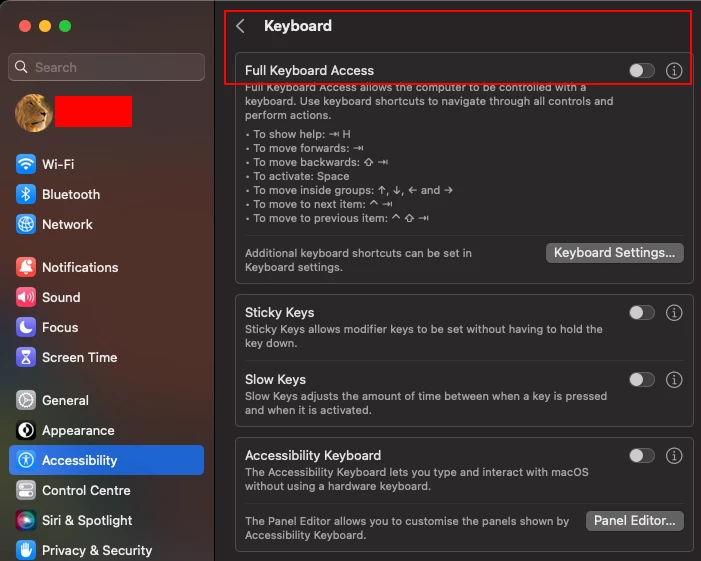
    You have Full Keyboard Access enabled in Settings > Accessibility > Keyboard. You can turn it off as shown in attached screenshot.
     

    4 replies

    Participating Frequently
    August 8, 2023

    Hi, I'm running Mac OS, and yes the blue outline is exactly as in the image, thank you. Do you know what it is and how I can stop it appearing please ? Regards Terry

    Ian Lyons
    Community Expert
    Ian LyonsCommunity ExpertCorrect answer
    Community Expert
    August 8, 2023

    You have Full Keyboard Access enabled in Settings > Accessibility > Keyboard. You can turn it off as shown in attached screenshot.


    Participating Frequently
    August 8, 2023

    Done it, and it appears ok now, will let you know if it happens again. Meanwhile thank you very much very much appreciated

    Conrad_C
    Community Expert
    Community Expert
    August 7, 2023

    A couple of questions…

    1. Is your computer running macOS, or Windows?

    2. Does the blue outline look like the one in the demo below, or is it different?


    Peru Bob
    Community Expert
    Community Expert
    August 6, 2023

    I've moved this from the Using the Community forum (which is the forum for issues using the forums) to the Lightroom forum so that proper help can be offered.

    Participating Frequently
    August 6, 2023

    Thank you

    Rob_Cullen
    Community Expert
    Community Expert
    August 7, 2023

    ...Lightroom ??!!

    Lightroom-v6 (perpetual)

    Lightroom-Desktop-v6.4 (Cloud)

    Lightroom-Classic v12.4

    Lightroom-Web

    Lightroom-Mobile

    "Library Module" would suggest Lightroom-Classic (or v6 perpetual) in which case the best forum is- https://community.adobe.com/t5/lightroom-classic/ct-p/ct-lightroom-classic


    Please include the following in your question:
    Adobe product and Version number.
    A Screenshot of the info panel from MENU: Help/System Info...
    Operating system and Version number
    What you were doing when the problem occurred
    Screenshots of the problem


    Regards. My System: Windows-11, Lightroom-Classic 15.1.1, Photoshop 27.3.1, ACR 18.1.1, Lightroom 9.0, Lr-iOS 10.4.0, Bridge 16.0.2 .
    kglad
    Community Expert
    Community Expert
    August 6, 2023

    what app?

    Participating Frequently
    August 6, 2023

    Don't understand....Lightroom ??!!