SEE REPLY #33 BELOW - There is another related issue with LR concerning NEC Spectraview display profile compatibility.
Using PS I combined idahochukar's two screenshots downloaded from reply #14 above as a composite image. They are both PNG file format with the OP's NEC Spectraview display profile embedded. The saved JPEG file also has the OP's NEC Spectraview display profile embedded as expected.
Test JPEG Rendering Results
1) Inside PS 20.0.2 the LR Develop module screenshot is more saturated and the Library module screenshot is less saturated just as described by the OP. This rendering appears correct.
2) Inside the LR Develop module the rendering is identical to PS as described above so also correct.
3) Inside the LR Library module the Develop module screenshot looks identical to the Library module screenshot with BOTH desaturated, which is not correct.
As a test I created a screenshot of the OP's screenshot and assigned it with my NEC Spectraview display profile. The results are the same as 1-3 above. So it appears NEC Spectraview display profile is compatible with PS 20.0.2, but not LR 8.1. Keep in mind my NEC Spectraview calibration display profile works fine with NO rendering issues. This is a LR Library module color management issue. Unchecking 'Use Graphics Processor' and viewing at 1:1 Zoom has no affect on the rendering.
Try it for your self with the below JPEG file. View it in the Develop module and then switch to the Library module. The top Develop module screenshot desaturates and the Library module screenshot below it stays the same (less saturated) with both now the same. Very bizarre!
NOTE: You may not see much of a difference if using a standard gamut display. The NEC PA272w is a wide gamut display with 99% Adobe RGB gamut.
Dropbox - NEC PA272W LR Screenshot Develop.jpg
PROBLEM SOLVED
There's nothing wrong with your NEC Spectraview calibration, Datacolor Spyder 5, or NEC PA272w monitor.
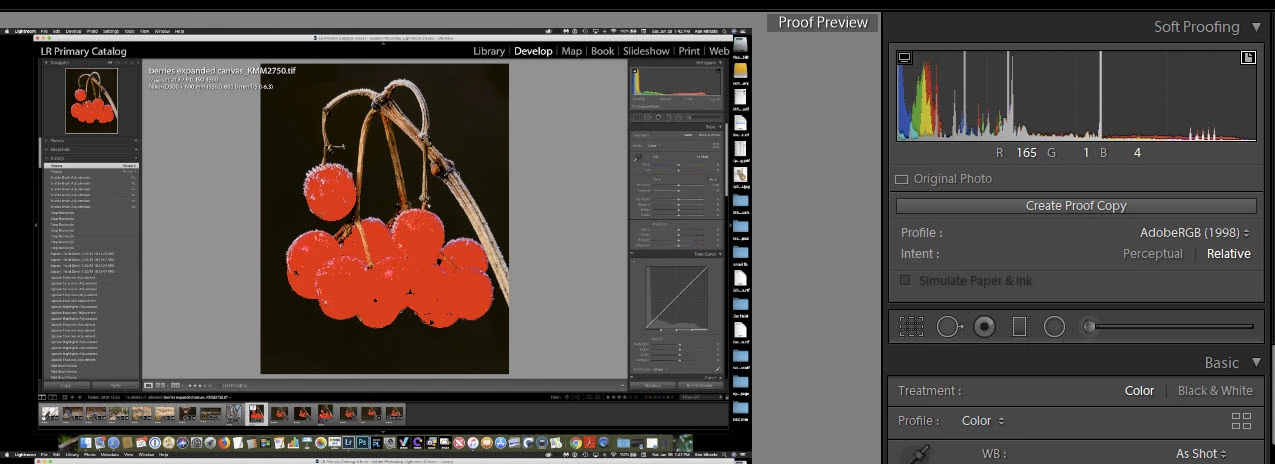
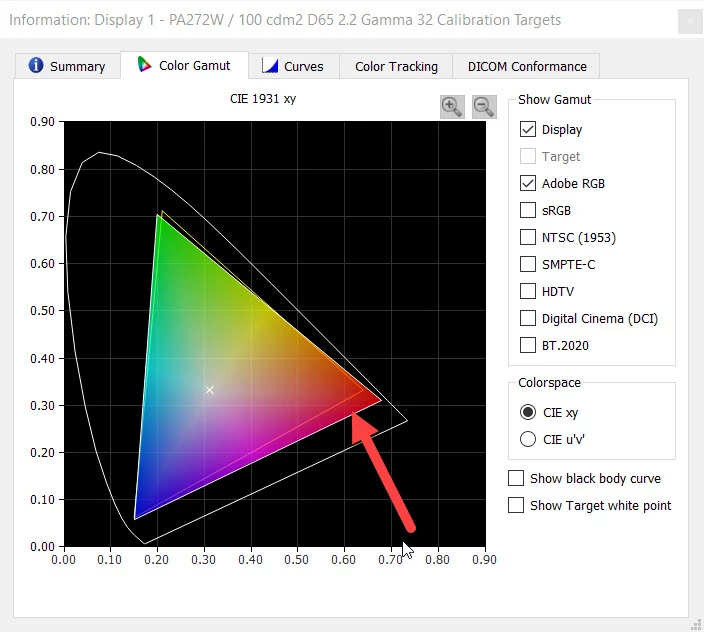
We sometimes overlook the obvious and as stated above you may not see the issue here when using a standard gamut display. Below is a LR Adobe RGB Soft Proof view showing the berries all outside of gamut. The Develop module uses a much wider Pro Photo RGB 1.0 Gamma working color space and the the Library module uses Adobe RGB. The NEC PA 272w monitor renders 99% Adobe RGB, but has additional gamut outside of Adobe RGB in the Red chromaticity (see below). This additional Red gamut is visible in the Develop module's wider gamut color space so when switching to the Library module there is a very noticeable red desaturation.
SOLUTION
You're Brush 1 settings as described are probably pushing the red berries outside of Adobe RGB. Use less saturation adjustment and turn on Soft Proof to prevent pushing color into an area that can't be rendered in actual prints or on lesser capable displays. Please let me know if you have any other questions.


 AdChoices
