
Participant
November 22, 2021
Question

Brush shows grayed out until paint stroke

  • November 22, 2021
  • 2 replies
  • 194 views

New Brush


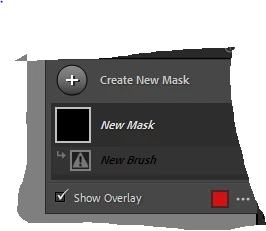
I have found the brush icon under masking and have been using but it has stopped working. It is now greyed out with a disabled type symbol as per pic below. Can you please tell me how to get it to work. I have signed out, turned my computer off and it is still not working. It is driving my crazy. Would love help from any clever person out there.
 

Thanks


This topic has been closed for replies.

2 replies

Rob_Cullen
Community Expert
Community Expert
November 22, 2021

You need to 'Paint' (Brush or apply a Gradient) on the image- first! for the ! icon to disappear.

    > Apply Brush >      


Regards. My System: Windows-11, Lightroom-Classic 15.1.1, Photoshop 27.3.1, ACR 18.1.1, Lightroom 9.0, Lr-iOS 10.4.0, Bridge 16.0.2 .
johnrellis
Legend
November 22, 2021

Thanks Rob, I never noticed that and just assumed it was unusual!

johnrellis
Legend
November 22, 2021

Have you tried it on several different photos, raw and non-raw?  Unless someone knows exactly what this is, it will help to narrow down the proximate causes...