
Participating Frequently
February 1, 2015
Question

Camera Calibration - which Profile to use?

  • February 1, 2015
  • 2 replies
  • 16657 views

This is a spin out of another thread in the forum - How do I avoid magenta discolouring?.

I am using a Lr 5.7.1 on OS X Mavericks (10.9.5) and photos from 3 cameras - Nikon D600, Nikon D40, and Canon 450D - they all exhibit a very similar behaviour with RAW files described below, but it much more noticeable with the Nikons and very noticeable with the D600. I have been using Lr since version 3 (I think but I might have started with version 2, I cannot remember).

By default I have always imported my RAW files leaving the profile under Camera Calibrations as Adobe Standard. I have been moderately unhappy with the results I was seeing in Lr, not with all the images but with quite a few of them; in a nutshell they don't as I envision them and they don't look the way they look in camera. With "the way the look in camera" I mean inspecting the histograms and clipping warnings.

I am fully ware that Lr does not read the picture control settings of any camera, my Nikons have always being set to Standard.

Below are 2 screenshots from a photo taken with the D600.

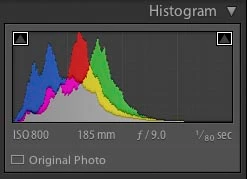
1) Histogram with Adobe Standard profile
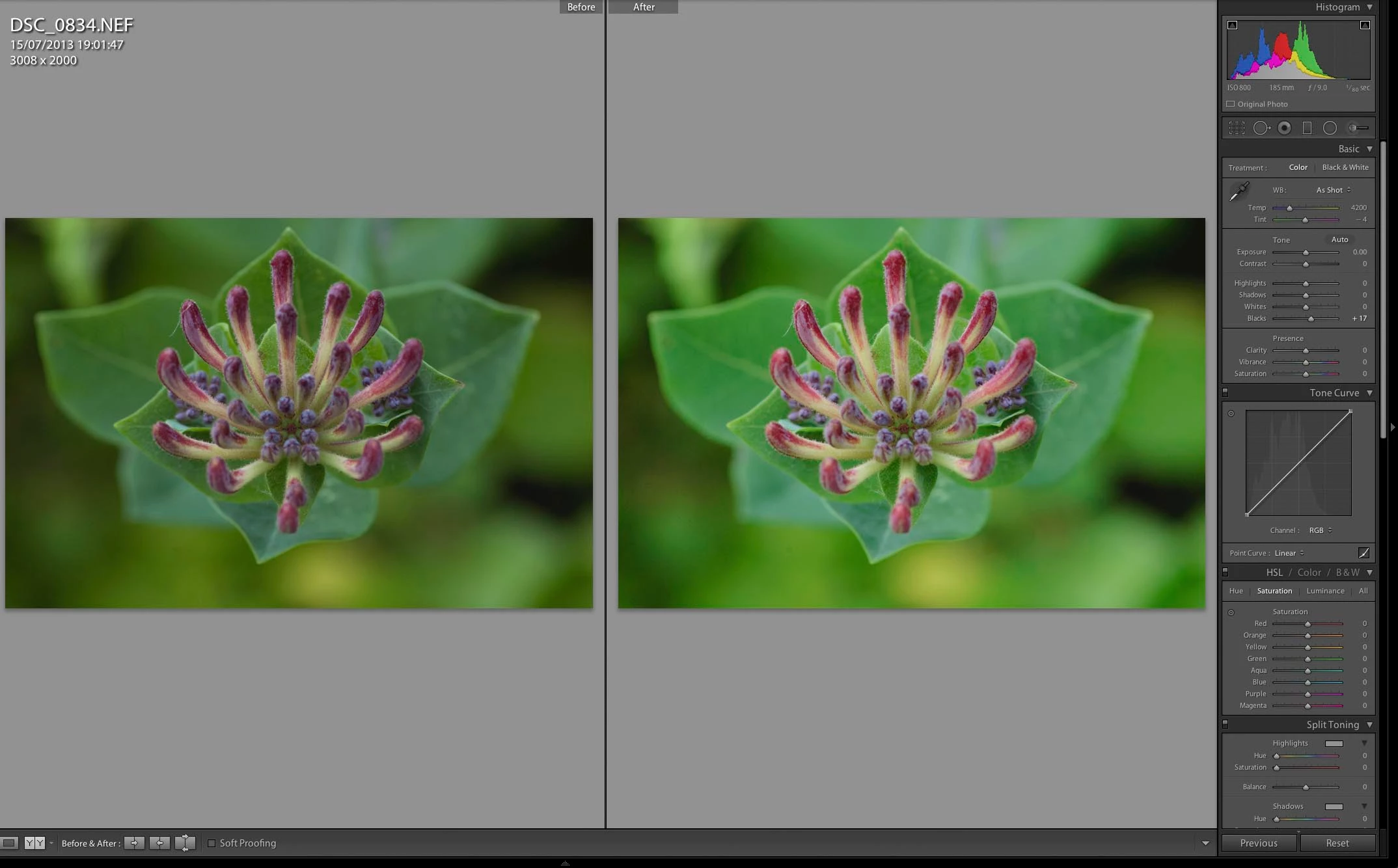
2) After and before view, left "Adobe Standard" right "Camera Standard"

There are 2 different images, the histogram is changed, the greens are render differently. I also know which one I'll pick for further work, the right image, the one with Camera Standard as the profile.
Back to the question for this post: Camera Calibration, which Profile to use? (and why?)

    This topic has been closed for replies.

    2 replies

    D Fosse
    Community Expert
    Community Expert
    February 3, 2015

    I work as photographer at an art museum, and obviously "correct" color is always an issue. For color-critical work I always include a ColorChecker in the shot - not to make profiles, but used as a first target for adjusting tone and color in Lightroom (some final tweaking is always necessary).

    Anyway - my experience is that the Adobe Standard profile, for the Nikon D800, is the one that consistently requires the least amount of adjustments to get there. It may look "dull", but it is the most neutral of all the profiles, and that's what I need. I use the DNG Profile Editor for non-standard light sources only (fluorescent or LED).

    I basically don't care what the camera LCD shows, except as a hint that my exposure is roughly right. The work starts when I have the shots up in Lightroom.

    I'm not saying the other profiles are "bad". It's nothing personal, just business

    Participating Frequently
    February 3, 2015

    twenty_one wrote:

    I work as photographer at an art museum, and obviously "correct" color is always an issue. For color-critical work I always include a ColorChecker in the shot - not to make profiles, but used as a target for adjusting tone and color in Lightroom.

    Anyway - my experience is that the Adobe Standard profile, for the Nikon D800, is the one that consistently requires the least amount of adjustments to get there. It may look "dull", but it is the most neutral of all the profiles, and that's what I need. I use the DNG Profile Editor for non-standard light sources only (fluorescent or LED).

    I basically don't care what the camera LCD shows, except as a hint that my exposure is roughly right. The work starts when I have the shots up in Lightroom.

    I'm not saying the other profiles are "bad". It's nothing personal, just business

    Thanks, the only things I check on the camera LCD are histograms and clipping warnings, that tells me if my exposure is right and if I have missed something when selecting the exposure. At the moment, I am consistently experiencing that "Camera Standard" gives more "correct colours" than "Adobe Standard" on a Nikon D600. Maybe I should stick with that an stop asking questions.

    JP Hess
    Inspiring
    February 3, 2015

    It's okay to ask questions. But it's also okay to choose a different profile as the default for a camera. There can be slight differences in sensors between your camera and the one Adobe used to create the profiles. As I indicated previously, there is no "right" profile. If the camera standard profile works better for the D600 then I would go ahead and create the defaults for that camera using that profile. I'm sure you understand that you can set camera defaults for every camera that you are using. In other words, changing the D600 default to using the camera standard profile isn't going to change anything for your other cameras. The default settings for each model are completely independent.

    Participating Frequently
    February 3, 2015

    I am very surprised nobody has replied to this after 2 days. So please let me just give it a new angle.

    After some tinkering with photos in my catalog I have established using "Camera Standard" instead of "Adobe Standard" makes a difference significant enough to use it as my Default camera calibration profile. The main reason for this is that I don't have the time to check each photo on an individual basis.

    With this in mind I have 2 questions:

    1) How do I apply "Camera Standard" as my default profile under camera calibration?

    2) For me this effectively a new process, most of my catalog (up to 10,000 images) uses the old process, "Adobe Standard" profile. How can I easily separate which part of my catalog has been processed using the old process and which part of my catalog has been processed using the new process?

    Hopefully somebody can give some guidance.

    ssprengel
    Inspiring
    February 3, 2015

    Which profile to use is a matter of personal taste, so why does it matter what other people use? I use a variety of profiles depending on the subject matter and lighting and camera body, and over the years I have used either Adobe Standard or Camera Standard or a custom-created dual-illuminant profile as my default camera profile. Currently it is Adobe Standard with my 7D Mark II.

    As to your question about making Camera Standard the default profile, you do it the same as customizing any other LR default: by selecting an unedited photo, setting Camera Standard as its profile, then on the keyboard use Alt - Set Default… (the button was Reset before pressing Alt) then confirm that you want to update the LR defaults to the current settings.

    I am not sure how to find photos with a particular camera profile but perhaps one of the filters in Library can do that, or a smart collection query. I don’t have LR in front of me right now to try things, myself.

    Participating Frequently
    February 3, 2015

    ssprengel wrote:

    Which profile to use is a matter of personal taste, so why does it matter what other people use?

    I am not sure I would agree with this statement without making some important qualifications.

    Camera profiles can be used for creative purposes, no disagreement there. However, I don't think this is the sole purpose of camera calibration and camera profile, isn't it? Jeff Schewe, who sometimes contributes to this forum, wrote in The Digital Negative "The profiles are designed to calibrate a particular camera model's particular colour rendering intent [...]. It's entirely possible that your particular camera might be a bit different from the one they profiled, so you might be able to make a customer profile for your camera that would produce a more accurate rending than what comes with Lightroom and Camera Raw"; the quote is taken from his section on Lightroom Camera Calibration and leads to conclude that the purpose of camera profiles is also to reproduce the colour rendering intent of camera.

    My point on the original post is that it seems that Camera Standard, with both my Nikons set to "Standard" picture controls, seems to better reproduce the colour rendering intent of both cameras, specially if greens are involved. All I am looking for is advice regarding best practice. This is absolutely non trivial from my point of view, best practice is not a matter of personal taste as I am sure you know. Insisting that default settings are best practice, I am not saying you are saying this, is not helpful.

    ssprengel wrote:

    As to your question about making Camera Standard the default profile, you do it the same as customizing any other LR default:  by selecting an unedited photo, setting Camera Standard as its profile, then on the keyboard use Alt - Set Default…  (the button was Reset before pressing Alt) then confirm that you want to update the LR defaults to the current settings.

    This is correct.

    ssprengel wrote:

    I am not sure how to find photos with a particular camera profile but perhaps one of the filters in Library can do that, or a smart collection query.  I don’t have LR in front of me right now to try things, myself.

    I don't think this possible. I cannot find a way to do it with smart collections or the filter library. I'll keep experimenting.