Participant
January 2, 2024
Answered

Camera Matching profile option missing

  • January 2, 2024
  • 1 reply
  • 2033 views

(LRc 13.1 / CR 16.1 / MacOS Ventura 13.6)


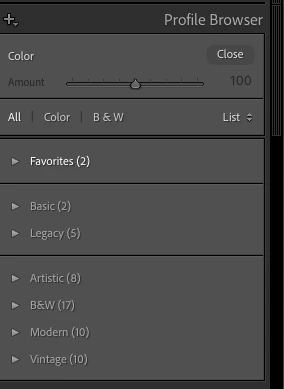
I am trying to access FujiFilm film simulations in the develop module for Fuji Raw files.  They are not shown in the Profile browser.  There are no option for 'camera matching' profiles shown.


They seem to have got lost, anyone know how i can point Lightroom at them again?
This topic has been closed for replies.
Correct answer Per Berntsen

Your screenshot indicates that you're working with a non-raw file (jpg, tiff, etc), it only says "Color" top left, instead of for instance Adobe Standard or Adobe Color.


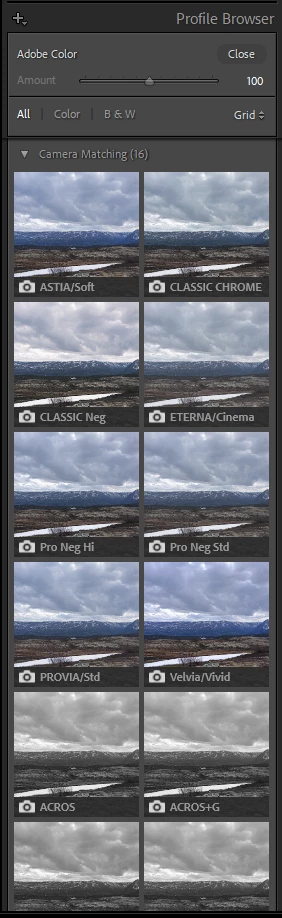
With a raw file (RAF) you should see something like this, if Adobe has provided camera matching profiles for your camera.


You have posted in the Photoshop forum, a moderator will move this thread to Lightroom Classic.


1 reply

Per Berntsen
Community Expert
Per BerntsenCommunity ExpertCorrect answer
Community Expert
January 2, 2024

Your screenshot indicates that you're working with a non-raw file (jpg, tiff, etc), it only says "Color" top left, instead of for instance Adobe Standard or Adobe Color.


With a raw file (RAF) you should see something like this, if Adobe has provided camera matching profiles for your camera.


You have posted in the Photoshop forum, a moderator will move this thread to Lightroom Classic.


Participant
January 2, 2024

/DOH!


Loded wrong SD card, jpegs instead of .RAF....