


Ken Nielsen
Legend
June 24, 2022
Answered

Can I do a radial mask with a subject mask active and in place?

  • June 24, 2022
  • 1 reply
  • 288 views

I would like to do a radial mask but just of the subject and not affecting the background. Is is possible to selcect the subject and then apply a radial mask to only affect that selected subject?
This topic has been closed for replies.
Correct answer Conrad_C

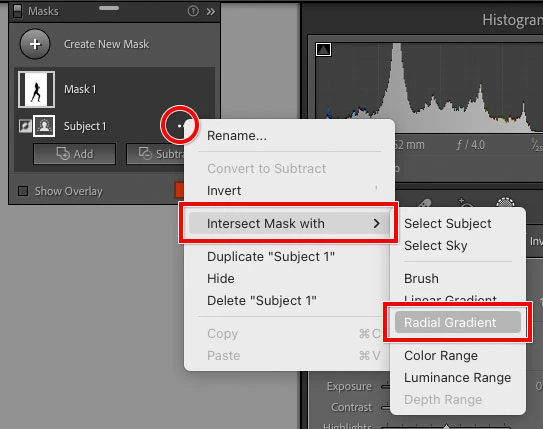
Does this do it?…for the subject mask, choose Intersect Mask with > Radial Gradient, then drag to create the gradient. The intersection should limit it to being within the subject mask.


1 reply

Conrad_C
Community Expert
Conrad_CCommunity ExpertCorrect answer
Community Expert
June 24, 2022

Does this do it?…for the subject mask, choose Intersect Mask with > Radial Gradient, then drag to create the gradient. The intersection should limit it to being within the subject mask.


Ken Nielsen
Legend
June 24, 2022

That's impressive and sounds like it would work. Let me prove it out at the computer tomorrow and will report back. Thanks for responding!