Exit
  • Global community
    • Language:
      • Deutsch
      • English
      • Español
      • Français
      • Português
  • 日本語コミュニティ
  • 한국 커뮤니티
0

Can I retrieve User Presets (Develop Presets) from a Mac TimeMachine backup?

New Here ,
Nov 04, 2016 Nov 04, 2016

We migrated from a MacBook Pro to another, opened the LR CC catalogue, and everything is fine except we are missing the user presets.

I understand how to find the presets in the hidden library folder of a current active user account by GO (option)>library>application support etc

But can they be retrieved from a time machine back up? I went looking and I can't get to the hidden Library folder.

thanks!
2.0K
Translate
Report
Community guidelines
Be kind and respectful, give credit to the original source of content, and search for duplicates before posting. Learn more
community guidelines

correct answers 1 Correct answer

LEGEND , Nov 05, 2016 Nov 05, 2016

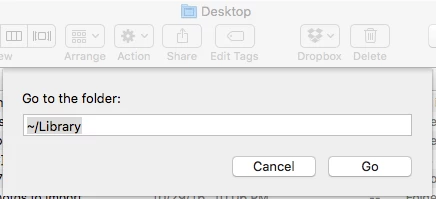
1. In a regular Finder window, do Go > Go To Folder, enter "~/Library", click Go:

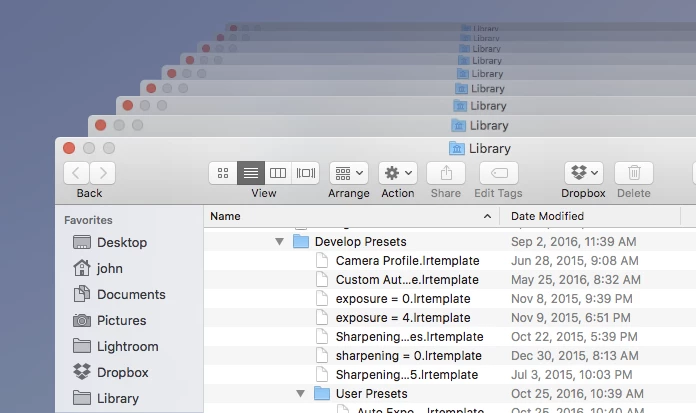
2. In Finder, navigate to the subfolder Application Support/Adobe/Lightroom/Develop Presets.  Make sure that you leave the Finder window selected on top of all your other open windows (very important -- don't click in another window or you'll confuse Time Machine).

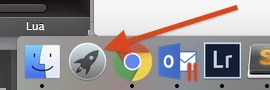
3. Click on the Launchpad in the dock:

Type "time machine" to launch the Time Machine.

4. It should open with the Finder window open as you left it, open on

...
Translate
LEGEND ,
Nov 05, 2016 Nov 05, 2016

1. In a regular Finder window, do Go > Go To Folder, enter "~/Library", click Go:

2. In Finder, navigate to the subfolder Application Support/Adobe/Lightroom/Develop Presets.  Make sure that you leave the Finder window selected on top of all your other open windows (very important -- don't click in another window or you'll confuse Time Machine).

3. Click on the Launchpad in the dock:

Type "time machine" to launch the Time Machine.

4. It should open with the Finder window open as you left it, open on Develop Presets.

Translate
Report
Community guidelines
Be kind and respectful, give credit to the original source of content, and search for duplicates before posting. Learn more
community guidelines
Participant ,
Mar 28, 2023 Mar 28, 2023

Hi, I'm having this same problem after wiping my mac clean and reinstalling LR, PS from CC.  I do have a time machine backup and I'm trying to get back a few develop presets but can't find them on the backup.


iMac 2017

Ventura 13.2.1

LR 12.2.1

Translate
Report
Community guidelines
Be kind and respectful, give credit to the original source of content, and search for duplicates before posting. Learn more
community guidelines
New Here ,
Mar 26, 2024 Mar 26, 2024
LATEST

Did you get help to retrieve the presets from time machine?

Translate
Report
Community guidelines
Be kind and respectful, give credit to the original source of content, and search for duplicates before posting. Learn more
community guidelines