
Inspiring
July 19, 2023
Answered

Can not install ICC profiles

  • July 19, 2023
  • 4 replies
  • 983 views

Hi! I downloaded some ICC profiles to be able to make softproofs of some paper. When I right click on the relevant ICC profile and go to Install Profile nothing happens and I can not see the profile in LR. What is wrong here?

(I'm on Win 10, LR Classic 12.4
This topic has been closed for replies.
Correct answer Per Berntsen

You find the profiles here: https://www.saal-digital.de/service/icc-profil/

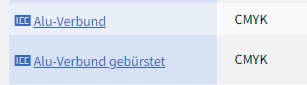
The one I need is called "Alu-Verbund", it's almost at the bottom of the list.


According to the page you linked to, Alu-Verbund is a CMYK profile.


4 replies

HaraldAuthor
Inspiring
July 19, 2023

Yes, reboot was done, LR and also the whole PC.

Per Berntsen
Community Expert
Community Expert
July 19, 2023

Could you post a link to one of these profiles, so we could take a look at it?

Per Berntsen
Community Expert
Per BerntsenCommunity ExpertCorrect answer
Community Expert
July 19, 2023

You find the profiles here: https://www.saal-digital.de/service/icc-profil/

The one I need is called "Alu-Verbund", it's almost at the bottom of the list.


According to the page you linked to, Alu-Verbund is a CMYK profile.


AxelMatt
Community Expert
Community Expert
July 19, 2023

Do you have reboot you machine and restart Lightroom after you have installed the ICC profiles?


My System: Intel i7-8700K - 64GB RAM - NVidia Geforce RTX 3060 - Windows 11 Pro 25H2 -- LR-Classic 15 - Photoshop 27 - Nik Collection 8 - PureRAW 5 - Topaz Photo
HaraldAuthor
Inspiring
July 19, 2023

They are not CMYK profiles. The profile I want to use is in the folder you mentioned but does not show up in LR when I click Softproof in the bottom left hand corner and then go to the upper right corner and choose "other profiles".

Per Berntsen
Community Expert
Community Expert
July 19, 2023

If these are CMYK profiles, they will not appear in LrC, which doesn't support CMYK.

Support for soft proofing with CMYK profiles was introduced in Lightroom 6.0, but was removed in version 6.2 or 6.3, because it was not working properly. Adobe said at the time that they would fix the issue and re-introduce CMYK support, but it has never happened.

So you have to use Photoshop for soft proofing, and/or for converting to CMYK.


When you right click a profile and choose install, the only thing that happens is that the profile is copied to the correct folder, which is C:\Windows\System32\spool\drivers\color