Inspiring
October 5, 2022
Answered

Can't find brush tool in Lightroom Classic (Windows)

  • October 5, 2022
  • 3 replies
  • 1485 views

Hi. First post in this forum, and still fairly new to Lightroom (and Photoshop) itself. Here's my question. I'm aware that the Brush tool is a fairly important one in Lightroom -- one that can make a significant difference on an image. But I can't seem to find it! In images I've seen online, under the histogram is a bunch of little icons, including one at the end that is like a little circle with dots surrounding it and then a slider, but I don't see anything like that. The rightmost icon for me is for the masking tool, which I believe is different. Any clarification would be appreciated. Thank you!


{Title edited by Moderator}
This topic has been closed for replies.
Correct answer Rob_Cullen

Now even the help file link given by @Ranjisha Sengupta  is OUT OF DATE! except for the one reference link to https://helpx.adobe.com/lightroom-classic/help/masking.html


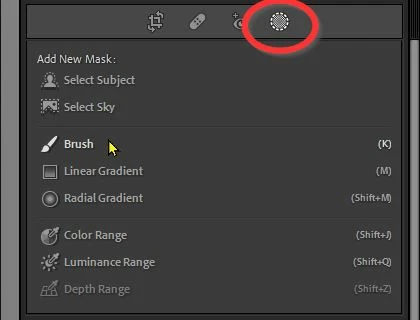
These tool icons are not used in Lightroom-Classic v11.5.


The 'New' version uses the Masking icon that contains the 'old' Tools and the new 'super' AI masking tools. (Select Subject, etc_)

Read about these new features here-

2021-10 MASKING TOOL Oct2021 (J Kost)

And FYI the Brush Tool is still activated by keyboard [K] (as the masking panel indicates!)


3 replies

Inspiring
October 7, 2022

Okay, sorry I got a bit sidetracked so couldn't respond sooner. I was just about to take a screenshot and then also paste a link from an online image displaing how I thougth it was supposed to look, but now it looks like it's a moot point. But just to answer your question anyway, Ranjisha, it's 11.5, which I guesss is consistent with Rob's answer (I just download for the first time about two months ago, so I assumed I had the newest version). Thanks to both of you. 

Rob_Cullen
Community Expert
Rob_CullenCommunity ExpertCorrect answer
Community Expert
October 5, 2022

Now even the help file link given by @Ranjisha Sengupta  is OUT OF DATE! except for the one reference link to https://helpx.adobe.com/lightroom-classic/help/masking.html


These tool icons are not used in Lightroom-Classic v11.5.


The 'New' version uses the Masking icon that contains the 'old' Tools and the new 'super' AI masking tools. (Select Subject, etc_)

Read about these new features here-

2021-10 MASKING TOOL Oct2021 (J Kost)

And FYI the Brush Tool is still activated by keyboard [K] (as the masking panel indicates!)


Regards. My System: Windows-11, Lightroom-Classic 15.1.1, Photoshop 27.3.1, ACR 18.1.1, Lightroom 9.0, Lr-iOS 10.4.0, Bridge 16.0.2 .
Ranjisha Sengupta
Legend
October 5, 2022

Hi there,


Welcome to the Community; thanks for reaching out.

Which version of Lightroom are you using? Can you share a screenshot of what you're seeing? 

We have a 'brush' preference under the masking tool section; are you referring to that or the Adjustment brush tool?

Check this article to know where and how you can get the brush tool and its functionalities: https://helpx.adobe.com/lightroom-classic/help/apply-local-adjustments.html.


Let us know if this works.


Thanks,

Ranjisha