
CaiusC
Participant
April 8, 2022
Answered

Can't find Lightroom Brush Presets drop down menu

  • April 8, 2022
  • 3 replies
  • 2198 views

I recently updated to the new Lightroom Classic and have some brush presets I want to use. I copied the presets into the Local Adjustment Presets folder but when I go to add a new brush mask, I do not have the option to change the preset effect. It simply says Erase and is blacked out so I cannot click on it.
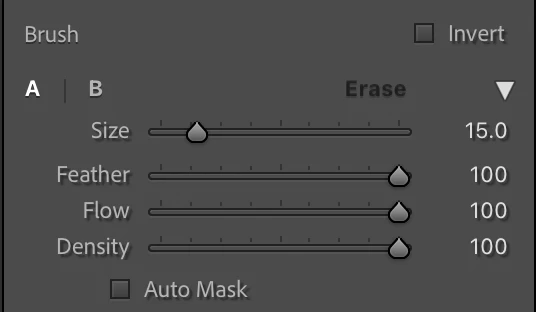


Any idea as to why this might happen? Many thanks!
This topic has been closed for replies.
Correct answer Ian Lyons

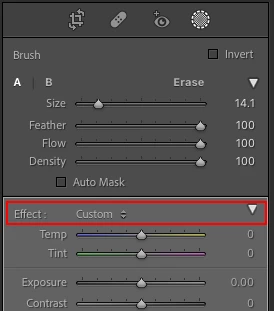
You should find the brush 'Effects' drop down menu at the top of the panel containing the adjustment sliders. If you can't see these sliders then click on the turny triangle as shown in attached screesnhot.


3 replies

JohanElzenga
Community Expert
Community Expert
April 8, 2022

Like Ian says, the preset is chosen under the Effects. The reason why you cannot choose Erase is simple. You have to brush something before you can erase parts of that again. Erase is not an eraser like Photoshop has. It is an option to 'undo' parts of what you just brushed.


-- Johan W. Elzenga
Ian Lyons
Community Expert
Ian LyonsCommunity ExpertCorrect answer
Community Expert
April 8, 2022

You should find the brush 'Effects' drop down menu at the top of the panel containing the adjustment sliders. If you can't see these sliders then click on the turny triangle as shown in attached screesnhot.


Known Participant
October 24, 2024

There is no effect button on my LR. How do I get it?

JohanElzenga
Community Expert
Community Expert
October 24, 2024

Did you already create a mask?


-- Johan W. Elzenga
AxelMatt
Community Expert
Community Expert
April 8, 2022

In a first step please try resetting the preferences of Lightroom Classic:   https://helpx.adobe.com/lightroom-classic/help/setting-preferences-lightroom.html


It's recommended to backup your preferences before you reset the preferences to the default settings: 

https://helpx.adobe.com/lightroom-classic/kb/preference-file-and-other-file-locations.html

My System: Intel i7-8700K - 64GB RAM - NVidia Geforce RTX 3060 - Windows 11 Pro 25H2 -- LR-Classic 15 - Photoshop 27 - Nik Collection 8 - PureRAW 5 - Topaz Photo