
Participant
July 11, 2022
Answered

Can't Move Onto Next Image When Viewing Watermark in Lightroom Classic On Windows

  • July 11, 2022
  • 1 reply
  • 211 views

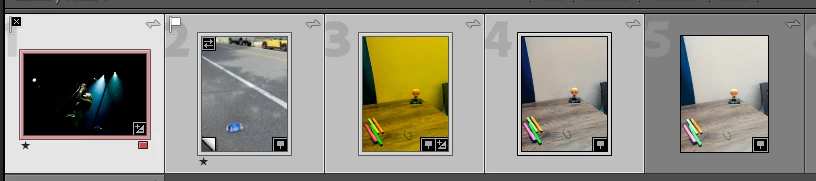
I have created a number of watermarks. When in the watermark editor, I want to see which one iIprefer. At the top of the image, there are arrows pointing left/right, in order to view what the watermark looks like on the previous/next image. Since the last number of updates, I have not been able to move onto the next/previous image.The arrows are there, but when I select one, nothing happens. any ideas.


Many thanks in advance.


{Thread title updated by moderator}
This topic has been closed for replies.
Correct answer Sameer K

Hi Elliott,


Thanks for reaching out. We're sorry for the trouble with Lightroom Classic. We're here to help.

Could you please share the version of Lightroom Classic & the operating system you are working on?

Are you selecting a set of images before you go to the Watermark editor?


You must select more than one image for the navigation arrows to work in the watermark editor.

Please try this:

  • Select & Highlight a range of images by pressing the Shift key or CTRL + A to select all.

  • Go to Edit > Edit Watermarks.
  • Try using the arrow to navigate now & it should work.


Let us know if this help,

Thanks!

Sameer K

1 reply

Sameer K
Community Manager
Sameer KCommunity ManagerCorrect answer
Community Manager
July 11, 2022

Hi Elliott,


Thanks for reaching out. We're sorry for the trouble with Lightroom Classic. We're here to help.

Could you please share the version of Lightroom Classic & the operating system you are working on?

Are you selecting a set of images before you go to the Watermark editor?


You must select more than one image for the navigation arrows to work in the watermark editor.

Please try this:

  • Select & Highlight a range of images by pressing the Shift key or CTRL + A to select all.

  • Go to Edit > Edit Watermarks.
  • Try using the arrow to navigate now & it should work.


Let us know if this help,

Thanks!

Sameer K

Participant
July 11, 2022

Ahaaa, Sameer. Yes, that's it. I needed to have selected/hi-lighted them first before I attempt to view the images with the watermark. I didn't realise that.


Many thanks. I'm pleased it was a lot easier than it was.


Regards

George