


Participating Frequently
August 2, 2024
Answered

Can't open Lightroom Catalog from saved backups on my PC

  • August 2, 2024
  • 3 replies
  • 509 views

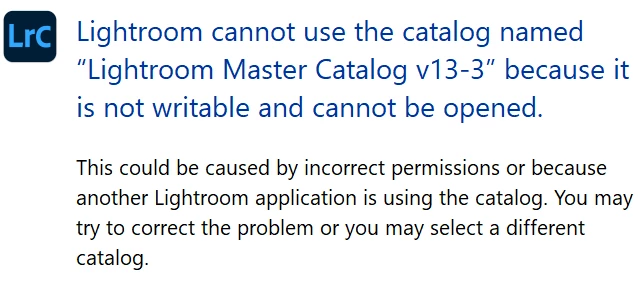
I'm using Version 13.3 of LRC on a PC, Windows 11.  I am unable to open any of my saved catalog backups.  When I click on the zip file, I get the following error message.  I am storing my backup catalogs on my OneDrive so they are also backed up to the cloud.  I have set the permisssions on the LRC folder in my Onedrive to full access - read/write/edit.  I would greatly appreciate any advice!


This topic has been closed for replies.
Correct answer AxelMatt
quote

... I have set the permisssions on the LRC folder in my Onedrive to full access - read/write/edit.  I would greatly appreciate any advice!


By @miranda22194250t8lp


You can't open a catalog from OneDrive. Copy the zip file to your loacal drive and unzip it as @GoldingD wrote.


3 replies

GoldingD
Legend
August 2, 2024
 I have set the permisssions on the LRC folder in my Onedrive to full access - read/write/edit. 

Oh, I missed that bit. Hat tip to AxelMatt.

LrC and OneDrive, Bad, very bad. for backups OK, for working Bad, very bad.

Participating Frequently
August 3, 2024
Thank you so much!
AxelMatt
Community Expert
AxelMattCommunity ExpertCorrect answer
Community Expert
August 2, 2024
quote

... I have set the permisssions on the LRC folder in my Onedrive to full access - read/write/edit.  I would greatly appreciate any advice!


By @miranda22194250t8lp


You can't open a catalog from OneDrive. Copy the zip file to your loacal drive and unzip it as @GoldingD wrote.


My System: Intel i7-8700K - 64GB RAM - NVidia Geforce RTX 3060 - Windows 11 Pro 25H2 -- LR-Classic 15 - Photoshop 27 - Nik Collection 8 - PureRAW 5 - Topaz Photo
GoldingD
Legend
August 2, 2024

You need to unzip the file.


Typically these are the steps taken when trying to use a backup catalog.Typically due to a corrupt catalog.


  • Rename or move the corrupt catalog
  • Copy the backup and locate it in the hard drive, in the folder the corrupt  catalog is/was in
  • Unzip the copy
  • Double click on the copy.