
Answered
Can't rotate identity plate when printing in portrait orientation
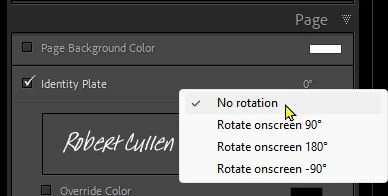
I just started using an identity plates to "sign" my work for shows. I use custom text. It works well for landscape orientation -- the text shows up as expected with the baseline near the bottom and reading left-to-right. When I switch to portrait orientation, the text rotates 90 degrees clockwise, so the baseline is along the left edge and it reads top-to-bottom. I can find no way to rotate it back to "normal". Is this a known limitation or am I missing some simple way to have landscape-oriented identity text in a portrait print?
 AdChoices