
Participating Frequently
September 13, 2018
Answered

Can't unlock Lightroom catalog

  • September 13, 2018
  • 2 replies
  • 1471 views

My catalog is locked.  I have tried the remedy (moving the lock file to the trash) and it hasn't worked.  I can see the lock file and the wallet but I cannot move them to the trash.  When I reopen the catalog, it says, "the file cannot be found."

Suggestions?

thanks,

Joel williams
    This topic has been closed for replies.
    Correct answer JohanElzenga

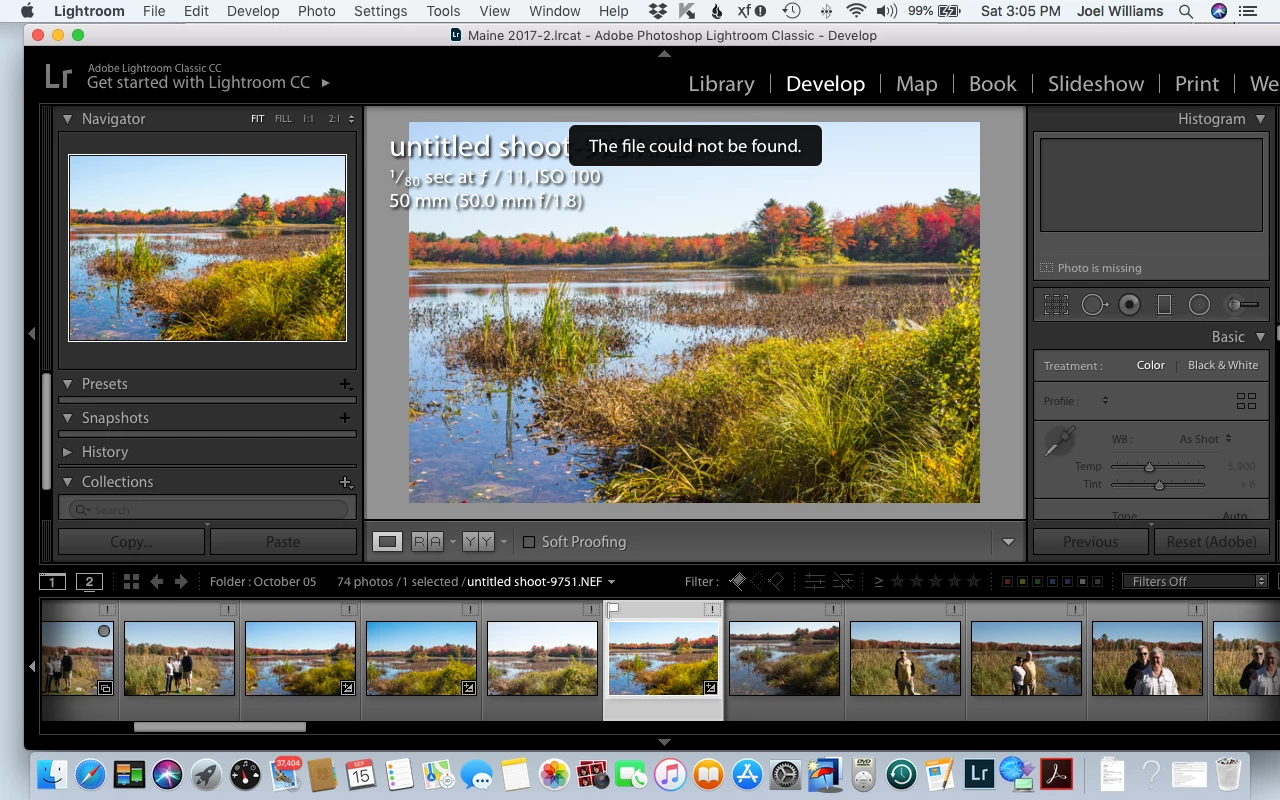
    This is a screen shot of the workspace you see the message displayed.  Let me know if that helps and thanks.


    That has nothing to do with a locked catalog, or any other problem with the catalog for that matter. You see this error because the selected image is missing. All the other images in the film strip are also missing, so it’s probably the whole folder. https://www.lightroomqueen.com/lightroom-photos-missing-fix/

    2 replies

    Participating Frequently
    September 14, 2018

    Thank, you.

    I'm running the most current version of Mac OS and the most current version of Lightroom CC Classic.

    I found what you recommended on the web and tried it.  I have tried to delete the file and cannot.  I have tried dragging it to Trash and cannot.  Trash will not accept the file and I get a "thunk" tone when I try to manually delete it.

    If you have other thoughts, I would appreciate it.

    Regards,

    Joel

    dj_paige
    Legend
    September 14, 2018

    Show us a screen capture of what you see when you find this .lock file.

    Participating Frequently
    September 14, 2018

    DdeGannes
    Community Expert
    Community Expert
    September 13, 2018

    You need to be specific about what you are doing. What OS are you using Win or Mac and version number. Also the version of Lightroom are you using the latest version is Lightroom Classic CC 7.5.

    " I can see the lock file and the wallet but I cannot move them to the trash."

    What wallet are you referring to??

    Hint "Lightroom creates a temporary file with the same name as the Catalog file with an additional extension .lock. This file prevents the Catalog file from being accessed by any other user and will be discarded when Lightroom is shut down. If Lightroom is shut down abnormally e.g loss of power the .lock file will remain in place, so with Lightroom closed go the folder that contains your catalog and if there is a .lock file present delete it and do not interfere with any other files in the folder."

    Then you can attempt to launch Lightroom and see if it opens.

    Regards, Denis: iMac 27” mid-2015, macOS 11.7.10 Big Sur; 2TB SSD, 24 GB Ram, GPU 2 GB; LrC 12.5,; Lr 6.5, PS 24.7,; ACR 15.5,; (also Laptop Win 11, ver 24H2, LrC 15.0.1, PS 27.0; ) Camera Oly OM-D E-M1.