Inspiring
February 9, 2024
Answered

Can you find anything corrupted in this LCR catalog?

  • February 9, 2024
  • 1 reply
  • 3007 views

I had a backup drive fail and rearranged the photos into another drive.....actually all the photos since I started using Adobe.  But for some reason I can't get LRC to connect to any drive, let alone the one with the photos.  I'm to the point where I may have to ask you to coach me on a complete restart from the getgo.  I know, it would take me a month to re-enter all the photos, which would be fine since I've begun pruning the older files.

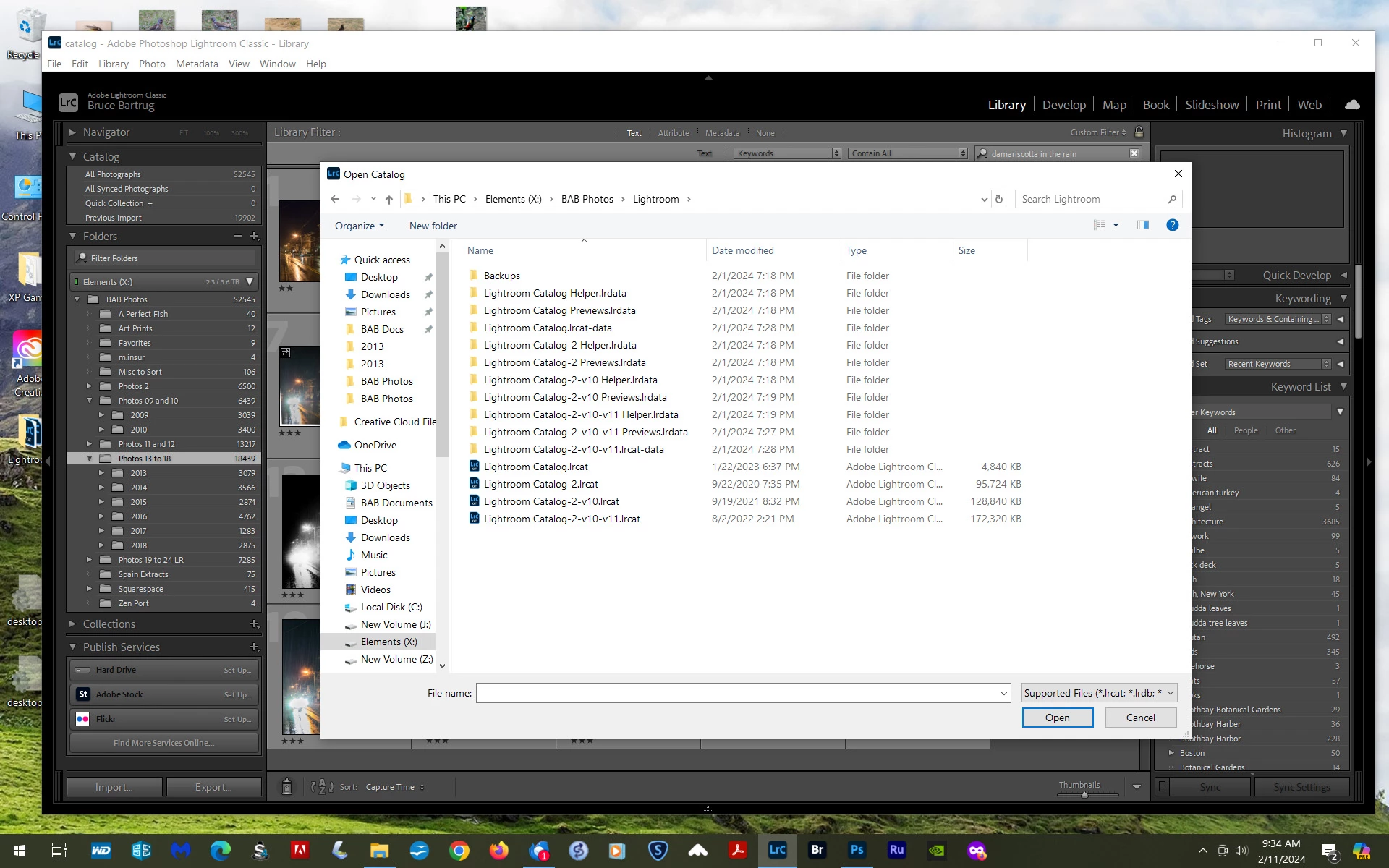
If there is an obvious problem with what you see below, that could indicate the catalog was somehow corrupted.  I know, it's a mess, but it's an accumulation over more than a decade of changes.
This topic has been closed for replies.
Correct answer D Fosse

Well, if I open "Lightroom" in this melange I get this....see below.  There's no cat.3, which may or may not have thrown a wrench in the works?  This could most likely be thinned, and then I should download cat.3?  Dunno, although I'm certain I will be getting some suggestions considering this monument to 14years of use :).


It seems you're storing your catalogs in a rather random way. You need to be systematic here.


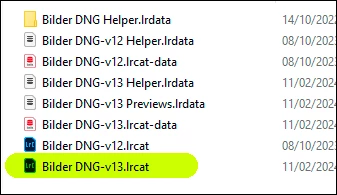
What you're looking for now is a version 13 catalog file. It will look like this (depending on what you called the catalog when making it). Note the -v13. lrcat suffix.


And again, just to be clear, your photos won't be here. This is just the catalog database, the actual photos will be stored elsewhere, and the catalog linking to them.


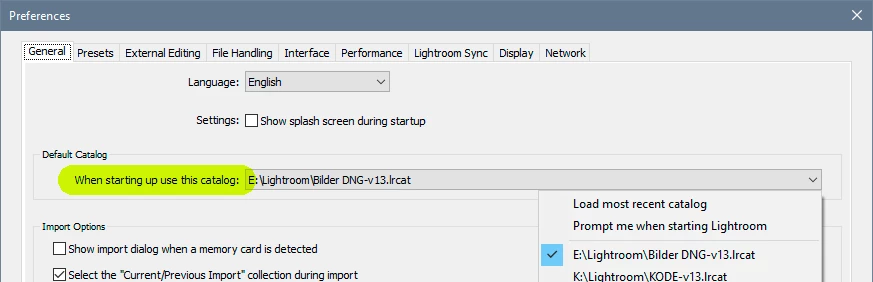
Take a look in your Lr Preferences. Here you can set the catalog to open by default when starting Lightroom. You can set a specific catalog, or you can set it to open whichever you had open last.


Any catalog can be opened into Lightroom just by double-clicking it. You don't necessarily need to open the application first.


Older catalogs can be deleted. You may want to keep a version back, but not several. Make catalog backups and backup your photos.

1 reply

Rob_Cullen
Community Expert
Community Expert
February 9, 2024

"rearranged the photos into another drive".  How exactly? and where are they now?

A "restart from the get go" will mean you lose years of work, editing, keywording, etc, etc. -Not recommended.!!

Are you opening the current v13 catalog?

What does the Folder panel in LrC show?

Are there "Missing" folders with a [?]...?

Are there "Missing" photos with an [!]...?

I have tried to suggest an explanation for what you show in your screen-clip, but from that we cannot see where your photo files are.

It is possible you need to re-link the current catalog to the new location of your files. Info in this link:

MISSING FILES & FOLDERS (Lightroom Queen)


Regards. My System: Windows-11, Lightroom-Classic 15.1.1, Photoshop 27.3.1, ACR 18.1.1, Lightroom 9.0, Lr-iOS 10.4.0, Bridge 16.0.2 .
Inspiring
February 10, 2024

Thanks, Rob!

I rearranged all the photos into a new drive so all the folders will be available on LRC (long story, mainly because I couldn't store all the folders on the computer's basic hard drive).  There are no folders in the Folder file, but once I get the catalog together I think your reference to Lightroom Queen will find these for me.


Lord!  I owe you my life; you or the LR Queen.  I found the new folder and it's adding all my photos to LR.  Over 20K as I speak.  I haven't yet removed all the "Old Stuff" from the catalog, but I will soon.  If you lived nearby I'd buy you a bottle

of Macallan Scotch.  Thanks!  I may have another question concerning the catalog tomorrow.


Bruce

D Fosse
Community Expert
Community Expert
February 10, 2024

I noted the catalog after loading did not have a Cat3 anywhere so I tried to correct the catalog, but all that happened was no photos and no access to any folders or files.  LR Queen says, "Don't import, click on the parent folder......", but I couldn't find a parent folder unless I pushed the import button.  So this is the second time I'm importing all my photos, even though LR Queen says not to, and yes they all have large block numbers.  I'm imagining the result will be the same as above in the two pastes I added, but if not I'll update that for you.  Thanks for your time and effort.  I'm just not doing something right.


quoteI'm just not doing something right.

By @bruceb76700895


Yes. You're reimporting instead of relinking.