

Cannot import MP4 from DJI Mavic 2 Pro on iMac
I'm getting this error on just the videos from my Mavic 2 Pro when I try to import into my iMac - late 2013 3.2 Ghz Quad Core i5 on Catalina 10.15.5 OSX:
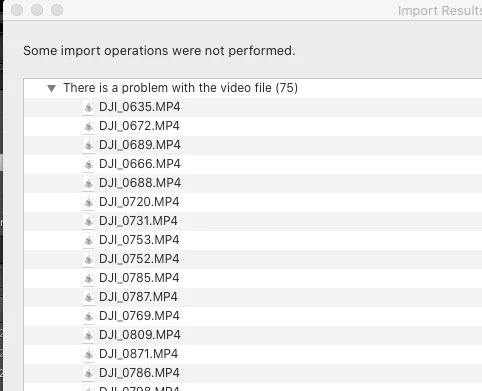
However I can import perfectly fine on my newer Macbook Pro 16". The versions of OSX and Lightroom Classic are exactly the same on both systems, but on the iMac, it is not working. Even the prview is saying "Preview unavailable for this file".
Here's the LRC system info:
Lightroom Classic version: 9.3 [ 202005281810-476e492c ]
License: Creative Cloud
Language setting: en-US
Operating system: Mac OS 10
Version: 10.15.5 [19F101]
Application architecture: x64
Logical processor count: 4
Processor speed: 3.2 GHz
SqLite Version: 3.30.1
Built-in memory: 24,576.0 MB
Real memory available to Lightroom: 24,576.0 MB
Real memory used by Lightroom: 1,149.1 MB (4.6%)
Virtual memory used by Lightroom: 10,281.1 MB
Memory cache size: 0.0MB
Internal Camera Raw version: 12.3 [ 493 ]
Maximum thread count used by Camera Raw: 3
Camera Raw SIMD optimization: SSE2,AVX,AVX2
Camera Raw virtual memory: 1MB / 12287MB (0%)
Camera Raw real memory: 2MB / 24576MB (0%)
Displays: 1) 2560x1440
Graphics Processor Info:
Metal: NVIDIA GeForce GT 755M
Application folder: /Applications/Adobe Lightroom Classic
Library Path: /Volumes/TC006-WD-2019/TCMedia/Pictures/Lightroom/LR Catalog Main A-2.lrcat
Settings Folder: /Users/tim/Library/Application Support/Adobe/Lightroom
Installed Plugins:
1) AdobeStock
2) Aperture/iPhoto Importer Plug-in
3) Aurora HDR 2017
4) Export to Photomatix Pro
5) Facebook
6) Flickr
7) Nikon Tether Plugin
😎 Teekesselchen
Config.lua flags: None
AudioDeviceIOBlockSize: 512
AudioDeviceName: $$$/dvaaudiodevice/SystemDefaultAndEffectiveDeviceName=System Default (Built-in Output)#{comment}DVAAU-4201250: Open the audio hardware preferences page.
AudioDeviceNumberOfChannels: 2
AudioDeviceSampleRate: 44100
I appreciate any help on solving this.
 AdChoices