Participant
March 13, 2018
Answered

Cannot open Lightroom Classic on MacBook Pro

  • March 13, 2018
  • 4 replies
  • 34074 views

I have paid my creative cloud membership and photoshop opens perfectly on my computer. Lightroom Classic however is not opening, it sends a lot of crash reports. Where is the problem?

This topic has been closed for replies.
Correct answer 99jon

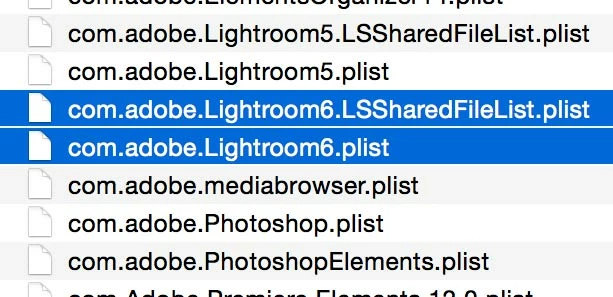
Try trashing the LR saved prefs and re-booting. Start by quitting Lightroom. Launch Finder and on the menu bar click “Go” whilst holding down the Optn(Alt) key and choose Library. Open the Preferences folder and trash the two plist files and any other .plist files relating to LR6 (see image below). It is also worth cleaning up any plist files relating to prior versions such as LR5 etc.

Then re-boot your Mac and re-launch Lightroom.

N.B. Apple hides the user Library until the Alt key is depressed.

Are you sure you are running LR Classic? Do you have a subscription or perpetual license?
4 replies

Participating Frequently
May 6, 2022

This did not work for me. Sadly, I'm in the middle of a huge photo shoot with many deadlines. Any other advice? When I try to open LR, I get a quick view of the opening page and then it disappears.

Participant
June 5, 2022

I've got the same issue and these plist files are nowhere to find in the preference folder. I upgraded from a Macbook Air to Macbook Pro (MacOS Monterey). When I open Lightroom CC it says "Adobe Lightroom Classic CC quit unexpectedly." Any updates to solve this problem?

Ian Lyons
Community Expert
Community Expert
June 5, 2022

To delete the preference file - use Method 1 in linked Adobe Help document


https://helpx.adobe.com/lightroom-classic/help/setting-preferences-lightroom.html

Participant
January 25, 2022

I had this issue. What worked for me was to trash the preferences as specified in this thread. But I had to create a new catalogue. Then I imported the photos from a backup of the old catalogue. The issue seems to have been the catalog I was using. Even though I back it up everytime I quit, have it check for integrity, etc. 

Participant
January 6, 2020

I too have the Problem that Lightroom Classic won't launch.  The Startup screen comes on, then goes away, then nothing.  I have trashed the preferences files and reboot.  But this didn't change anything.  Any more possibilities for solutions?

Participant
January 6, 2020

PS. I'm running Mojave


Participating Frequently
July 31, 2020

I also have exactly the same problem.

I'm using Macbook pro 2016.


I'm having the same problem too. I have a 1017 Macbook pro with Catalina 10.15.5. The lightroom box flashes on the screen briefly but never opens. I tried trashing the playlists. That doesn't work.

JohanElzenga
Community Expert
Community Expert
March 13, 2018

How can we tell if you don't give any more details, like the version of MacOS X you are using, the version of Lightroom Classic, whether Lightroom Classic did run before or never did, any error dialogs you get? Saving a crash report and posting a link to it might also help the technical people on this forum to suggest a cause.

-- Johan W. Elzenga
Participant
March 13, 2018

Hi Johan,

Lightroom Classic 2015.4 version, lightroom worked before well. A month ago I reordered and since on the MacBook Pro (mac OS High Sierra 10.13.3 version). Here are some crash reports:

99jon
99jonCorrect answer
Legend
March 13, 2018

Try trashing the LR saved prefs and re-booting. Start by quitting Lightroom. Launch Finder and on the menu bar click “Go” whilst holding down the Optn(Alt) key and choose Library. Open the Preferences folder and trash the two plist files and any other .plist files relating to LR6 (see image below). It is also worth cleaning up any plist files relating to prior versions such as LR5 etc.

Then re-boot your Mac and re-launch Lightroom.

N.B. Apple hides the user Library until the Alt key is depressed.

Are you sure you are running LR Classic? Do you have a subscription or perpetual license?