Answered
Cannot open Lightroom Classic on MacBook Pro
I have paid my creative cloud membership and photoshop opens perfectly on my computer. Lightroom Classic however is not opening, it sends a lot of crash reports. Where is the problem?

I have paid my creative cloud membership and photoshop opens perfectly on my computer. Lightroom Classic however is not opening, it sends a lot of crash reports. Where is the problem?
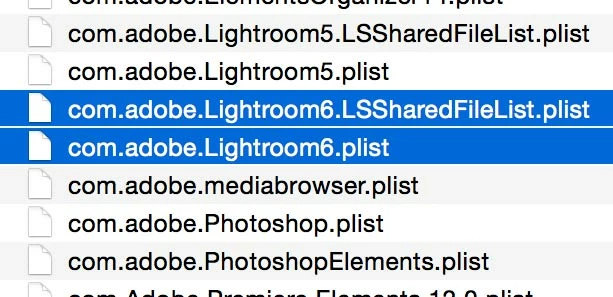
Try trashing the LR saved prefs and re-booting. Start by quitting Lightroom. Launch Finder and on the menu bar click “Go” whilst holding down the Optn(Alt) key and choose Library. Open the Preferences folder and trash the two plist files and any other .plist files relating to LR6 (see image below). It is also worth cleaning up any plist files relating to prior versions such as LR5 etc.
Then re-boot your Mac and re-launch Lightroom.
N.B. Apple hides the user Library until the Alt key is depressed.
Are you sure you are running LR Classic? Do you have a subscription or perpetual license?
Already have an account? Login
No account yet? Create an account
Enter your E-mail address. We'll send you an e-mail with instructions to reset your password.


 AdChoices