I have the same issue. I am using desktop version -
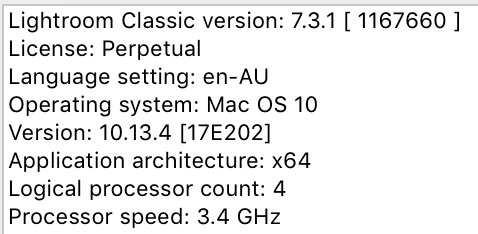
I was able to apply them and now they only show in the navigator. I edit in raw and the presets I am trying to use are adobe default and one I created.
Your license "Perpetual" does not permit you to use any version of Lr-7. All Lr-7 (and above eg. 7.3.1) versions are only available by subscription.
It appears you have been caught out by the bug in the Adobe update software that 'wrongly' allowed many to upgrade from a Version 6 (Perpetual) to a Version 7 (Subscribed).
You have two choices-
1) Subscribe to the Creative Cloud Photography Plan (paying monthly or yearly)
2) Uninstall Lr-7.3.1 and return to using v6.14.
If you already subscribe you need to contact Adobe to fix your subscription details.
If you do not subscribe, you need to return to Version 6 and there are two things to do-
1) While you have Version 7 running, select all photos you have imported since the upgrade from v6 and "save metadata" [Ctrl+S]. this will preserve most of your editing done on these photos (with limitations).
2) Find the v6 Catalog (copy or from a backup) that was created when you upgraded. As this is the only catalog that v6 will open. (Catalogs are not backward compatible with earlier versions of Lightroom)

 AdChoices