
Known Participant
July 22, 2025
Answered

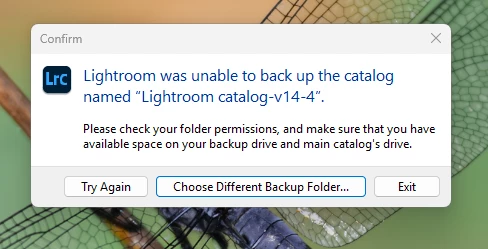
Cant backup my LRC 14.4 catalog

  • July 22, 2025
  • 2 replies
  • 212 views

Some how Windows onedrive moved my LRC Catalog to the cloud.  I had the Lightroom catalog in my pictures folder. After several attempt I moved the Lightroom folder from teh cloud to my 😧 drive on my desktop PC.  Now when I attempt to Backup the the Catalog I get a Error... Ive tried to select my Server or other storage. and it failes  Could there be a parm incorrect? 
 

Correct answer JohanElzenga

This problem has been reported here a few times and looks like catalog corruption. What you could try is this: Create a brand new catalog and choose 'File - Import from Another Catalog'. Select your old catalog to import. In the import dialog choose to import all photos, but do not move them. This will create an exact copy of your old catalog, but usually without the corruption. The only thing that won't come across is any publishing services you may have. You will have to recreate those. If you synced your catalog then you will have to enable sync for the new catalog. There are some reports that this could cause a problem. Here’s how to solve that: https://www.danhartfordphoto.com/blog/2025/1/lr026-fixing-sync-problems-caused-by-switching-the-sync-catalog


2 replies

JohanElzenga
Community Expert
JohanElzengaCommunity ExpertCorrect answer
Community Expert
July 22, 2025

This problem has been reported here a few times and looks like catalog corruption. What you could try is this: Create a brand new catalog and choose 'File - Import from Another Catalog'. Select your old catalog to import. In the import dialog choose to import all photos, but do not move them. This will create an exact copy of your old catalog, but usually without the corruption. The only thing that won't come across is any publishing services you may have. You will have to recreate those. If you synced your catalog then you will have to enable sync for the new catalog. There are some reports that this could cause a problem. Here’s how to solve that: https://www.danhartfordphoto.com/blog/2025/1/lr026-fixing-sync-problems-caused-by-switching-the-sync-catalog


-- Johan W. Elzenga
ronbyramAuthor
Known Participant
July 23, 2025

Hey Johan, thanks for the feedback.. Question I do have a backup from about 2 weeks ago should I try to use that backup instead of current one?  Thoughts?

JohanElzenga
Community Expert
Community Expert
July 23, 2025

You could obviously try that first. Unzip the backup, launch Lightroom Classic with it, and check if Lightroom can make a backup of this catalog on quit. If it can, then keep using this catalog.


-- Johan W. Elzenga
kglad
Community Expert
Community Expert
July 22, 2025

in the future, to find the best place to post your message, use the list here, https://community.adobe.com/

p.s. i don't think the adobe website, and forums in particular, are easy to navigate, so don't spend a lot of time searching that forum list. do your best and we'll move the post (like this one has already been moved) if it helps you get responses.


<"moved from using the community bugs">