
Participant
January 1, 2017
Answered

Cant locate RGB channels for tone curve on Lightroom CC

  • January 1, 2017
  • 2 replies
  • 15758 views

Just like the title suggest on my Lightroom only has the Tone Curve that allows me to control like the (b/w). But I cant seem to locate the individual RBG channels. When watching youtube videos I see on their lightroom below the graph they can change the channel but for mine it says Point Curve: Linear, Medium Constract or Strong Contrast. I really hope to find this because I cant color grade at the best level. I dont understand why its not in my lightroom thank you.
    This topic has been closed for replies.
    Correct answer Rob_Cullen

    EDIT: The Curves Interface has changed!

    See more recent posts in this thread- https://community.adobe.com/t5/lightroom-classic-discussions/cant-locate-rgb-channels-for-tone-curve-on-lightroom-cc/m-p/12347646#M241671


    This is the 'OLD' interface!

    2 replies

    Rob_Cullen
    Community Expert
    Rob_CullenCommunity ExpertCorrect answer
    Community Expert
    January 1, 2017

    EDIT: The Curves Interface has changed!

    See more recent posts in this thread- https://community.adobe.com/t5/lightroom-classic-discussions/cant-locate-rgb-channels-for-tone-curve-on-lightroom-cc/m-p/12347646#M241671


    This is the 'OLD' interface!

    Regards. My System: Windows-11, Lightroom-Classic 15.1.1, Photoshop 27.3.1, ACR 18.1.1, Lightroom 9.0, Lr-iOS 10.4.0, Bridge 16.0.2 .
    Participant
    April 3, 2017

    Hi!

    I cannot see the Channel: RGB dropdown menu at all.

    What can be wrong?

    BR

    Alen

    Rob_Cullen
    Community Expert
    Community Expert
    August 27, 2021

    I don't have that icon available. 


    Click on the 'Point Curve' white circle.

    The interface has changed since this forum thread was started.

    Regards. My System: Windows-11, Lightroom-Classic 15.1.1, Photoshop 27.3.1, ACR 18.1.1, Lightroom 9.0, Lr-iOS 10.4.0, Bridge 16.0.2 .
    Just Shoot Me
    Legend
    January 1, 2017

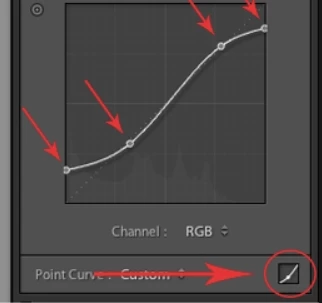
    Click the icon in the lower right hand corner of the Tone Curve section to go to the screen that has the RGB option.

    Participant
    September 20, 2021

    I have lightroom classic version 10.4 and I don't have the Point Curve option.  My tone curve editing tool is stuck on "region".  Is there a way I can change this?

    johnrellis
    Legend
    September 20, 2021

    [This post contains formatting and embedded images that don't appear in email. View the post in your Web browser.]


    If clicking on the grey circle doesn't change to an editable curve:


    then try resetting LR's preferences:
    https://www.lightroomqueen.com/articles-page/how-do-i-reset-lightrooms-preferences/


    LR sometimes soils its preferences file, and resetting it can fix all sorts of wonky behavior. That article explains how to restore the old preferences if resetting doesn't help.